

thelonelycoder
Part of the Furniture
Welcome, this is amtm 6.4, the Asuswrt-Merlin Terminal Menu
amtm is a front end that manages popular scripts for wireless routers running Asuswrt-Merlin firmware.
Starting with Asuswrt-Merlin firmware 384.15, amtm is included in the firmware.
What's new in amtm
If an update is available, amtm will prompt to update it directly.
Compatible scripts can then be seen with au, which also allows to disable this feature in amtm per script. Third-party scripts can also disable amtmupdate from their own scripts which will be shown in au.
I coordinated and developed this feature with the AMTM-OSR team. All of their scripts are already compatible. Many thanks to @ExtremeFiretop and @Martinski for the input, ideas and swift implementation.
My hope is that all amtm third-party scripts will add this amtmupdate feature. I will post a how to soon, with details for coders how to add it.
There are plans to completely automate amtmupdate with a cron job in a future amtm release.
How to update amtm
In the amtm menu, enter u to update to this latest version.
The firmware built-in and the legacy amtm version receive updates at the same time.
The full version history can be found on diversion.ch
amtm start command
On firmware older than 384.15, you may have to enter the full path to amtm.
Note that the command below does not work for the firmware built in amtm.
Install command for Asuswrt-Merlin firmware older than 384.15
Copy and paste the complete command below into your favorite SSH terminal, then press Enter.
Routers with Asuswrt-Merlin firmware 384.15 and newer require no installation, amtm is included in the firmware.
amtm is hosted on the Diversion website: https://diversion.ch/amtm.html
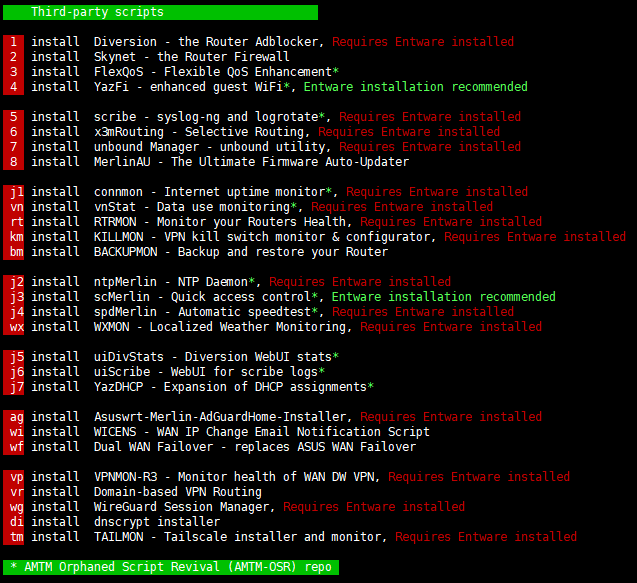
amtm is a front end that manages popular scripts for wireless routers running Asuswrt-Merlin firmware.
Starting with Asuswrt-Merlin firmware 384.15, amtm is included in the firmware.
What's new in amtm
- Suggests to also install disk-check dc script when fd formatting a disk. I forget who mentioned this to me, so thanks bud!
- Some code format changes and removal of obsolete code in multiple files.
- Adds au amtmupdate Automatic scripts update feature when using the u update function to directly update compatible third-party scripts. This feature is currently only available in the firmware version of amtm.
If an update is available, amtm will prompt to update it directly.
Compatible scripts can then be seen with au, which also allows to disable this feature in amtm per script. Third-party scripts can also disable amtmupdate from their own scripts which will be shown in au.
I coordinated and developed this feature with the AMTM-OSR team. All of their scripts are already compatible. Many thanks to @ExtremeFiretop and @Martinski for the input, ideas and swift implementation.
My hope is that all amtm third-party scripts will add this amtmupdate feature. I will post a how to soon, with details for coders how to add it.
There are plans to completely automate amtmupdate with a cron job in a future amtm release.
How to update amtm
In the amtm menu, enter u to update to this latest version.
The firmware built-in and the legacy amtm version receive updates at the same time.
The full version history can be found on diversion.ch
amtm start command
Code:
amtmNote that the command below does not work for the firmware built in amtm.
Code:
/jffs/scripts/amtmInstall command for Asuswrt-Merlin firmware older than 384.15
Copy and paste the complete command below into your favorite SSH terminal, then press Enter.
Code:
curl -Os https://diversion.ch/amtm/amtm && sh amtmamtm is hosted on the Diversion website: https://diversion.ch/amtm.html
Last edited:


