What's new
  • SNBForums Code of Conduct

    SNBForums is a community for everyone, no matter what their level of experience.

    Please be tolerant and patient of others, especially newcomers. We are all here to share and learn!

    The rules are simple: Be patient, be nice, be helpful or be gone!

connmon connmon v3.0.9 [2025-Nov-27] - Internet Connection Monitoring Tool for AsusWRT Merlin

3) MODIFIED: Upon a fresh installation, the default setting for the automatic ping test schedule is now set to every 5 minutes instead of every 3 minutes.
Still says "default: 3" in the webui, fyi.

1764663646524.png
 
Still says "default: 3" in the webui, fyi.
Very good eye!! Thanks for catching it!!
Functionality-wise, the code is working as expected; it's just an error in the text.

The fix will be in the next release (whenever that happens ;)).

Connmon_v3.0.10_WebUI_DefaultMinutes.jpg
 
Trying to use the InfluxDB exporting functionally. It looks like connmon is not able to use the API Token that is generated using
the InfluxDB UI. When I try to save a token it is missing the last two characters. Sending test data with connmon fails using router UI.

Token:
uW9AKwQwWosaIq_4EGyJFIDkBPVsUWgmIfSP_tP6n5RxeuDKhEExXj8vHDOLoCPtr60h1cMZWy9ehjv5vFaFog==

1. Toggle InfluxDB exporting
Currently: Enabled


InfluxDB Configuration

c1. Set InfluxDB Host
Currently: 10.215.101.33

c2. Set InfluxDB Port
Currently: 8086

c3. Set InfluxDB Database
Currently: conmon

c4. Set InfluxDB Version
Currently: 2.0

c5. Set InfluxDB Username (v1.8+ only)
Currently:

c6. Set InfluxDB Password (v1.8+ only)

c7. Set InfluxDB API Token (v2.x only)
Currently: uW9AKwQwWosaIq_4EGyJFIDkBPVsUWgmIfSP_tP6n5RxeuDKhEExXj8vHDOLoCPtr60h1cMZWy9ehjv5vFaFog

cs. Send test data to InfluxDB
 

Attachments

...
Token:
uW9AKwQwWosaIq_4EGyJFIDkBPVsUWgmIfSP_tP6n5RxeuDKhEExXj8vHDOLoCPtr60h1cMZWy9ehjv5vFaFog==
...
c7. Set InfluxDB API Token (v2.x only)
Currently: uW9AKwQwWosaIq_4EGyJFIDkBPVsUWgmIfSP_tP6n5RxeuDKhEExXj8vHDOLoCPtr60h1cMZWy9ehjv5vFaFog

cs. Send test data to InfluxDB
Great catch!!!
I just made a simple fix on the 'develop' branch. Please try the latest v3.0.10 development version:
Bash:
/jffs/scripts/connmon develop
 
Great catch!!!
I just made a simple fix on the 'develop' branch. Please try the latest v3.0.10 development version:
Bash:
/jffs/scripts/connmon develop
No change.

v3.0.10 on RT-BE88U
[Branch: develop]

From the router ui I enabled export ,pasted the correct token and saved but config file is still missing last two characters.

agagne@rt-be88u:/tmp/home/root# ls -ltr /opt/share/connmon.d/config
-rw-r--r-- 1 agagne root 1161 Dec 7 12:54 /opt/share/connmon.d/config

agagne@rt-be88u:/tmp/home/root# tail -1 /opt/share/connmon.d/config
NOTIFICATIONS_INFLUXDB_APITOKEN=uW9AKwQwWosaIq_4EGyJFIDkBPVsUWgmIfSP_tP6n5RxeuDKhEExXj8vHDOLoCPtr60h1cMZWy9ehjv5vFaFog
 
No change.

v3.0.10 on RT-BE88U
[Branch: develop]

From the router ui I enabled export ,pasted the correct token and saved but config file is still missing last two characters.

agagne@rt-be88u:/tmp/home/root# ls -ltr /opt/share/connmon.d/config
-rw-r--r-- 1 agagne root 1161 Dec 7 12:54 /opt/share/connmon.d/config

agagne@rt-be88u:/tmp/home/root# tail -1 /opt/share/connmon.d/config
NOTIFICATIONS_INFLUXDB_APITOKEN=uW9AKwQwWosaIq_4EGyJFIDkBPVsUWgmIfSP_tP6n5RxeuDKhEExXj8vHDOLoCPtr60h1cMZWy9ehjv5vFaFog
And just for my own sanity, cause full transparency I have not played with InfluxDB before last night.
I can query the DB using the token I am trying to use with connmon.
 

Attachments

No change.

v3.0.10 on RT-BE88U
[Branch: develop]

From the router ui I enabled export ,pasted the correct token and saved but config file is still missing last two characters.

agagne@rt-be88u:/tmp/home/root# ls -ltr /opt/share/connmon.d/config
-rw-r--r-- 1 agagne root 1161 Dec 7 12:54 /opt/share/connmon.d/config

agagne@rt-be88u:/tmp/home/root# tail -1 /opt/share/connmon.d/config
NOTIFICATIONS_INFLUXDB_APITOKEN=uW9AKwQwWosaIq_4EGyJFIDkBPVsUWgmIfSP_tP6n5RxeuDKhEExXj8vHDOLoCPtr60h1cMZWy9ehjv5vFaFog
You must really mean from the router WebUI, because when I did a quick test using the CLI Main Menu UI options, the token remains intact:

Connmon_v3.0.10_CLI_Menu_InfluxToken1.jpg


Connmon_v3.0.10_CLI_Menu_InfluxToken2.jpg


Please be very clear about what you mean, and provide readable and clear screenshots to illustrate the issue and show steps to recreate the problem.
The more precise and clearer you are, the better. In the meantime, I think I know where the issue is in the JavaScript code - taking a look...

UPDATE:
Found the source of the problem in the WebUI JavaScript code, and I already have a fix.

[Just FYI, I need to go out with the wife for some shopping and run a few errands, so I'll be back in 2-3 hours - if I'm lucky, and the wife is not in the mood to spend a long time "window shopping" as well... :eek:;)😀]
 
Last edited:
No change.

v3.0.10 on RT-BE88U
[Branch: develop]
Please try the latest 'develop' branch v3.0.10_25120718 version of connmon.

Once you verify that the issues you reported have been fixed, I can release the production version within 24 hours.
BTW, the same bug was affecting the setup of the Pushover notification.

Connmon_v3.0.10_CLI_DevelopBranch_Help.jpg


HTH
 
Please try the latest 'develop' branch v3.0.10_25120718 version of connmon.

Once you verify that the issues you reported have been fixed, I can release the production version within 24 hours.
BTW, the same bug was affecting the setup of the Pushover notification.

View attachment 69425

HTH
Thanks the issue of saving the token using the router webui has been solved.
HELP [v3.0.10_25120718]

In the router webui I removed the token and hit save.
agagne@rt-be88u:/tmp/home/root# tail -1 /opt/share/connmon.d/config
NOTIFICATIONS_INFLUXDB_APITOKEN=

Then add token and hit save.
agagne@rt-be88u:/tmp/home/root# tail -1 /opt/share/connmon.d/config
NOTIFICATIONS_INFLUXDB_APITOKEN=uxifWDhieter42ZIZDInCPsHijF2p9E-3KHqFdTQEEm94VjSa41sVEIr7U9fX5HengK05Pe9FKdf10BvZz1gtg==
 
Thanks the issue of saving the token using the router webui has been solved.
HELP [v3.0.10_25120718]

In the router webui I removed the token and hit save.
agagne@rt-be88u:/tmp/home/root# tail -1 /opt/share/connmon.d/config
NOTIFICATIONS_INFLUXDB_APITOKEN=

Then add token and hit save.
agagne@rt-be88u:/tmp/home/root# tail -1 /opt/share/connmon.d/config
NOTIFICATIONS_INFLUXDB_APITOKEN=uxifWDhieter42ZIZDInCPsHijF2p9E-3KHqFdTQEEm94VjSa41sVEIr7U9fX5HengK05Pe9FKdf10BvZz1gtg==
Any way to see response code returned from attempting in write to the influxdb.
All I get from running a test in either the webui or using connmon ui from command line is a failed message.

2025-12-08T06:16:36.000000-05:00 rt-be88u connmon_[24535]: Data failed to send to InfluxDB
 
Thanks the issue of saving the token using the router webui has been solved.
HELP [v3.0.10_25120718]
Good news. Thank you for verifying the fix.

Any way to see response code returned from attempting in write to the influxdb.
All I get from running a test in either the webui or using connmon ui from command line is a failed message.

2025-12-08T06:16:36.000000-05:00 rt-be88u connmon_[24535]: Data failed to send to InfluxDB
Try the latest 'develop' branch v3.0.10_25120808 version.

I've made changes to capture and display errors from the curl command sent when testing/sending notifications using InfluxDB. This applies only to the CLI menu. Hopefully, this will be more helpful to figure out the source of the issues you're having when testing your InfluxDB setup.

Connmon_v3.0.10_CLI_DevelopBranch_Help.jpg
 
Good news. Thank you for verifying the fix.


Try the latest 'develop' branch v3.0.10_25120808 version.

I've made changes to capture and display errors from the curl command sent when testing/sending notifications using InfluxDB. This applies only to the CLI menu. Hopefully, this will be more helpful to figure out the source of the issues you're having when testing your InfluxDB setup.

View attachment 69436

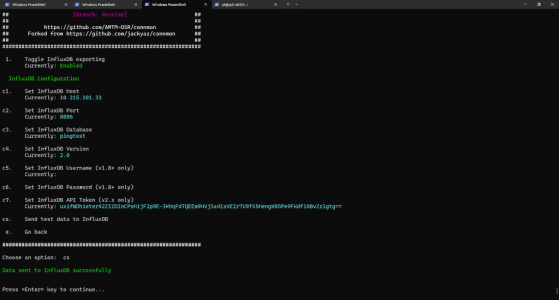
v3.0.10 on RT-BE88U
[Branch: develop]
HELP [v3.0.10_25120808]

Something is not quite right with the InfluxDB export test now.
When I run it using connmon ui commandline it reports success. I have not seen any data show up in the database
so I deleted the bucket (pingtest) and I still get a success message. Since it is trying to write to a non-existent bucket I should
see errors in the InfluxDB logs but do not.
 

Attachments

  • Screenshot 2025-12-08 133657.png
    Screenshot 2025-12-08 133657.png
    79.4 KB · Views: 6
v3.0.10 on RT-BE88U
[Branch: develop]
HELP [v3.0.10_25120808]

Something is not quite right with the InfluxDB export test now.
When I run it using connmon ui commandline it reports success. I have not seen any data show up in the database
so I deleted the bucket (pingtest) and I still get a success message. Since it is trying to write to a non-existent bucket I should
see errors in the InfluxDB logs but do not.
Like Spock would say: Fascinating!! ;)😄
When I input "bad" config settings, I get a failure along with some verbose output:

Connmon_v3.0.10_CLI_TestingInfluxDB.jpg


Try the latest 'develop' branch v3.0.10_25120811 version.
When executing the curl command and it returns a success code, I normally delete the temporary file that gets created. Now, for testing purposes, I simply commented out the line that deletes the file.

So, after you run your test again, check the contents of the temporary file:
Code:
/tmp/var/tmp/temp_connmon.LOG
 
Like Spock would say: Fascinating!! ;)😄
When I input "bad" config settings, I get a failure along with some verbose output:

View attachment 69446

Try the latest 'develop' branch v3.0.10_25120811 version.
When executing the curl command and it returns a success code, I normally delete the temporary file that gets created. Now, for testing purposes, I simply commented out the line that deletes the file.

So, after you run your test again, check the contents of the temporary file:
Code:
/tmp/var/tmp/temp_connmon.LOG
v3.0.10 on RT-BE88U
[Branch: develop]
HELP [v3.0.10_25120811]

Run test:
Choose an option: cs

Data sent to InfluxDB successfully

Code:
agagne@rt-be88u:/tmp/mnt/rt-be88u/entware/home# cat /tmp/var/tmp/temp_connmon.LOG
2025-Dec-08 Mon 03:12:12 PM EST
Note: Unnecessary use of -X or --request, POST is already inferred.
  % Total    % Received % Xferd  Average Speed   Time    Time     Time  Current
                                 Dload  Upload   Total   Spent    Left  Speed
  0     0    0     0    0     0      0      0 --:--:-- --:--:-- --:--:--     0*   Trying 10.215.101.33:8086...
* Connected to 10.215.101.33 (10.215.101.33) port 8086
> POST /api/v2/write?bucket=pingtest&precision=s HTTP/1.1
> Host: 10.215.101.33:8086
> User-Agent: curl/8.4.0
> Accept: */*
> Authorization: Token uxifWDhieter42ZIZDInCPsHijF2p9E-3KHqFdTQEEm94VjSa41sVEIr7U9fX5HengK05Pe9FKdf10BvZz1gtg==
> Accept-Encoding: gzip
> Content-Length: 83
> Content-Type: application/x-www-form-urlencoded
>
} [83 bytes data]
< HTTP/1.1 400 Bad Request
< Content-Type: application/json; charset=utf-8
< X-Influxdb-Build: OSS
< X-Influxdb-Version: v2.7.12
< X-Platform-Error-Code: invalid
< Date: Mon, 08 Dec 2025 20:12:12 GMT
< Content-Length: 65
<
{ [65 bytes data]
100   148  100    65  100    83  24109  30786 --:--:-- --:--:-- --:--:-- 74000
* Connection #0 to host 10.215.101.33 left intact

Odd even after re-creating the pingtest bucket, removing the /tmp/var/tmp/temp_connmon.LOG and
re-running the test I get the same message.

Code:
agagne@rt-be88u:/tmp/mnt/rt-be88u/entware/home# cat /tmp/var/tmp/temp_connmon.LOG
2025-Dec-08 Mon 03:16:53 PM EST
Note: Unnecessary use of -X or --request, POST is already inferred.
  % Total    % Received % Xferd  Average Speed   Time    Time     Time  Current
                                 Dload  Upload   Total   Spent    Left  Speed
  0     0    0     0    0     0      0      0 --:--:-- --:--:-- --:--:--     0*   Trying 10.215.101.33:8086...
* Connected to 10.215.101.33 (10.215.101.33) port 8086
> POST /api/v2/write?bucket=pingtest&precision=s HTTP/1.1
> Host: 10.215.101.33:8086
> User-Agent: curl/8.4.0
> Accept: */*
> Authorization: Token uxifWDhieter42ZIZDInCPsHijF2p9E-3KHqFdTQEEm94VjSa41sVEIr7U9fX5HengK05Pe9FKdf10BvZz1gtg==
> Accept-Encoding: gzip
> Content-Length: 83
> Content-Type: application/x-www-form-urlencoded
>
} [83 bytes data]
< HTTP/1.1 400 Bad Request
< Content-Type: application/json; charset=utf-8
< X-Influxdb-Build: OSS
< X-Influxdb-Version: v2.7.12
< X-Platform-Error-Code: invalid
< Date: Mon, 08 Dec 2025 20:16:53 GMT
< Content-Length: 65
<
{ [65 bytes data]
100   148  100    65  100    83  25038  31972 --:--:-- --:--:-- --:--:-- 74000
* Connection #0 to host 10.215.101.33 left intact
 

Similar threads

Latest threads

Support SNBForums w/ Amazon

If you'd like to support SNBForums, just use this link and buy anything on Amazon. Thanks!

Sign Up For SNBForums Daily Digest

Get an update of what's new every day delivered to your mailbox. Sign up here!
Back
Top