What's new

Firewall - Outbound rules

ITguy

New Around Here
I know the firewall has inbound filtering, however, I don't see the capability to further custom lockdown the firewall.
Does anyone know how to setup custom outbound rules using the Network Services Filter ?

At the bottom of the image below, you have Source IP and Destination IP listed. (ie. 192.168.0.2 - 192.168.0.254)
I'd like to specify an IP range in the box. I already know how to specify a port range.

1737993288632.png
 
@ITguy You haven't said what router or firmware version you're using. Your image is of the stock firmware from the Asus FAQ. As such it probably doesn't support CIDR notation. Try moving your mouse pointer over "Source IP" and seeing if there's a popup help balloon.
 
As others indicated, click on the text "Source IP" and "Destination IP" to see the tooltip information for each field. For example:
Source IP Tool Tip:
sourceIP.jpg

Destination IP Tool Tip:
destinationIP.jpg
 
Thanks everyone.

Specifically, I was looking to cover something along this range of .2 - .254.
(as an example 192.168.0.2 - 192.168.0.254)

I wanted to leave .1 out of the range.
 
Thanks everyone.

Specifically, I was looking to cover something along this range of .2 - .254.
(as an example 192.168.0.2 - 192.168.0.254)

I wanted to leave .1 out of the range.
Is the .2 - .254 range the destination or the source? It sounds like it's the destination addresses of an upstream router that you're NATed behind. In other words you're trying to block access to that subnet apart from that router's admin interface. Correct?

What router model and firmware version is the Asus?
 
Is the .2 - .254 range the destination or the source? It sounds like it's the destination addresses of an upstream router that you're NATed behind. In other words you're trying to block access to that subnet apart from that router's admin interface. Correct?
Correct.

Actually, it could be either dest or source ip depending on how far you want to lock things down with deny rules.

AX 88 Pro
 
What difference does it make. Seems to me that most routers in this Asus class use firmware that functions identical/almost identical to other in the class.
See post #3. Merlin supports CIDR notation which AFAIK stock firmware doesn't. Merlin also contains other enhancements like custom firewall scripts.

Stock firmware for this model is based on the 3.0.0.6.102 branch whereas Merlin's is based on the older 3.0.0.4.388 branch. There are major differences between these two branches.
 
Last edited:
See post #3. Merlin supports CIDR notation which AFAIK stock firmware doesn't. Merlin also contains other enhancements like custom firewall scripts.

Stock firmware for this model is based on the 3.0.0.6.102 branch whereas Merlin's is based on the older 3.0.0.4.388 branch. There are major differences between these two branches.
I don't have Merlin. Even with CIDR, the range I'm looking to cover generates many entries if I'm not mistaken.

Something weird that I did notice is that TCP and TCP ALL, do not function the same way meaning TCP will do the block (deny) and TCP ALL won't.

I'm currently making use of asterisk (ie 192.168.0.*) when specifying IP addresses but I'd like to be more precise as per post #6

Whats fustrating is the fact there are some other cheap routers out there that have a more flexible firewall configuration.
 
Something weird that I did notice is that TCP and TCP ALL, do not function the same way meaning TCP will do the block (deny) and TCP ALL won't.
TCP ALL refers to the TCP flags, SYN, ACK, etc. So the "ALL" part means "when all flags are set". This is a situation that never occurs making that option completely pointless. Hence that option was removed from Merlin's firmware.
 
Hi All,
It's little over a year since the last reply., but i'll give it a try with more or less the same question.

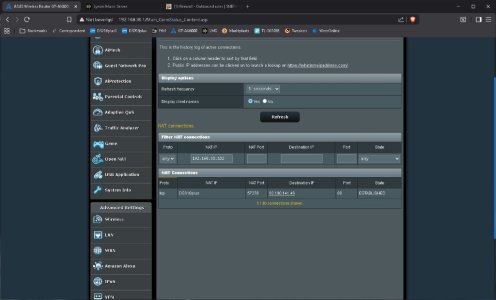
When i check my Systemlog > Connections, i see my Synology NAS with local IP 192.169.30.102:different ports connects to 34.210.61.151:80 which is an Amazon server. Ik don't know why, but i don't want it.
How can i prevent it? I've tried setting Firewall > Network Services Filter like this. But still it seems to connect, though connection state is TIME_WAIT most of the time. I have no need for extra apps like Skynet and hope it can be done directly in Merlin.
What would be the right way to accomplish this?
TIA
 

Attachments

  • Clipboard_03-15-2026_01.jpg
    Clipboard_03-15-2026_01.jpg
    78.6 KB · Views: 13
Last edited:
Remove the second rule as it doesn't do anything. You can leave the source ports field blank as that is the same as specifying "all" the ports.

34.210.61.151 is AWS so it's quite possible that it's actually a Synology-related server.

If you still have the problem post a screenshot of the connections page.
 
When i check my Systemlog > Connections, i see my Synology NAS with local IP 192.169.30.102:different ports connects to 34.210.61.151:80 which is an Amazon server. Ik don't know why, but i don't want it.
Have you looked at the Synology NAS configuration to see why, aka what DSM feature (ETA: or DSM package or docker container) you have enabled, that is connecting to an Amazon server? It may be possible to disable that feature to stop the traffic to the Amazon IP/server. For example have you enabled Synology Account in the Synology DSM? Have you enabled Synology's Active Insight? What about having DSM's QuickAccess or DDNS enabled?
 
Last edited:
Removed the second rule and cleared the port range field on the first one like Colin suggested.
Found out that it happens when streaming radio stations. I have Lyrion music server running as a Docker container on the NAS. Obviously i can't block all internet access to it, so i'll try to block specific sites (Amazon, Cloudflare etc.) which IMO have nothing to do with listening to any internet radio station. Also configured all radio streaming connections to run via WireGuard now. Had made some exceptions in VPN Director for Hi-Res stations (like Radio Paradise) in the past. Will see...

<edit> Remarkable things happened: When running via Wireguard, no more connection attempts to Amazon seem to be made (e.g. just plain 1 on 1 streaming), even with no firewall rules in place??

regards, Kees
 
Last edited:
<edit> Remarkable things happened: When running via Wireguard, no more connection attempts to Amazon seem to be made (e.g. just plain 1 on 1 streaming), even with no firewall rules in place??
If you are sending the Lyrion music server (on the Synology NAS Docker) traffic through the Wireguard VPN tunnel it is possible the Amazon attempts are still being made, just that the traffic is now masked/not shown in the Systemlog > Connections due the Wireguard tunnel. The Systemlog > Connections will likely show the Wireguard tunnel connection but not the traffic connections inside that VPN tunnel.
 
Well, this is how my Systemlog > Connections overview looks now. The only connection made is to a Worldstream server, which makes sense to me. Guess i'll leave it this way (no firewall), since Hi-Res streams are running fine too via Wireguard.
 

Attachments

  • Clipboard_03-16-2026_01.jpg
    Clipboard_03-16-2026_01.jpg
    68.8 KB · Views: 5
Last edited:

Support SNBForums w/ Amazon

If you'd like to support SNBForums, just use this link and buy anything on Amazon. Thanks!

Sign Up For SNBForums Daily Digest

Get an update of what's new every day delivered to your mailbox. Sign up here!
Back
Top