What's new

RTRMON RTRMON v2.2.3 -Nov 16, 2025- Monitor your Router's Health (New: Wireguard, AMTM, Network Conn/Bandwidth/Diag + Port Scanner + Speedtest) - v2.3.0Beta7

Yes, without .sh worked for monitor which I ran before, but as -screen/-monitor X did not work I just gave it a whirl to rule it out, ta.
Hey @jksmurf ... this means you can either use -screen OR -monitor with the page # appended to the end of it.

This works perfectly fine for me. Even for screen 7 @scootertramp (although the instructions just say screens 1-6, but I fixed that wording for the upcoming release, along with the change of wording to 'AiMesh'). Here's some more examples:

Code:
rtrmon -screen 7 (starts on page 7 with screen + reminder)
rtrmon -monitor 5 (starts on page 5 under regular monitor mode)
rtrmon -screen 2 -now (start on page 2 with screen with no wait)
 
Last edited:
Hey @jksmurf ... this means you can either use -screen OR -monitor with the page # appended to the end of it.

This works perfectly fine for me. Even for screen 7 @scootertramp (although the instructions just say screens 1-6, but I fixed that wording for the upcoming release, along with the change of wording to 'AiMesh'). Here's some more examples:

Code:
rtrmon -screen 7 (starts on page 7 with screen + reminder)
rtrmon -monitor 5 (starts on page 5 under regular monitor mode)
rtrmon -screen 2 -now (start on page 2 with screen with no wait)
lol ok... sorry I misread the / as a combined switch... :-).
 
Nice work on coming up with a solution, @jksmurf! I may have already asked, but what happens if you run RTRMON on the nodes? Or are you looking for info other than the "unknown" values that you might get as @visortgw showed above?
Hi,

So I can now answer this question; yes I get the names, IP and MAC, but no I do not get the Sig (RSSI) TX or RX or band info on the AiMesh Node; the Node device Name, MAC, IP, and RSSI was what I was after most.

Couple of observations on the -monitor X and -screen X options, you probably have a method for it already, but it keeps jumping to the bottom, so I cannot see the screen in the top half unless I hold the mouse on the scroll bar. I tried both with and without screen. In screen mode, using rtrmon -screen 7 did not go to screen 7 for me, it went to the screen shown. Monitor worked fine.

Top.jpg
Bottom.jpg
First.jpg
 
Hi,

So I can now answer this question; yes I get the names, IP and MAC, but no I do not get the Sig (RSSI) TX or RX or band info on the AiMesh Node; the Node device Name, MAC, IP, and RSSI was what I was after most.

Couple of observations on the -monitor X and -screen X options, you probably have a method for it already, but it keeps jumping to the bottom, so I cannot see the screen in the top half unless I hold the mouse on the scroll bar. I tried both with and without screen. In screen mode, using rtrmon -screen 7 did not go to screen 7 for me, it went to the screen shown. Monitor worked fine.

View attachment 69849View attachment 69850View attachment 69851
Use <shift>+X to stop display at end of current run. Then you can scroll up/down at will. <shift>+X will resume.
 
Hey @jksmurf ... this means you can either use -screen OR -monitor with the page # appended to the end of it.

This works perfectly fine for me. Even for screen 7 @scootertramp (although the instructions just say screens 1-6, but I fixed that wording for the upcoming release, along with the change of wording to 'AiMesh'). Here's some more examples:

Code:
rtrmon -screen 7 (starts on page 7 with screen + reminder)
rtrmon -monitor 5 (starts on page 5 under regular monitor mode)
rtrmon -screen 2 -now (start on page 2 with screen with no wait)
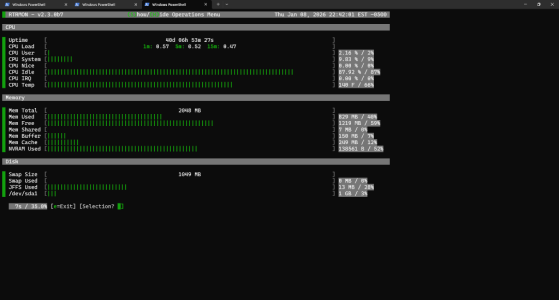
Wish I could say screen 7 works for me but, this is what I get on rt-be88u and xt-8.

RTRMON v2.3.0b7
 

Attachments

  • Screenshot 2026-01-08 224226.png
    Screenshot 2026-01-08 224226.png
    66.9 KB · Views: 8
Wish I could say screen 7 works for me but, this is what I get on rt-be88u and xt-8.

RTRMON v2.3.0b7
That is exactly what I am seeing.
Hooray, I am not going bonkers... actually I am, but it's not due to RTRMON.
 
Wish I could say screen 7 works for me but, this is what I get on rt-be88u and xt-8.

RTRMON v2.3.0b7
That is exactly what I am seeing.
Hooray, I am not going bonkers... actually I am, but it's not due to RTRMON.
Ah. I found it. It was working when using the -monitor command, but not the -screen command. I found the culprit. Please download this same version, and try again. The command rtrmon -screen 7 -now should work now! :)

Code:
curl --retry 3 "https://raw.githubusercontent.com/ViktorJp/RTRMON/develop/rtrmon.sh" -o "/jffs/scripts/rtrmon.sh" && chmod 755 "/jffs/scripts/rtrmon.sh"
 
Ah. I found it. It was working when using the -monitor command, but not the -screen command. I found the culprit. Please download this same version, and try again. The command rtrmon -screen 7 -now should work now! :)

Code:
curl --retry 3 "https://raw.githubusercontent.com/ViktorJp/RTRMON/develop/rtrmon.sh" -o "/jffs/scripts/rtrmon.sh" && chmod 755 "/jffs/scripts/rtrmon.sh"
Awesome. Here I thought it was a gummy kicked in faster that expected screwing with me.
 
Hi,

So I can now answer this question; yes I get the names, IP and MAC, but no I do not get the Sig (RSSI) TX or RX or band info on the AiMesh Node; the Node device Name, MAC, IP, and RSSI was what I was after most.
So... I did a bit more testing this morning running RTRMON on AiMesh nodes. I installed RTRMON on (2) GT-AX6000 and (1) GT-AXE16000 nodes. Configured RTRMON just as I configured it on GT-BE98 Pro primary router, but I set the (12) : Mark Router As AiMesh Node/Repeater/Bridge? flag on each. I launched RTRMON on each using rtrmon -monitor 7 on each AiMesh node. I see the "Sig (RSSI) TX or RX or band info" for all devices connected to the respective AiMesh nodes — the only thing missing is the host name and IP address, which we determined is due to the fact that the DHCP server runs on the primary router, but not on the AiMesh nodes.
 
The command rtrmon -screen 7 -now should work now! :)
Yup starts for me now thank you! Although tbh I’ve never seen the nice screen layout work on my iPad, only on the windows desktop,

One odd thing happened, but only once, when I exited the rtrmon screen with “e” I briefly saw it invoked getting out of the Tailmon Screen too, like it had some hook 🪝into that Tailmon screen option too. Couldn’t reproduce it though.

Any more thoughts on RSSI on Nodes Viktor? If the scripts I supplied above or your equivalents can get the values off the node routers (Merlin pr even stock nodes), all you’d need is the main router to somehow grab that data and display them in tables in the main interface?
 
Last edited:
I launched RTRMON on each using rtrmon -monitor 7 on each AiMesh node.
Ahhh, I see. Yes I could do the same with the scripts above.

What I was hoping Viktor the magnificent could do is go a step further and have all the nodes device info display on the MAIN router i.e. have the main router run that monitor line on the node, and then get the MAIN RTRMON to read that and display it on the main screen?

As you already have the IP and MAC and Names in the Main, you’d just need to marry the data.
 
Last edited:
Ahhh, I see. Yes I could do the same with the scripts above.

What I was hoping you could do is go a step further and have all the nodes device info display on the MAIN router i.e. have the main router run that monitor line on the node, and the get the MAIN read that I go and display it on the main screen?

As you already have the IP and MAC and Names, you’d just need to marry them.
Easier said than done as an ssh session would need to be launched on each node to generate data, the data collected (saved to file?), the data parsed, and then married.
 
Easier said than done as an ssh session would need to be launched on each node to generate data, the data collected (saved to file?), the data parsed, and then married.
Hmmm .. fair enough. Maybe just more headaches than it’s worth. I just tested it like you suggested, on the node and yes, RSSI is there.

In the scripts above I used a hard coded text file from which to read the missing data, but I’ll admit it was all done on the node.
 
Hmmm .. fair enough. Maybe just more headaches than it’s worth. I just tested it like you suggested, on the node and yes, RSSI is there.

In the scripts above I used a hard coded text file from which to read the missing data, but I’ll admit it was all done on the node.
Yeah, functionality like what you're describing could get messy real fast. There would need to either be some kind of working file sharing component, or a listener service on a port on one side or the other to push/pull data. Or like in a 1:many client-server methodology. Definitely not easy out-of-the-box plug and play.

I think an enterprise license of Solarwinds might be able to do this though. ;)
 
Yeah, functionality like what you're describing could get messy real fast. There would need to either be some kind of working file sharing component, or a listener service on a port on one side or the other to push/pull data. Or like in a 1:many client-server methodology. Definitely not easy out-of-the-box plug and play.

I think an enterprise license of Solarwinds might be able to do this though. ;)
In addition to getting messy, the processing power on the primary router might affect network performance as well.
 
Yeah, functionality like what you're describing could get messy real fast. There would need to either be some kind of working file sharing component, or a listener service on a port on one side or the other to push/pull data. Or like in a 1:many client-server methodology. Definitely not easy out-of-the-box plug and play.

I think an enterprise license of Solarwinds might be able to do this though. ;)
Just must be willing to part with arm or leg for your home lab.:eek:
 
Yeah, functionality like what you're describing could get messy real fast.
Definitely not easy out-of-the-box plug and play.
No worries at all, totally get it. I’m pretty ok with my dinky little script.

Along those lines then, if you could a function (or just an explanation) to export the custom_clientlist data (or whatever makes sense) from main and have teh user stick it in a dir on the node, when you run rtrmon on the node, at least you could get rid of the “unknown” monikers we’re currently seeing, so you could pretty much get all the info, just run as a separate process on each node (which is what I do now)?
 

Similar threads

Latest threads

Support SNBForums w/ Amazon

If you'd like to support SNBForums, just use this link and buy anything on Amazon. Thanks!

Sign Up For SNBForums Daily Digest

Get an update of what's new every day delivered to your mailbox. Sign up here!
Back
Top