

What's new
  • SNBForums Code of Conduct

    SNBForums is a community for everyone, no matter what their level of experience.

    Please be tolerant and patient of others, especially newcomers. We are all here to share and learn!

    The rules are simple: Be patient, be nice, be helpful or be gone!

switches in series

Bofely

New Around Here
Hello,

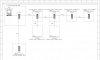
Please tell me if the design (in the attached file) is good or is it bad?
It's a 100 Mbps Ethernet network. The cable are STP Cat5e cables with length between 50 and 90 meters. Communication only happens between the server and other devices on the network. Other devices on the network doesn't need to communicate with each other. There's about 4 devices connected to each switch. Switches are L2 type.

Should I connect the Cat5e cable on the furthest switch (250 meters from the server) directly with the switch on the server side (with help of repeater)? Or should I connect all Cat5e cables from all switches to the (main) switch at the server side to make it a star network?

With the current design the server can connect to 4 devices (Teamviewer sessions), but the Teamviewer sessions are very bad in quality & speed.
 

Attachments

  • 2013-12-20 18_18_41-GENERAL_021192148930A00.pdf - Foxit Reader.jpg
    2013-12-20 18_18_41-GENERAL_021192148930A00.pdf - Foxit Reader.jpg
    35.5 KB · Views: 561
What is the topology of the current design that is giving you problems?

Cascading switches is fine and a good way to avoid having to use repeaters for long distances.

The main problem is that you need to watch bandwidth over those single links. Each link between switches has to handle the total bandwidth of all the switches downstream of it.

An easy way to handle this is to use Gigabit switches if you are going to overload a 100 Mbps link.
 
if it's attenuation you're concerned about, all the switches that are 100m or less i'd directly connect to the main, then use the furthest switch to go farther. try and eliminate devices in the path where you can, essentially.

these longest linked switches would be best to use lacp with, if you were so inclined
 
Last edited:
What is the topology of the current design that is giving you problems?
...

All the switches are 10/100 Mbps types, the main switch too.


if it's attenuation you're concerned about, all the switches that are 100m or less i'd directly connect to the main, then use the furthest switch to go farther. try and eliminate devices in the path where you can, essentially.

these longest linked switches would be best to use lacp with, if you were so inclined

I'm not sure where the cause(s) of the problem lies. It could because of the design, but it could be something else. This network is installed in a factory. At the location we see that the Cat5e STP cables (data) or not properly separated from the power cables, this may also cause the problem?
 
Where on the network are the devices that have problems when you run 4 of them? On a particular switch?

Have you tried dropping Teamviewer back to lower bandwidth limits?
 
you probably just really need to upgrade to gigabit. that old hardware might not be able to handle the simultaneous throughput
 
Where on the network are the devices that have problems when you run 4 of them? On a particular switch?

Have you tried dropping Teamviewer back to lower bandwidth limits?

The 4 devices are each located at 1 switch (truck & ship). I see that most of the time one Teamviewer connection is better than the others 3. I guess that the better connection is closer to the main switch, but I'm not sure. (I willl check if I'm at the location again.)

I haven't tried to drop some Teamviewer connections to see the result :(

--

Thanks everyone for the help. If there are changes/improvement, then I'll update.
 
Last edited:
Usually, no.

It is possible though. Just how much length are the cat5e cables running with the mains? What kind of mains? What kind of factory?

It is certainly possible to get feedback along the mains that'll setup some nasty noise in UTP if it runs along it for a good length. If the 60-90 meters is all running parrallel to the network cables, it is certainly possible this is what is causing it, especially in the further connections (the noise will increase even with switches or repeaters in between). A factory makes me think of lots of machineary/motors that might be connected in to the mains and these LOVE to cause noise along power wiring.

That said, 10/100 is typically much less sensitive to induced noise than gigabit is. Heck, you can basically run 10Mb along barbed wire in a lightning storm at full speed.
 

Latest threads

Support SNBForums w/ Amazon

If you'd like to support SNBForums, just use this link and buy anything on Amazon. Thanks!

Sign Up For SNBForums Daily Digest

Get an update of what's new every day delivered to your mailbox. Sign up here!

Staff online

Back
Top