What's new
  • SNBForums Code of Conduct

    SNBForums is a community for everyone, no matter what their level of experience.

    Please be tolerant and patient of others, especially newcomers. We are all here to share and learn!

    The rules are simple: Be patient, be nice, be helpful or be gone!

VPNMON VPNMON-R3 v1.8.2 -Nov 23, 2025- Monitor OpenVPN/Wireguard WAN/Dual-WAN Health & Random Reset Multiple Connections (Available in AMTM!) - v1.8.3Beta1

@Viktor Jaep Think I got it. I rebuilt the OVPN config files and uploaded, and now it connects. Thanks for the quick replies
Good call! Didn't even think of going down that path yet! Lol. And may I add "Goedzo, jochie!" :P
 
Last edited:
@Viktor Jaep,
Finally, I've just finished installing and configuring VPNMON-3, and I'm very impressed with the script!

I ended up making a very simple PHP script, hosted on my website, that retrieves the full servers list using NordVPN API v2.
I just pass a proper country name in a GET parameter with the URL, so the script filters JSON data based on the supplied country name -> server status (online) -> technology id -> technology status (online), then outputs a ready-to-use list of IPs for VPNMON-R3 to use.
So it has become down to a matter of a few bytes to download ;)

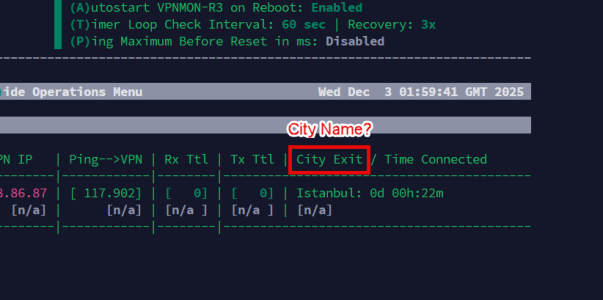
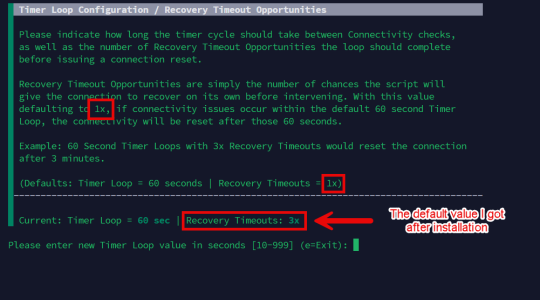
I'm already enjoying this great script now! However, I noticed 2 display issues that need to be reviewed by you, as I'm not completely sure they are not intended to be there. See the attached screenshots.
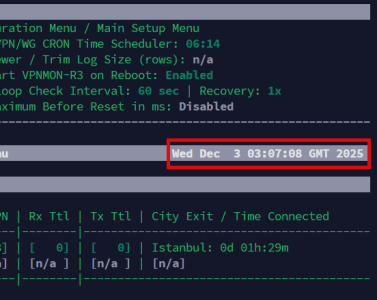
[EDIT] The date and time displayed on the main menu is consistent with my local time, but it's not GMT! (missing the time zone suffix?)

I'll discuss with you later my first-time user experience, as you might be interested in improving something important.
 

Attachments

  • 2025-12-03_02-00-35.png
    2025-12-03_02-00-35.png
    34.9 KB · Views: 18
  • 2025-12-03_02-03-31.png
    2025-12-03_02-03-31.png
    65.8 KB · Views: 16
Last edited:
@Viktor Jaep,
Finally, I've just finished installing and configuring VPNMON-3, and I'm very impressed with the script!
Glad you like it!
I ended up making a very simple PHP script, hosted on my website, that retrieves the full servers list using NordVPN API v2.
I just pass a proper country name in a GET parameter with the URL, so the script filters JSON data based on the supplied country name -> server status (online) -> technology id -> technology status (online), then outputs a ready-to-use list of IPs for VPNMON-R3 to use.
So it has become down to a matter of a few bytes to download ;)
Great work!
I'm already enjoying this great script now! However, I noticed 2 display issues that need to be reviewed by you, as I'm not completely sure they are not intended to be there. See the attached screenshots.
[EDIT] The date and time displayed on the main menu is consistent with my local time, but it's not GMT! (missing the time zone suffix?)

I'll discuss with you later my first-time user experience, as you might be interested in improving something important.
1. The "City Exit" is by design. It's basically shortened for "City Name VPN Tunnel Exit".

2. The Recovery timeouts should default to 1, but it was set to 3. I'll make that change for the next version update. Thank you for reporting!
 
It's basically shortened for "City Name VPN Tunnel Exit".
Would you consider changing "City Exit" to "City" or "City Name"?
It confused me as a first-time user to the degree that I thought it was a wording mistake and reported it.
I'll make that change for the next version update.
Great! Do you recommend for me that I set the timeout to 1?
The date and time displayed on the main menu is consistent with my local time, but it's not GMT! (missing the time zone suffix?)
Any comment?
 
Would you consider changing "City Exit" to "City" or "City Name"?
It confused me as a first-time user to the degree that I thought it was a wording mistake and reported it.
When dealing with VPN infrastructure, you typically deal with terms like tunnels, and exit nodes/servers. The word "City" implies a "City Name"... and tacks on the fact that this is its exit node while saving as much screen space as possible. I think "City Exit" is a perfectly acceptable and understandable term.

Great! Do you recommend for me that I set the timeout to 1?
Start with 1, and if you find that it frequently tries to reconnect due to line instability issues, then try increasing that number to 2 or 3.

The date and time displayed on the main menu is consistent with my local time, but it's not GMT! (missing the time zone suffix?) Any comment?
Could you please show me an example of what you mean, comparing to what you see in VPNMON-R3 and what you see in your Web UI?
 
Could you please show me an example of what you mean, comparing to what you see in VPNMON-R3 and what you see in your Web UI?
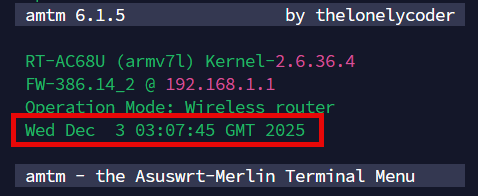
Oops, I'm afraid that I just discovered a model-specific bug in my router! Unfortunately, it displays the same in the AMTM main menu too.
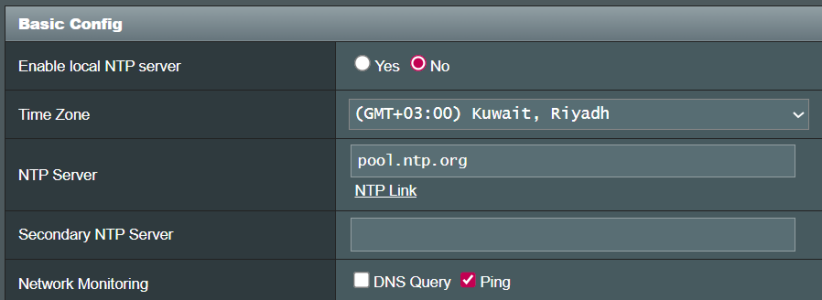
My router is setup up with a GMT+03:00 time zone, but the actual time zone is not displayed correctly neither in AMTM nor in VPNMON :rolleyes:
It's obvious that it's 00:07 GMT at the time of writing this post. However, it's showing 03:07 GMT in my router which is my local time not GMT time!
 

Attachments

  • 2025-12-03_03-07-32.png
    2025-12-03_03-07-32.png
    32.9 KB · Views: 15
  • 2025-12-03_03-08-25.png
    2025-12-03_03-08-25.png
    19.2 KB · Views: 14
  • 2025-12-03_03-12-44.png
    2025-12-03_03-12-44.png
    20.7 KB · Views: 13
Last edited:
Oops, I'm afraid that I just discovered a model-specific bug in my router! Unfortunately, it displays the same in the AMTM main menu too.
My router is setup up with a GMT+03:00 time zone, but the actual time zone is not displayed correctly neither in AMTM nor in VPNMON :rolleyes:
It's obvious that it's 00:07 GMT at the time of writing this post. However, it's showing 03:07 GMT in my router which is my local time not GMT time!
What does it say under System Log -> General Log -> System Time?

1764721287833.png
 
What does it say under System Log -> General Log -> System Time?
Wed,Dec 03 03:24:21 2025
The correct local time, but "System Time" doesn't mention the time zone at all (not GMT, not GMT+03:00)
In AMTM and other scripts including VPNMON, it either should show the correct time zone (i.e. GMT+03:00) or not mention GMT at all
 

Attachments

  • 2025-12-03_03-26-23.png
    2025-12-03_03-26-23.png
    39.4 KB · Views: 13
Wed,Dec 03 03:24:21 2025
The correct local time, but "System Time" doesn't mention the time zone at all (not GMT, not GMT+03:00)
In AMTM and other scripts including VPNMON, it either should show the correct time zone (i.e. GMT+03:00) or not mention GMT at all
So... the actual time is right after all between the script and the web UI? I thought you said it was supposed to be 00:17, not 03:17? But it's right now?

I'm simply reporting whatever timezone the router is returning... so if it's not supposed to be GMT, than what is it supposed to be?

Code:
ViktorJp@GT-AX6000-3C88:/tmp/home/root# date +%Z
EST
 
Code:
/tmp# export TZ=EST5DST
/tmp# date
Wed Dec  3 01:36:40 EST 2025
/tmp# export TZ=UTC-3_1
/tmp# date
Wed Dec  3 09:36:45 UTC 2025
/tmp#
I think Tarek's timezone should be AST but it displays as UTC for me. This is router level, though, not something VPNMON could address.
Asus busybox seems to have timezone names as shown in Github asuswrt-merlin.ng/release/src/router/rc/common.c
AST is UTC+3
The IANA database entry Asia/Kuwait ends with AST-3
Code:
/rom/usr/share/zoneinfo/Asia# strings /rom/usr/share/zoneinfo/Asia/Kuwait | tail -1
AST-3
 
So... the actual time is right after all between the script and the web UI?
As a local time, yes it is right and has always been. I never said it was wrong. Again, you misunderstood me.
I thought you said it was supposed to be 00:17, not 03:17?
If the reported (on-screen) time zone is correct, then my local time should have displayed 00:17, instead of 03:17
Just as @EmeraldDeer thankfully explained, I'm not in the GMT/UTC time zone, I'm in the GMT+03:00 time zone.
I'm simply reporting whatever timezone the router is returning... so if it's not supposed to be GMT, than what is it supposed to be?
I know, and I didn't say that there's something wrong with your script specifically. I already said that it seems to me it's a model specific issue, since it's shown in various/all other scripts (I didn't and won't search it)...
Oops, I'm afraid that I just discovered a model-specific bug in my router!
so if it's not supposed to be GMT, than what is it supposed to be?
Should be GMT+03:00 or AST as EmeraldDeer suggested.
I think Tarek's timezone should be AST but it displays as UTC for me. This is router level, though, not something VPNMON could address.
Exactly! Thank you for helping with clarifying my issue with precision.

So, @Viktor Jaep, and @EmeraldDeer, any ideas how can I get this fixed in my own setup? I recall there's a file named TZ, should I check/change the value there? Here's the current output of the two commands you provided in your own posts, if it helps..
Code:
# date +%Z
GMT
# strings /rom/usr/share/zoneinfo/Asia/Kuwait | tail -1
strings: /rom/usr/share/zoneinfo/Asia/Kuwait: No such file or directory
# strings /opt/share/zoneinfo/Asia/Kuwait | tail -1
<+03>-3
 
I think the best that can be done under the circumstances is using the Z and z format options to the date command in one's scripts
Code:
/tmp# export TZ=EST5DST
/tmp# date +"%A, %B %d, %Y %r %Z %z"
Wednesday, December 03, 2025 03:32:38 PM EST -0500
/tmp# export TZ=GMT
/tmp# date +"%A, %B %d, %Y %r %Z %z"
Wednesday, December 03, 2025 08:32:51 PM GMT +0000
/tmp# export TZ=UTC-3_1
/tmp# date +"%A, %B %d, %Y %r %Z %z"
Wednesday, December 03, 2025 11:33:39 PM UTC +0300
 
I think the best that can be done under the circumstances is using the Z and z format options to the date command in one's scripts
So, from what I can understand now, every script displaying my time zone as "GMT" (without the +0300), is not displaying a proper time zone for all users? Hence, it can only be corrected by every script owner by using the "%z" variable?

To confirm your conclusion, I checked what's inside that TZ file after searching for it, and tried to display current time using your date command. It confirmed your conclusion..
Code:
# cat /jffs/addons/amtm/TZ
GMT-3
# date +"%A, %B %d, %Y %r %Z %z"
Wednesday, December 03, 2025 11:50:10 PM GMT +0300

However, I didn't execute any export command, neither found a current TZ environment variable??!!
Code:
# echo "$TZ"

# echo $TZ
Any ideas?
 
Last edited:
As the common linux filesystems are not persistent through reboots with Asus Busybox linux, persistent data is stored in the /jffs filesystem or nvram.
I think the time zone is stored in nvram
Code:
/tmp# nvram show | grep time_zone
time_zone=EST5DST
time_zone_dst=1
time_zone_dstoff=M3.2.0/2,M11.1.0/2
time_zone_x=EST5DST,M3.2.0/2,M11.1.0/2
Linux time is kept in sync globally in UTC.
Localization can be handled by the TZ variable but has a local default if not set. In the Asus case, I think that would be the value from nvram time_zone.
Since your "date +%Z" shows as GMT, you also need the offset "date +%z" for it to make sense.
Perhaps this would not be necessary if it showed as AST. But, then again, other time zones use the same acronym.
 
Linux time is kept in sync globally in UTC.
Localization can be handled by the TZ variable but has a local default if not set. In the Asus case, I think that would be the value from nvram time_zone.
Since your "date +%Z" shows as GMT, you also need the offset "date +%z" for it to make sense.
Perhaps this would not be necessary if it showed as AST. But, then again, other time zones use the same acronym.
Thank you very very much for your time and explanation, you answered every question I had in my mind.
I understand the whole situation now, and I believe the community wouldn't be interested in fixing such a minor time zone display issue although it affects a wide range of time zones.

Here's the output of the command you suggested:
Code:
# nvram show | grep time_zone
time_zone_dst=0
time_zone_x=GMT-3
time_zone_dstoff=M3.2.0/2,M10.2.0/2
time_zone=UTC-3_1
 
Thank you very very much for your time and explanation, you answered every question I had in my mind.
I understand the whole situation now, and I believe the community wouldn't be interested in fixing such a minor time zone display issue although it affects a wide range of time zones.

Here's the output of the command you suggested:
Code:
# nvram show | grep time_zone
time_zone_dst=0
time_zone_x=GMT-3
time_zone_dstoff=M3.2.0/2,M10.2.0/2
time_zone=UTC-3_1
I'll play around with this and enhance the TZ output a bit more so it makes sense for those seeing this issue. Thank you both @Tarek Yag and @EmeraldDeer for looking into this!
 
I'll play around with this and enhance the TZ output a bit more so it makes sense for those seeing this issue. Thank you both @Tarek Yag and @EmeraldDeer for looking into this!
Cool! I'm happy you're taking a step into this.
EmeraldDeer did a great job explaining it all, and I'm glad I was part of the change.
 
vpnmon 1.8.2 on a rt-be88u.
NOTE: I have disabled wan monitoring to see if there is any improvement in stability.

Not sure if this just isn't Holiday traffic or not but, I seem to be seeing an excessive number of wan down events.
What I do not see is any wan down in the router logs. Just wan up as a result of a router reboot. I believe I would be
seeing those if there was a state change in wan0_state_t that you use as one of the two test for your wan down circuit breaker.
So I assume that these wan down events are the result of a failed open_ssl connection to a google server.

What is troubling me is the penalty for the 15/30 second difference between (ERROR: WAN Connectivity Issue Detected)
and the (WARNING: WAN Link Detected -- Trying to Reconnect/Reset VPN/WG). It takes on average 10 minutes to fully
recover from a wan down event. The 5 minute loop before it starts to Reconnect/Reset connections and 5 minutes to
get 4 slots recovered ( 2 VPN and 2 WG).

Not sure what I am looking for other than to vent my observations and hope the stability that I have enjoyed
with vpnmon in the past returns.
 

Attachments

Not sure if this just isn't Holiday traffic or not but, I seem to be seeing an excessive number of wan down events.
Thankfully all stable on my end. Seeing more events like this could also be indicative of quality of your Internet connectivity starting to suffer... but...
What I do not see is any wan down in the router logs. Just wan up as a result of a router reboot. I believe I would be
seeing those if there was a state change in wan0_state_t that you use as one of the two test for your wan down circuit breaker.
So I assume that these wan down events are the result of a failed open_ssl connection to a google server.
...as you mentioned, it's most likely this. Failing to make an SSL connection to the server you have specified. One way around this is to point to another server. Perhaps 9.9.9.9... I switch things around every so often if I'm seeing issues like this. I like the idea of checking wan state, or perhaps also implementing the same retry capabilities as we have on the VPN/WG slots.

What is troubling me is the penalty for the 15/30 second difference between (ERROR: WAN Connectivity Issue Detected)
and the (WARNING: WAN Link Detected -- Trying to Reconnect/Reset VPN/WG). It takes on average 10 minutes to fully
recover from a wan down event. The 5 minute loop before it starts to Reconnect/Reset connections and 5 minutes to
get 4 slots recovered ( 2 VPN and 2 WG).

Not sure what I am looking for other than to vent my observations and hope the stability that I have enjoyed
with vpnmon in the past returns.
The idea behind this is in the case of an actual outage, making sure the router has time to recover before loading on the tasks of reconnecting all the tunnels. You also don't want the script to think that the tunnel is still down because it was too quick while the tunnel is still in the process of connecting. Back in the day, it seemed I had to give certain actions some time to stabilize before moving on, but I can see what happens if I drastically shorten the amount of time between steps.

I could also make it configurable, for you to determine how long to wait between when the router sees a connection again, and when it should start reconnecting the tunnels.

Lots of good stuff for me to chew on. Thank you!
 
Last edited:
If I understand correctly to change the ssl connection host I would have to edit vpnmon script.

##-------------------------------------##
## Added by Martinski W. [2024-Oct-05] ##
##-------------------------------------##
readonly PING_HOST_Deflt="8.8.8.8"

From checkwan function()

# Using Google's DNS server as default to test for WAN connectivity over verified SSL Handshake
wandownbreakertrip=0
testssl="$PING_HOST_Deflt"

Maybe a good candidate to make configurable.
 

Similar threads

Latest threads

Support SNBForums w/ Amazon

If you'd like to support SNBForums, just use this link and buy anything on Amazon. Thanks!

Sign Up For SNBForums Daily Digest

Get an update of what's new every day delivered to your mailbox. Sign up here!

Members online

Back
Top