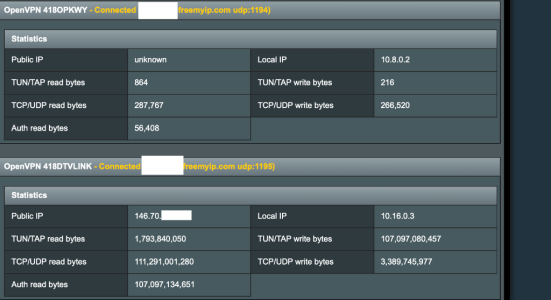
I will need to watch this to see if it is the only culprit.
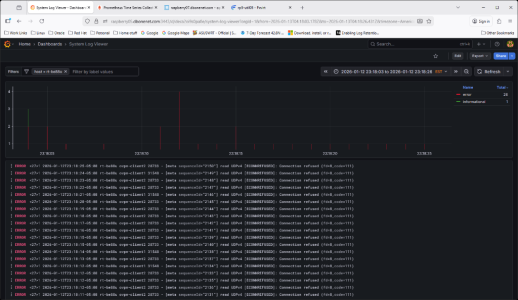
Info in the router log from last night that match vpnmon resets.
No, there was no indication of trouble.
Here a little wider timeframe.
2026-01-12T23:03:04.000000-05:00 rt-be88u connmon_[32490]: 30 second ping test to 1.1.1.1 starting...
2026-01-12T23:06:04.000000-05:00 rt-be88u connmon_[26819]: 30 second ping test to 1.1.1.1 starting...
2026-01-12T23:09:04.000000-05:00 rt-be88u connmon_[17563]: 30 second ping test to 1.1.1.1 starting...
2026-01-12T23:12:04.000000-05:00 rt-be88u connmon_[12550]: 30 second ping test to 1.1.1.1 starting...
2026-01-12T23:14:59.000000-05:00 rt-be88u ovpn-client1[31548]: VERIFY OK: depth=1, C=VG, ST=BVI, O=ExpressVPN, OU=ExpressVPN, CN=ExpressVPN CA, emailAddress=support@expres
2026-01-12T23:14:59.000000-05:00 rt-be88u ovpn-client1[31548]: VERIFY OK: nsCertType=SERVER
2026-01-12T23:14:59.000000-05:00 rt-be88u ovpn-client1[31548]: VERIFY X509NAME OK: C=VG, ST=BVI, O=ExpressVPN, OU=ExpressVPN, CN=Server-12229-1a, emailAddress=support@expr
2026-01-12T23:14:59.000000-05:00 rt-be88u ovpn-client1[31548]: VERIFY OK: depth=0, C=VG, ST=BVI, O=ExpressVPN, OU=ExpressVPN, CN=Server-12229-1a, emailAddress=support@expr
2026-01-12T23:14:59.000000-05:00 rt-be88u ovpn-client1[31548]: Control Channel: TLSv1.3, cipher TLSv1.3 TLS_AES_256_GCM_SHA384, peer certificate: 2048 bits RSA, signature:
2026-01-12T23:15:00.000000-05:00 rt-be88u agagne[-]: Checking for external IP change
2026-01-12T23:15:04.000000-05:00 rt-be88u connmon_[5672]: 30 second ping test to 1.1.1.1 starting...
2026-01-12T23:18:04.000000-05:00 rt-be88u connmon_[32263]: 30 second ping test to 1.1.1.1 starting...
2026-01-12T23:18:04.000000-05:00 rt-be88u ovpn-client2[28733]: read UDPv4 [ECONNREFUSED]: Connection refused (fd=8,code=111)
2026-01-12T23:18:04.000000-05:00 rt-be88u ovpn-client2[28733]: read UDPv4 [ECONNREFUSED]: Connection refused (fd=8,code=111)
2026-01-12T23:18:05.000000-05:00 rt-be88u ovpn-client2[28733]: read UDPv4 [ECONNREFUSED]: Connection refused (fd=8,code=111)
2026-01-12T23:18:05.000000-05:00 rt-be88u ovpn-client2[28733]: read UDPv4 [ECONNREFUSED]: Connection refused (fd=8,code=111)
2026-01-12T23:18:06.000000-05:00 rt-be88u ovpn-client2[28733]: read UDPv4 [ECONNREFUSED]: Connection refused (fd=8,code=111)
2026-01-12T23:18:08.000000-05:00 rt-be88u ovpn-client2[28733]: read UDPv4 [ECONNREFUSED]: Connection refused (fd=8,code=111)
2026-01-12T23:18:11.000000-05:00 rt-be88u ovpn-client2[28733]: read UDPv4 [ECONNREFUSED]: Connection refused (fd=8,code=111)
2026-01-12T23:18:11.000000-05:00 rt-be88u ovpn-client2[28733]: read UDPv4 [ECONNREFUSED]: Connection refused (fd=8,code=111)
2026-01-12T23:18:12.000000-05:00 rt-be88u ovpn-client2[28733]: read UDPv4 [ECONNREFUSED]: Connection refused (fd=8,code=111)
2026-01-12T23:18:12.000000-05:00 rt-be88u ovpn-client1[31548]: read UDPv4 [ECONNREFUSED]: Connection refused (fd=8,code=111)
2026-01-12T23:18:12.000000-05:00 rt-be88u ovpn-client2[28733]: read UDPv4 [ECONNREFUSED]: Connection refused (fd=8,code=111)
2026-01-12T23:18:12.000000-05:00 rt-be88u ovpn-client2[28733]: read UDPv4 [ECONNREFUSED]: Connection refused (fd=8,code=111)
2026-01-12T23:18:13.000000-05:00 rt-be88u ovpn-client2[28733]: read UDPv4 [ECONNREFUSED]: Connection refused (fd=8,code=111)
2026-01-12T23:18:14.000000-05:00 rt-be88u ovpn-client1[31548]: read UDPv4 [ECONNREFUSED]: Connection refused (fd=8,code=111)
2026-01-12T23:18:15.000000-05:00 rt-be88u ovpn-client2[28733]: read UDPv4 [ECONNREFUSED]: Connection refused (fd=8,code=111)
2026-01-12T23:18:15.000000-05:00 rt-be88u ovpn-client2[28733]: read UDPv4 [ECONNREFUSED]: Connection refused (fd=8,code=111)
2026-01-12T23:18:16.000000-05:00 rt-be88u ovpn-client2[28733]: read UDPv4 [ECONNREFUSED]: Connection refused (fd=8,code=111)
2026-01-12T23:18:17.000000-05:00 rt-be88u ovpn-client2[28733]: read UDPv4 [ECONNREFUSED]: Connection refused (fd=8,code=111)
2026-01-12T23:18:18.000000-05:00 rt-be88u ovpn-client2[28733]: read UDPv4 [ECONNREFUSED]: Connection refused (fd=8,code=111)
2026-01-12T23:18:19.000000-05:00 rt-be88u ovpn-client2[28733]: read UDPv4 [ECONNREFUSED]: Connection refused (fd=8,code=111)
2026-01-12T23:18:20.000000-05:00 rt-be88u ovpn-client2[28733]: read UDPv4 [ECONNREFUSED]: Connection refused (fd=8,code=111)
2026-01-12T23:18:21.000000-05:00 rt-be88u ovpn-client1[31548]: read UDPv4 [ECONNREFUSED]: Connection refused (fd=8,code=111)
2026-01-12T23:18:22.000000-05:00 rt-be88u ovpn-client2[28733]: read UDPv4 [ECONNREFUSED]: Connection refused (fd=8,code=111)
2026-01-12T23:18:23.000000-05:00 rt-be88u ovpn-client2[28733]: read UDPv4 [ECONNREFUSED]: Connection refused (fd=8,code=111)
2026-01-12T23:18:24.000000-05:00 rt-be88u ovpn-client1[31548]: read UDPv4 [ECONNREFUSED]: Connection refused (fd=8,code=111)
2026-01-12T23:18:25.000000-05:00 rt-be88u ovpn-client2[28733]: read UDPv4 [ECONNREFUSED]: Connection refused (fd=8,code=111)
2026-01-12T23:18:51.000000-05:00 rt-be88u dnsmasq-dhcp[31645]: DHCPREQUEST(br0) 10.215.101.253 4c:24:98:fd:6e:54
2026-01-12T23:18:51.000000-05:00 rt-be88u dnsmasq-dhcp[31645]: DHCPACK(br0) 10.215.101.253 4c:24:98:fd:6e:54 ring-doorbell
2026-01-12T23:18:52.000000-05:00 rt-be88u ovpn-client1[31548]: [Server-12229-1a] Inactivity timeout (--ping-restart), restarting
2026-01-12T23:18:52.000000-05:00 rt-be88u ovpn-client1[31548]: SIGUSR1[soft,ping-restart] received, process restarting
2026-01-12T23:18:52.000000-05:00 rt-be88u ovpn-client1[31548]: Restart pause, 1 second(s)
2026-01-12T23:18:53.000000-05:00 rt-be88u ovpn-client1[31548]: WARNING: --ns-cert-type is DEPRECATED. Use --remote-cert-tls instead.
2026-01-12T23:18:53.000000-05:00 rt-be88u ovpn-client1[31548]: NOTE: the current --script-security setting may allow this configuration to call user-defined scripts
2026-01-12T23:18:53.000000-05:00 rt-be88u ovpn-client1[31548]: TCP/UDP: Preserving recently used remote address: [AF_INET]151.240.45.237:1195
2026-01-12T23:18:53.000000-05:00 rt-be88u ovpn-client1[31548]: Socket Buffers: R=[524288->1048576] S=[524288->1048576]
2026-01-12T23:18:53.000000-05:00 rt-be88u ovpn-client1[31548]: UDPv4 link local: (not bound)
2026-01-12T23:18:53.000000-05:00 rt-be88u ovpn-client1[31548]: UDPv4 link remote: [AF_INET]151.240.45.237:1195
2026-01-12T23:18:56.000000-05:00 rt-be88u ovpn-client2[28733]: [Server-12229-1a] Inactivity timeout (--ping-restart), restarting
2026-01-12T23:18:56.000000-05:00 rt-be88u ovpn-client2[28733]: SIGUSR1[soft,ping-restart] received, process restarting
2026-01-12T23:18:56.000000-05:00 rt-be88u ovpn-client2[28733]: Restart pause, 1 second(s)
2026-01-12T23:18:57.000000-05:00 rt-be88u ovpn-client2[28733]: WARNING: --ns-cert-type is DEPRECATED. Use --remote-cert-tls instead.
2026-01-12T23:18:57.000000-05:00 rt-be88u ovpn-client2[28733]: NOTE: the current --script-security setting may allow this configuration to call user-defined scripts
2026-01-12T23:18:57.000000-05:00 rt-be88u ovpn-client2[28733]: TCP/UDP: Preserving recently used remote address: [AF_INET]151.240.45.237:1195
2026-01-12T23:18:57.000000-05:00 rt-be88u ovpn-client2[28733]: Socket Buffers: R=[524288->1048576] S=[524288->1048576]
2026-01-12T23:18:57.000000-05:00 rt-be88u ovpn-client2[28733]: UDPv4 link local: (not bound)
2026-01-12T23:18:57.000000-05:00 rt-be88u ovpn-client2[28733]: UDPv4 link remote: [AF_INET]151.240.45.237:1195
2026-01-12T23:19:44.000000-05:00 rt-be88u dnsmasq-dhcp[31645]: DHCPREQUEST(br0) 10.215.101.253 4c:24:98:fd:6e:54