What's new

【AiProtection Bug】Malicious Sites Blocking Remains Enabled Despite Turning Off "Enable AiProtection"

YumeHatsuyuki

Occasional Visitor
Firmware: 3006_102.5
RT-BE88U

I’ve encountered some confusing behavior with the Malicious Sites Blocking feature. For example, even after disabling the Enabled AiProtection option, the Malicious Sites Blocking still operates. It completely blocks all websites on its blacklist.

Here are my test results for unlocking cdn.sinacloud.net with AiProtection:
1757437326079.png


Test 1: Disabled Enabled AiProtection and all associated options:
1757436896078.png

Code:
nslookup cdn.sinacloud.net

Server:    RT-BE88U-B020.lan
Address:  192.168.50.1

Name:      cdn.sinacloud.net
Address 1: 3.114.78.198

It hijacked the DNS traffic to blocking.asus.hns.tm.

Test 2: Disabled Enabled AiProtection but enabled all associated options:
1757437076755.png

Code:
nslookup cdn.sinacloud.net

Server:    RT-BE88U-B020.lan
Address:  192.168.50.1

Name:      cdn.sinacloud.net
Address 1: 3.114.78.198

It still hijacked the DNS traffic to blocking.asus.hns.tm.

Test 3: Enabled Enabled AiProtection but disabled all associated options:
1757437170124.png

Code:
nslookup cdn.sinacloud.net

Server:    RT-BE88U-B020.lan
Address:  192.168.50.1

Name:      cdn.sinacloud.net
Address 1: 3.114.78.198

The DNS traffic was hijacked to blocking.asus.hns.tm again.

Test 4: Enabled Enabled AiProtection and enabled all associated options:
1757437227279.png

Code:
nslookup cdn.sinacloud.net

Server:    RT-BE88U-B020.lan
Address:  192.168.50.1

Name:      cdn.sinacloud.net
Address 1: xxx.xxx.xxx.xxx
Address 2: xxx.xxx.xxx.xxx
Address 3: xxx.xxx.xxx.xxx
Address 4: xxx.xxx.xxx.xxx

Only with this configuration did it resolve all the correct IPs.

Question:

Aside from adding websites to the whitelist, is it possible to either disable the Malicious Sites Blocking feature individually or turn off AiProtection completely? I don't want to revoke the privacy settings in system management because I need to keep other related features (such as QoS). Is there a better solution?
 
Last edited:
Note that when disabling AiProtection (or the Trend Micro features) you need to go into Administration > Policy section and click the Withdraw button for it in order to fully shut down the feature.
 
Note that when disabling AiProtection (or the Trend Micro features) you need to go into Administration > Policy section and click the Withdraw button for it in order to fully shut down the feature.
Yes, I've seen this solution mentioned in other forum posts. However, if I disable it completely, other related features (such as QoS and traffic statistics) also become unavailable. I need all functionalities except for the web filtering feature, yet currently the only way to bypass the blocking seems to be adding sites to the whitelist, which is quite frustrating.
 
I’ve identified the issue with the AiProtection settings not taking effect. According to my tests, the problem consistently occurs when Web History is enabled—it automatically enables and overrides all security options of AiProtection by default. However, after turning off Web History, the AiProtection behavior becomes fully consistent with the configuration shown in the WEB UI.
 
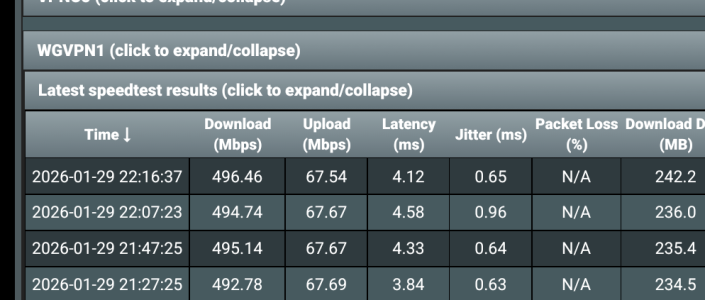
AiProtection significantly impacts internet speed and jitter when using the WireGuard VPN Client.
AiProtection is disabled.jpeg
AiProtection is enabled.jpeg
 
Last edited:
All depends on the distance to the wireguard server you're using.
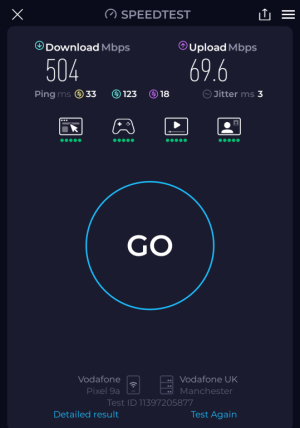
You got a certain result on the router. I tested it on a laptop connected to the router via WiFi. And the results were significantly different. However, the connection conditions (server distance) didn't change. I believe my measurement method is more accurate. I need internet on the laptop, not the router.
 
You got a certain result on the router. I tested it on a laptop connected to the router via WiFi. And the results were significantly different. However, the connection conditions (server distance) didn't change. I believe my measurement method is more accurate. I need internet on the laptop, not the router.
1000046788.png
Even better result.
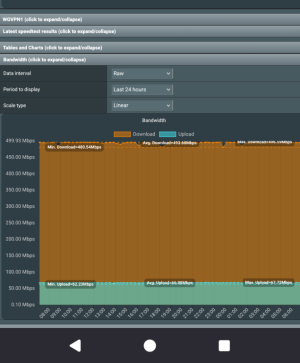
FYI the built-in router test and spdmerlin have always been bang-on for me
1000046790.png
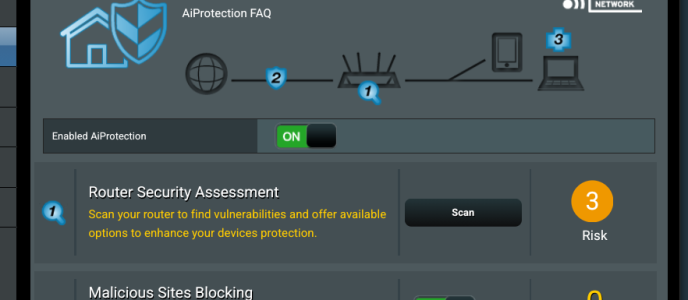
And if anyone wants to suggest any impropriety, it's still enabled
1000046791.png
 
Last edited:
Even better result.
A quick clarification: you're using an RT-BE88U, and you have the built-in WireGuard VPN Client enabled, which your RT-BE88U uses to access the internet. You also have AiProtection enabled, which includes Malicious Site Blocking, Two-Way IPS, Infected Device Prevention, and Blocking. You connected to the RT-BE88U via WiFi and measured the same server. But you only have one screenshot? Please take two measurements, one with AiProtection enabled and one with AiProtection disabled, on the same website. In both cases, the router should receive internet through the WireGuard VPN Client.
 
You know what? I can't be bothered with this any more - don't need the 'jump through hoops' requests, changing setting to suit your purpose. You have the info I've given above, accept it and move on.
tl;dr my speeds are the same over wireguard with or without AiProtection. 500/70.
 
Firmware: 3006_102.5
RT-BE88U

I’ve encountered some confusing behavior with the Malicious Sites Blocking feature. For example, even after disabling the Enabled AiProtection option, the Malicious Sites Blocking still operates. It completely blocks all websites on its blacklist.

Here are my test results for unlocking cdn.sinacloud.net with AiProtection:
View attachment 67873

Test 1: Disabled Enabled AiProtection and all associated options:
View attachment 67868
Code:
nslookup cdn.sinacloud.net

Server:    RT-BE88U-B020.lan
Address:  192.168.50.1

Name:      cdn.sinacloud.net
Address 1: 3.114.78.198

It hijacked the DNS traffic to blocking.asus.hns.tm.

Test 2: Disabled Enabled AiProtection but enabled all associated options:
View attachment 67869
Code:
nslookup cdn.sinacloud.net

Server:    RT-BE88U-B020.lan
Address:  192.168.50.1

Name:      cdn.sinacloud.net
Address 1: 3.114.78.198

It still hijacked the DNS traffic to blocking.asus.hns.tm.

Test 3: Enabled Enabled AiProtection but disabled all associated options:
View attachment 67870
Code:
nslookup cdn.sinacloud.net

Server:    RT-BE88U-B020.lan
Address:  192.168.50.1

Name:      cdn.sinacloud.net
Address 1: 3.114.78.198

The DNS traffic was hijacked to blocking.asus.hns.tm again.

Test 4: Enabled Enabled AiProtection and enabled all associated options:
View attachment 67871
Code:
nslookup cdn.sinacloud.net

Server:    RT-BE88U-B020.lan
Address:  192.168.50.1

Name:      cdn.sinacloud.net
Address 1: xxx.xxx.xxx.xxx
Address 2: xxx.xxx.xxx.xxx
Address 3: xxx.xxx.xxx.xxx
Address 4: xxx.xxx.xxx.xxx

Only with this configuration did it resolve all the correct IPs.

Question:

Aside from adding websites to the whitelist, is it possible to either disable the Malicious Sites Blocking feature individually or turn off AiProtection completely? I don't want to revoke the privacy settings in system management because I need to keep other related features (such as QoS). Is there a better solution?
@Tech9 can fill us in on this odd yet puzzling behavior. what happens when you try this site http://malware.wicar.org/data/eicar.com ?
 

Latest threads

Support SNBForums w/ Amazon

If you'd like to support SNBForums, just use this link and buy anything on Amazon. Thanks!

Sign Up For SNBForums Daily Digest

Get an update of what's new every day delivered to your mailbox. Sign up here!
Back
Top