What's new

amtm amtm 6.6 - the Asuswrt-Merlin Terminal Menu, April 06, 2026

So, what would I suggest as an alternative? Options for wording in amtm:

A. Scripts supporting amtmupdate (currently enabled unless otherwise shown)
B. Scripts currently enabled / disabled in amtmupdate (enabled unless otherwise shown)
C Something else…
I see what you mean. Let me pore over a dictionary and find some appropriate words to add.
 
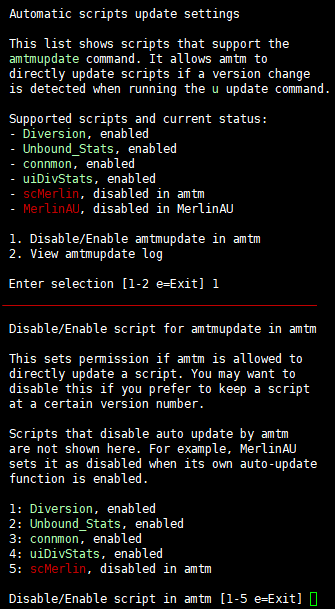
How about this for clarity of the au function, with two examples.

The meaning of "scMerlin, disabled in amtm":
Here, I disabled scMerlin to auto-update in amtm because I may want to keep it at the current version for now.

The meaning of "MerlinAU, disabled in MerlinAU":
MerlinAU has its own auto-update feature enabled and therefore tells amtm not to update it. This is part of what amtm checks when it refreshes the supported scripts list.

69e2ac401d89.png


Comments are welcome.
 
Comments are welcome.

My only suggestion would be to maybe change the wording from "Disabled in MerlinAU" to "Disabled by MerlinAU"

The only reason is that people might still associate "Disabled in MerlinAU" as meaning "MerlinAU auto-update feature is disabled" when in reality auto-update is enabled in MerlinAU, and due to that we disabled AMTM updates.

It might be more clear that they are two independent functions by saying "Disabled by MerlinAU".

Edit: Keeping "Disabled in AMTM" makes sense and wouldn't need to change, that would be a preference thing.
 
How about this for clarity of the au function, with two examples.
My only suggestion would be to maybe change the wording from "Disabled in MerlinAU" to "Disabled by MerlinAU"
@thelonelycoder, thanks for thinking this through, it reads nicely.

My initial reaction was the same as @ExtremeFiretop whose suggestion neatly clarifies the subtle but important distinction between “in” and “by”, meaning the user will have to go to MerlinAU to make the amendment needed to be able to enable it in amtm.

To dovetail with the “by” suggestion, I would also recommend your example be amended as follows: “For example, the amtm autoupdate function for MerlinAU is disabled, by MerlinAU, when it’s own auto-update function is enabled.
 
Comments are welcome.
How about the following changes in messaging?

AMTM_v6.5.1_AutoScriptUpdates_1.jpg

AMTM_v6.5.1_AutoScriptUpdates_2.jpg


UPDATE: Posted the correct screenshot for the 2nd image.

I've submitted a pull request to the AMTM GitHub repo so @thelonelycoder can easily check and review the code changes directly (if he chooses to).

BTW, I've already incorporated some of the changes proposed by @thelonelycoder and @ExtremeFiretop.
 
Last edited:
A friend of mine reported a very minor cosmetic issue he found with the latest AMTM 6.5 version, and I recreated the issue on my test router.

When a user installs more than nine 3rd-party scripts that support the "Automatic Script Updates" feature in AMTM, the numbered menu list to enable/disable script updates goes out of alignment.

Screenshot using AMTM 6.5 version:
AMTM_v6.5.0_Misalignment_1.jpg


Screenshot using AMTM 6.5.1 (the test/development version BEFORE the fix):

AMTM_v6.5.1_Misalignment_2.jpg


I’ve submitted changes to fix the alignment issue to the AMTM GitHub repo:

AMTM_v6.5.1_Alignment_OK.jpg


FYI.
 
A friend of mine reported a very minor cosmetic issue he found with the latest AMTM 6.5 version, and I recreated the issue on my test router.

When a user installs more than nine 3rd-party scripts that support the "Automatic Script Updates" feature in AMTM, the numbered menu list to enable/disable script updates goes out of alignment.

Screenshot using AMTM 6.5 version:
View attachment 71018

Screenshot using AMTM 6.5.1 (the test/development version BEFORE the fix):

View attachment 71019

I’ve submitted changes to fix the alignment issue to the AMTM GitHub repo:

View attachment 71020

FYI.

I like that friend, he‘s my kind of person.
 
I like that friend, he‘s my kind of person.
On many occasions, when @ExtremeFiretop and I were developing some features for MerlinAU, that same friend volunteered to run extra testing on the then-latest production versions as well as on the development versions, and several times he caught a few bugs that we had not found ourselves during our own testing and validation.

@ExtremeFiretop probably still remembers some of the bugs my friend found during his test runs.

So yeah, he’s a very good tester, but, more importantly, he's a great friend to have in your corner.
 
Last edited:
amtm 6.6 is now available
  • Changed wording and logic in au Automatic script updates function. Thanks to @Martinski for the pull request.
    As a non-native English speaker, I always welcome corrections and readability improvements.
  • Changed wording from 'third-party' to '3rd-party' throughout amtm.
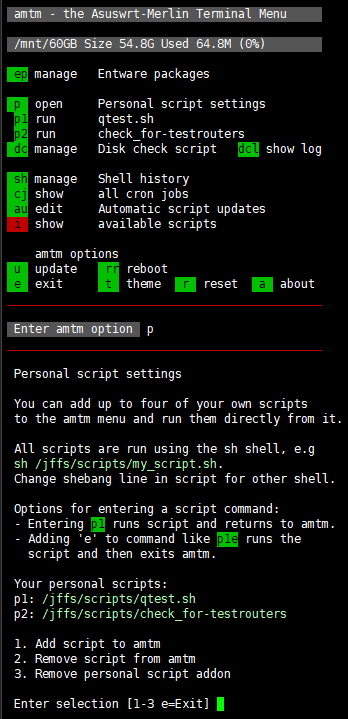
  • Added option p to add up to four of your own personal scripts to the amtm menu to run it directly from it.
  • Again, this update is only available for the firmware built in version of amtm.
241c4aa43292.png
 
Changed wording from 'third-party' '3rd-party' throughout amtm.
Thank you for the update ! Love the personal scripts option.

Quick question in case it was not actually missed (and apologies for the near-illegible red text), but is this third-party instance (vs 3rd-party) one that belongs to the old script pre-update or just one that slipped through the net?

IMG_3339.jpeg
 
Quick question in case it was not actually missed (and apologies for the near-illegible red text), but is this third-party instance (vs 3rd-party) one that belongs to the old script pre-update or just one that slipped through the net?
That was added by the previous version of amtm. It will use the new term with the current version next time you check for updates. Good eye!
 
pl is not an option
 
Last edited:
I updated amtm on the RT-BE92U. But can't get it to work. Here is the output of the au settings:
1775483176607.png


Here is the setting inside Diversion:
1775483265770.png


It works on my other network with the BE96U.
 
I updated amtm on the RT-BE92U. But can't get it to work. Here is the output of the au settings:
View attachment 71106

Here is the setting inside Diversion:
View attachment 71107

It works on my other network with the BE96U.

Try to select option 11 in your screenshot. To enable update by Amtm.

Then go back to AMTM and use the "au" menu again.
 
Many thanks @thelonelycoder for the personal scripts support! I have a few that are in different directories and now I can call them up in amtm.
 

Latest threads

Support SNBForums w/ Amazon

If you'd like to support SNBForums, just use this link and buy anything on Amazon. Thanks!

Sign Up For SNBForums Daily Digest

Get an update of what's new every day delivered to your mailbox. Sign up here!

Staff online

Back
Top