What's new

AMTM formatting and swap file

keef

Senior Member
Hello. I have an AX88U Pro with current firmware. AMTM will format my USB 3.0 hd fine. When I reboot then try to create a swap file it says 'no compatible drive found'. I can however reformat and the drive is found ok. I tried unplugging the drive and plugging it back in with no luck.

thanks
 
Look at the syslog and see what it says about USB detection.
 
Great idea thanks. I formatted it for the 73rd time and it allowed my to install Entware and it is trudging on through the swap file creation. I have no idea why but I will take the win.
 
Look at the syslog and see what it says about USB detection.
The swap file created fine and unbound installed nicely. Now just a little setback. From a previous install Skynet shows up on the AMTM main screen. If I select it I get 'USB install directory not ready — sleeping 10s (1/10)'. I figure I have to delete Skynet somewhere however I cannot find where.
 
I installed Unbound and the cache it rate never changes and when it starts up I get a warning that the NTP server is not enabled. I cannot find it in either the current AX88UPro firmware or Beta. It is not in Advanced System Content > Basic Config as I have seen with other routers.

thanks
 
I get a warning that the NTP server is not enabled. I cannot find it in either the current AX88UPro firmware or Beta.
See the 3006.102.7_1 test build Merlin put up yesterday afternoon. It supposedly has a fix for the missing NTP field in the GUI.
I have uploaded 3006.102.7_1 test builds for all models:


For other models this contains a few fixes (like the Wifi 6 devices missing NTPD settings), updates to curl and wget (from the 102_39848 GPL used by the RT-BE92U), the missing Cake settings for the GT-BE19000AI.

I'm going to leave this up for a few days, eventually 3006.102.7_2 will become the final release.

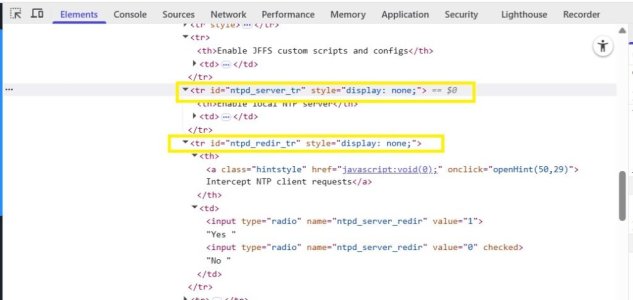
Otherwise, on the Administration -> System -> Basic Config page; use the browser console to temporary delete the code "display; none" for the TR Id's indicated in the following screen capture so the hidden NTP fields shows.
inspect.jpg
 
Last edited:
Installation of the browser console failed. I thought of trying NTP Merlin and while Unbound sees it, it changes nothing. I will have to wait for hopefully the next firmware release.

thanks
 
Installation of the browser console failed.
Installation of the browser console? What browser were you using? For example with the Brave browser you hit the F12 key while on the GUI System page to bring up the console, there is nothing to install. Or try right clicking on the Enable JFFS custom scripts and configs area and selecting Inspect. Then in the console's Elements section, look for the following two elements.
Code:
<tr id="ntpd_server_tr" style="display: none;">
<tr id="ntpd_redir_tr" style="display: none;">
Double click on the "display: none" for each and it should allow you to then delete the value which unhides the two hidden fields.
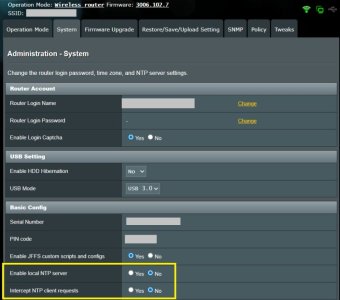
Example with "display: none" deleted:
System.jpg
Other browsers like Firefox should be similar (just tested and it works in Firefox Inspect element as well).
 
I went down the incorrect road of Idefix Terminal. Ok, moving on from that error, I do not see what you are seeing "ntpd_server_tr". I do not get a whole lot but I get three paragraphs starting with [DOM] Password field is. I will keep poking around after lunch.

thanks for the help

 
I went down the incorrect road of Idefix Terminal. Ok, moving on from that error, I do not see what you are seeing "ntpd_server_tr". I do not get a whole lot but I get three paragraphs starting with [DOM] Password field is. I will keep poking around after lunch.
Another option, which you use at your own risk, is to enable both Enable local NTP server and Intercept NTP client requests using the nvram set command when connected to the router using SSH. Something like the following should enable both settings.
Code:
nvram set ntpd_enable=1
nvram set ntpd_server_redir=1
nvram commit
This suggestion comes from this post in the Asus-Merlin 3006.102.7 release thread. See that post for additional nvram values to set if the above code snippet doesn't work.
One might have to restart/reboot their router if the NTP service doesn't start immediately after an nvram commit.
No idea if other nvram values are changed with one or both settings are enabled (or disabled). If one needs to disable either or both settings via nvram, change the 1 to a 0 and commit the changes.
 
See the 3006.102.7_1 test build Merlin put up yesterday afternoon. It supposedly has a fix for the missing NTP field in the GUI.


Otherwise, on the Administration -> System -> Basic Config page; use the browser console to temporary delete the code "display; none" for the TR Id's indicated in the following screen capture so the hidden NTP fields shows.
View attachment 70802
I grabbed the test build and Whoo-hoo the NTP option is right where it should be.
 
What does extended testing on the external drive show? Having issues early on in the mounting process implies media issues. Run a full overnight test. It appears that issues persist with the newer thread of: ubound cache not ticking up - it would seem that there are "ghost" issues cause by media defects rather than a firmware or router hardware issue. Please correct me if I'm wrong.

Exclude storage media as an issue with an extended sector-by-sector test. Is the drive ext4 formatted?

Good luck. Cheers.
 
I had two SSD'd fail an overnight check. Tossed them aside and with a 340g USB HD (other then unbound stats) everything is cooperating.
 
I had two SSD'd fail an overnight check. Tossed them aside and with a 340g USB HD (other then unbound stats) everything is cooperating.
Are these the ones responsible for the initial formatting fail? If so, mark post as solved and add explanatory text in post.
 
Solved: defective SSD's were the culprit. Format would fail, then create swap may or may not fail. All seems good now.
 

Latest threads

Support SNBForums w/ Amazon

If you'd like to support SNBForums, just use this link and buy anything on Amazon. Thanks!

Sign Up For SNBForums Daily Digest

Get an update of what's new every day delivered to your mailbox. Sign up here!
Back
Top