What's new
  • SNBForums Code of Conduct

    SNBForums is a community for everyone, no matter what their level of experience.

    Please be tolerant and patient of others, especially newcomers. We are all here to share and learn!

    The rules are simple: Be patient, be nice, be helpful or be gone!

Asus AX86u block DoT traffic?

josh3003

Regular Contributor
Hi just wanting to know if I have prevent client auto DOH enabled is there another option or command to prevent devices from accessing DoT as I have DNS Director enabled.
 
if I have prevent client auto DOH enabled

This one is an attempt only, mostly Firefox browser. It won't stop client doing DoH. Blocking known DoH servers does better job. You need something like Pi-hole with stock Asuswrt. More on-router options with Asuswrt-Merlin (Diversion, AdGuard Home).

prevent devices from accessing DoT

You can block port 853 in firewall, if you want to.
 
DNS Director effects both DNS (53) and DoT (853).
I have been using DNS Diretor for a few years now and it has been working great. I use Pihole as recursive server with adlists to block doh. Recently I got an Android phone and noticed when using Android Private DNS it can bypass the router when setting the phone to use any other dns like 8.8.8.8.

Is there a way to prevent Android phones from bypassing the router?
Thanks.
 
I have been using DNS Diretor for a few years now and it has been working great. I use Pihole as recursive server with adlists to block doh. Recently I got an Android phone and noticed when using Android Private DNS it can bypass the router when setting the phone to use any other dns like 8.8.8.8.

Is there a way to prevent Android phones from bypassing the router?
Thanks.
Post a readable screen shot of your DNS Director configuration. You may not have DNS Director configured properly.

An example of how to configure an Asus router to use Pi-Hole, including DNS Director configuration, under 3006.102.x Asus-Merlin firmware is explained here:

Example DNS Director configuration with two Pi-Hole (Raspberry Pi) devices:

dns-director-jpg.69256
 
That's how I've had it and it's always been fine. I used to have iPhones, and using iPhones I could never bypass the router when setting a different dns server on the phone. But now that I recently got Android I noticed I can.

1765742046018.png
 
That's how I've had it and it's always been fine. I used to have iPhones, and using iPhones I could never bypass the router when setting a different dns server on the phone. But now that I recently got Android I noticed I can.
To confirm. If you are using an external device to hold the Pi-Hole is that device in the DNS Director's Client List section and set to No Redirection?
Do you have the option Advertise router's IP in addition to user-specified DNS set to No on the LAN > DHCP Server page?
If external Pi-Hole device is that device's IP address listed in the LAN > DHCP Sever DNS field(s)?
Do you have IPv6 enabled on the router or Android phone? Maybe the phone is using IPv6 requests bypassing Pi-Hole. If so may need to check the Pi-Hole to see how it's handling IPv6 in your setup.
Do you have any addon scripts installed?
 
But now that I recently got Android I noticed I can.
Look at the System Log -> Network Connections tab. Do you have any connections from the phone to destination port 853?

How do your rules look?
Code:
iptables -nvL DNSFILTER_DOT
 
To confirm. If you are using an external device to hold the Pi-Hole is that device in the DNS Director's Client List section and set to No Redirection?
Do you have the option Advertise router's IP in addition to user-specified DNS set to No on the LAN > DHCP Server page?
If external Pi-Hole device is that device's IP address listed in the LAN > DHCP Sever DNS field(s)?
Do you have IPv6 enabled on the router or Android phone? Maybe the phone is using IPv6 requests bypassing Pi-Hole. If so may need to check the Pi-Hole to see how it's handling IPv6 in your setup.
Do you have any addon scripts installed?
This is the way I've had it now for a very long time.
No other devices on the network are able to bypass the router when using their own dns server, only the Android phones using Private DNS.

1765749376885.png

1765749395738.png

1765749436431.png
 
Look at the System Log -> Network Connections tab. Do you have any connections from the phone to destination port 853?

How do your rules look?
Code:
iptables -nvL DNSFILTER_DOT
I don't see any connections using port 853. I did notice something peculiar. It seems the Android is only able to bypass the router when using 8.8.8.8. If I use any other dns server, it doesn't bypass the router. I tried 1.1.1.1, 208.67.222.222 and it will not bypass. As soon as I use 8.8.8.8 it does.
 
I don't see any connections using port 853. I did notice something peculiar. It seems the Android is only able to bypass the router when using 8.8.8.8. If I use any other dns server, it doesn't bypass the router. I tried 1.1.1.1, 208.67.222.222 and it will not bypass. As soon as I use 8.8.8.8 it does.
Are there any connections from the phone's IP to 8.8.8.8? What's your test that proves it's bypassing?
 
Are there any connections from the phone's IP to 8.8.8.8? What's your test that proves it's bypassing?
I use Pihole to block adult sites. So when I change the Android's dns to 8.8.8.8 I can visit sex.com...with any other dns server in there that site is blocked.
 
I don't see any connections using port 853. I did notice something peculiar. It seems the Android is only able to bypass the router when using 8.8.8.8. If I use any other dns server, it doesn't bypass the router. I tried 1.1.1.1, 208.67.222.222 and it will not bypass. As soon as I use 8.8.8.8 it does.
What are the WAN DNS server set to out of curiosity? Google's DNS servers or something else?
What is the Pi-Hole's DNS servers set to?

Try blocking, if you are not already doing so, Google's DNS servers (8.8.8.8 and 8.8.4.4) on the Router's LAN > Route page and see if that helps. Example (use your router's IP as the Gateway address):

Route.jpg
 
What are the WAN DNS server set to out of curiosity? Google's DNS servers or something else?
What is the Pi-Hole's DNS servers set to?

Try blocking, if you are not already doing so, Google's DNS servers (8.8.8.8 and 8.8.4.4) on the Router's LAN > Route page and see if that helps. Example (use your router's IP as the Gateway address):

View attachment 69552
This seems to have worked! - Thank you!!
I use Pihole in recursive mode with Unbound.

Why was google dns the only one that was able to get through?
 
Last edited:
I use Pihole in recursive mode with Unbound.
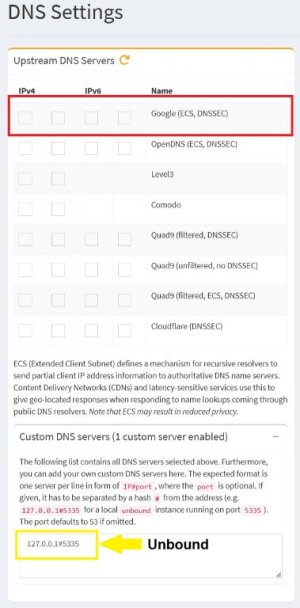
Right, but how is your Pi-Hole DNS Settings configured? Do you by chance have Google selected in addition to having Unbound in the Custom DNS Servers field?

PI-Hole DNS.jpg
 
I did find a subtle bug in DNS Director going back to 2022 where DoT blocking rules are no longer generated for IPv6. It obviously hasn’t been a huge issue for anyone since it was never reported since 386.7. Not related to this issue since IPv6 isn’t enabled, but I discovered it while testing the DoT behavior after reading this thread.
To verify, does anyone with IPv6 and DNS Director enabled see any rules running this command?
Code:
# ip6tables -nvL DNSFILTER_DOT
Chain DNSFILTER_DOT (0 references)
 pkts bytes target     prot opt in     out     source               destination
 
To verify, does anyone with IPv6 and DNS Director enabled see any rules running this command?
I fit the requirement and I have the basic requirements I believe. IPv4 and IPv6 servers defined under WAN>DoT with global redirection set to "Router", as I always have done. No results from your one liner.
Hmmmmmm!

*edit*
Just tested a custom rule for one connected device with both IPv4 and IPv6 DNS - no result.
 
Last edited:

Latest threads

Support SNBForums w/ Amazon

If you'd like to support SNBForums, just use this link and buy anything on Amazon. Thanks!

Sign Up For SNBForums Daily Digest

Get an update of what's new every day delivered to your mailbox. Sign up here!
Back
Top