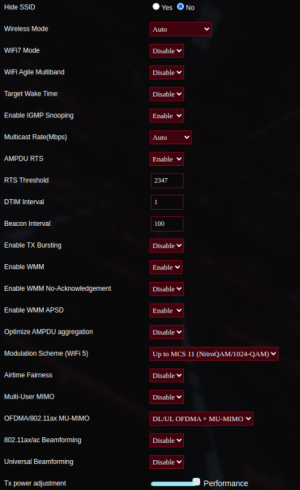
I’m new here; not new to asus routers since early 90’s… i install asus (my choice) in smart homes since 2006. Installed two BE 98’s yesterday for first time yesterday into a home i i stalled asus in back in 2008. Aimesh was tunning on ac5300 as main rtr and there are 4 assorted waps with wired backhaul.
The two BE 98’s replaced the main rtr (ac5300) and an ac5300 wap - again all aimesh running for years. Other waps includeTUF5400, Ax89U, etc.
After the swap out, I had 2.4g everywhere but could not get 5g to allow users to log in - always challenge the password. But passwords were fine. <i had team of three plus customer (3 people) test from different phone tupes standing close to different aimesh waps.> Still all no good on 5G band.
What i noticed when logged into main router was the WIRELESS tab was unpopulated - i.e., the SSID and password fields were not seen. Contacted ASUS a screen shot and they were surprised.
For business reasons i decided to leave the customer’s home with 2.4G operational only so i return today to troubleshoot this problem. To do this i went into the professional sub-tab to turn off the 5G radio - i had already turned off the wifi6 radios.
AS SOON AS I DISABLED THE 5G RADIO IN THE MAIN ASUS ROUTER, THE INVALID PASSWORD PROBLEM DISSAPPEARED IN ALL THE AIMESH WAPS REFARDLESS OF MODEL!!! I was able to verifiy intra-home roaming happening across ALL FIVE aimesh waps.
Given the main router is in the basement in utility areas it didn’t matter that only 2.4G was the only operating wifi band.
For those with experiencing the incorrect password problem, i simply ask you try turning off the 5G and 6 G radios in the main router and see if this permits normal aimesh wap operation everywhere else.
This approach to routing and wifiwaps is not new. Back in the 80’s and 90’s we use to install WIRED routers with capacity to erform firewall functions, radius, dhcp, filtering and forwarding functions. The wifi was handled by seperate WAP devices not burdened with any of the normal router functionality. Post 1990, integrated wireless routers started appearing trying to be the ‘everything’ box and doing quite poorly at it, thus the merlin and shibby tomato code developments.
I know it cost more to dedicate a main router without wireless operation and prefer not to do so…. But as a smart home provider i must solve challenges at the end of the day and cannot wait for asus or any other s/w developer to come up with a fix!
For sake of FIY:
- fastest way to add aimesh is factory resetting a router and attaching a hardwire backhaul from main lan to mesh node wan port. It’s discovered in 10 seconds and cometes aimesh join on less than 90 seconds. Then move it to where you need.
- if the node were already on an iamesh network, REMOVE IT FIRST from the original network, then without any alteration have the new aimesh main router search for it.
- best to add aimesh node o e at a time, name it, move it to final location, then continue with other aimesh nodes.
- i tried bth firmware bersions available for be98. Neither veraion operated as it should and required turning off the radio to enable the aimesh node to behave.
- as soon as wifi7 radio was turned off, the aimesh nodes allowed android phones supporting wifi 7 to join.
- 10G and multi-gig wired backhaul is sweet but requires a wired i frastructure that support 10G to be in place.
Hope this helps…marcel