Uuugh
New Around Here
Hello,
I have an Asus RT-AC3200 on configured to run OpenVPN. I am trying to configure it to run on a subnet but get a conflict message "Conflict with the router's DHCP IP pool:192.168.0.100 ~ 192.168.0.126".
My network is on the 192.168.0.1 subnet.
-I have manually assigned IP address from 192.168.0.2 - 99
-The DHCP assigns IP addresses from 192.168.0.100 - 126
By default, OpenVPN hands out IP addresses on the 10.8.0.1 subnet.
I need the VPN subnet to to be 192.168.0.x (some number above the DHCP range) in order for a number of my systems to be accessible to me over the VPN (cameras in particular).
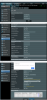
I've attached a picture that best displays my setup.
IP Address: 192.168.0.1
Subnet Mask: 255.255.255.128
IP Pool Starting Address: 192.168.0.100
IP Pool Ending Address: 192.168.0.126
VPN Subnet/Netmask: 192.168.0.225 255.255.255.224 (yes, I could have used .192 but I was adding a 'buffer' while troubleshooting)
Does anyone see the conflict?
Thanks!
Rich
image

I have an Asus RT-AC3200 on configured to run OpenVPN. I am trying to configure it to run on a subnet but get a conflict message "Conflict with the router's DHCP IP pool:192.168.0.100 ~ 192.168.0.126".
My network is on the 192.168.0.1 subnet.
-I have manually assigned IP address from 192.168.0.2 - 99
-The DHCP assigns IP addresses from 192.168.0.100 - 126
By default, OpenVPN hands out IP addresses on the 10.8.0.1 subnet.
I need the VPN subnet to to be 192.168.0.x (some number above the DHCP range) in order for a number of my systems to be accessible to me over the VPN (cameras in particular).
I've attached a picture that best displays my setup.
IP Address: 192.168.0.1
Subnet Mask: 255.255.255.128
IP Pool Starting Address: 192.168.0.100
IP Pool Ending Address: 192.168.0.126
VPN Subnet/Netmask: 192.168.0.225 255.255.255.224 (yes, I could have used .192 but I was adding a 'buffer' while troubleshooting)
Does anyone see the conflict?
Thanks!
Rich
image