What's new

ASUS ZenWiFi BQ16 Firmware version 3.0.0.6.102_39254 (2026/03/16)

Vogemic

New Around Here
Improvements:
Optimized Wi-Fi roaming stability for devices supporting 802.11k but not allowing 11v.
Improved Wi-Fi roaming compatibility and stability for iOS 26 devices.
Refined accessibility-related UI and interaction details.
Improved overall remote connection stability.
Improved system behavior when using System Diagnostic on feedback page.

Bug Fixes:
Fixed incorrect connection status display for certain Wi-Fi devices.
Fixed a system issue that caused AiCloud features to appear on unsupported models.

Security Enhancements:
Strengthened input sanitization mechanism
Enhanced system API validation for stronger protection consistency.
Strengthened command handling and system resource access controls.
Improved system logging and security event recording mechanisms.

Download
 
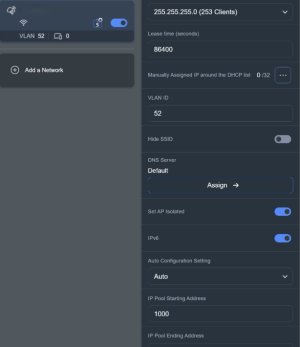
IPV6 has been enabled for the guest network on the Pro, not sure about the non Pro.
 

Attachments

  • Screenshot 2026-03-16 162716.jpg
    Screenshot 2026-03-16 162716.jpg
    29.1 KB · Views: 46
Same available for BQ16 Pro
For completeness, the Pro link.

 
Dear Asus, do actually perform regression testing on your firmware releases?

24hr experience with this release has not been good.

HomeKit devices have had major instability - the dreaded 'no response'.
Meross power sockets unable to join network after router reboot, necessitating power on and off.
IP cameras taking forever to come online after a router reboot.
Etc. etc. etc.

Rolling back to 37026 as I type.
 
Dear Asus, do actually perform regression testing on your firmware releases?

24hr experience with this release has not been good.

HomeKit devices have had major instability - the dreaded 'no response'.
Meross power sockets unable to join network after router reboot, necessitating power on and off.
IP cameras taking forever to come online after a router reboot.
Etc. etc. etc.

Rolling back to 37026 as I type.
I reset mine to defaults after updating, not seeing any issues. With the various security updates in the new firmware, resetting to defaults is usually strongly recommended, downgrading can cause issues.
 
I reset mine to defaults after updating, not seeing any issues. With the various security updates in the new firmware, resetting to defaults is usually strongly recommended, downgrading can cause issues.
This is a consumer grade product. Resetting to factory defaults after upgrading / downgrading firmware should not be needed (and makes a mockery of having a toggle switch for Auto Firmware Upgrade!)
 
@Vogemic, please include the Release tag in your initial post since you are posting about a new Release firmware.
 
I reset mine to defaults after updating, not seeing any issues. With the various security updates in the new firmware, resetting to defaults is usually strongly recommended, downgrading can cause issues.
RMerlin and others have stated that with each firmware update, especially those contain security updates, there are changes to the settings stored in NVRAM. settings from older firmware versions can conflict with the new defaults, thus causing functionality problems that can only be fixed by resetting to defaults.

It doesn't matter that the router is aimed at consumers, sometimes resetting to defaults is the ONLY way to fix issues.

And yes resetting to defaults after a firmware update has been recommended for years, even with consumer devices. Asus has even required it after firmware updates with lots of security patches.
 
Last edited:
I have encountered many issues with this new firmware. I am using this router as an aimesh node with the Asus GT98Pro. I reset to factory defaults but the connections after the reset are not usable. The BQ16 Pro doesn't reconnect as before when I was using the 3006.102.37026 firmware. My blink cameras and even the 5G bands won't connect as before. So I believe there is something Not compatable with firmware 3006.102.39254. I tried resetting it and trying a second time with no changes. The moment I switch back to 3006.102.37026 the router works fine afterwards. So it may work fine by itself But not in the aimesh mode with the GT98 pro router. I presume that it must just be my setup with working with 2 strong routers in MLO modes. Wifi 7 laptops and phones also worked fine after switching back the firmware. Oh well....guess I'll have to wait a few months until another firmware update comes out.
 
Anyone seen this error before since updating?

Mar 30 19:45:11 WATCHDOG: [NOTI_NEW_FW_AVAIL][noti_new_fw_available:(8896)]fw_version report is not exist.
Mar 30 19:45:11 WATCHDOG: [NOTI_NEW_FW_AVAIL][noti_new_fw_available:(8914)]final_fw_ver_obj = [null]
Mar 30 19:45:11 WATCHDOG: [NOTI_NEW_FW_AVAIL][noti_new_fw_available:(9030)]No need to send new fw event
Mar 30 19:45:41 WATCHDOG: [NOTI_NEW_FW_AVAIL][noti_new_fw_available:(8896)]fw_version report is not exist.
Mar 30 19:45:41 WATCHDOG: [NOTI_NEW_FW_AVAIL][noti_new_fw_available:(8914)]final_fw_ver_obj = [null]
Mar 30 19:45:41 WATCHDOG: [NOTI_NEW_FW_AVAIL][noti_new_fw_available:(9030)]No need to send new fw event
 

Support SNBForums w/ Amazon

If you'd like to support SNBForums, just use this link and buy anything on Amazon. Thanks!

Sign Up For SNBForums Daily Digest

Get an update of what's new every day delivered to your mailbox. Sign up here!

Members online

Back
Top