What's new

AX88U Pro unable to connect to any guest networks

diyguy

Regular Contributor
Hi All-

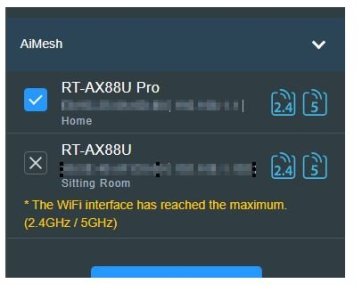
I just setup an AX88U Pro and am struggling with guest networks. I cannot connect to any guest networks, whether they broadcast or not even with the QR code scanning. I did recently add a 3004.xxx AX88u as an AImesh node, but I am not attaching these guest networks to that node, I only need my guest network on my main "PRO" router. No matter what I do I can't connect to the guest networks. Is this related to the incompatibility of 3006/3004 in the same AIMesh with guest networks, even though I dont need to attach those networks to the older 3004 device? I have tried single bands , dual bands etc. , rebooting etc, cannot connect to them at all.
 
What firmware is the RT-AX88U Pro running? If using 3006.x firmware, what are your Guest Network Pro profile configuration(s)?

When you first setup the RT-AX88U Pro, before you connected any AiMesh nodes, did you setup Guest Network Pro profiles and if so, could you connect clients to Guest Network Pro profiles?

Do the Guest Network Pro profile wireless SSID's even show up on the WiFI client?
What specific WiFi clients are having the problem?
If the Guest Network Pro profile is configured for WPA3, try reducing it to WPA2 instead.
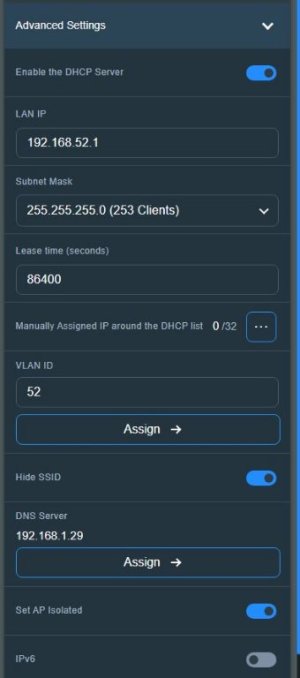
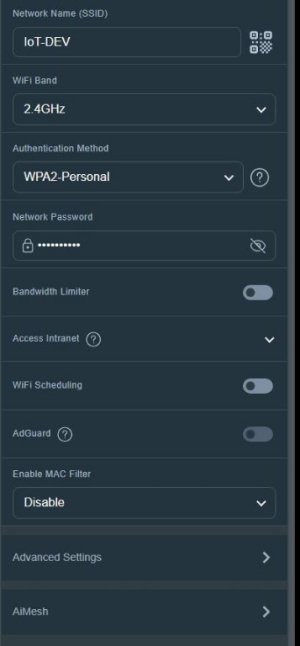
Screen shots of your settings (with sensitive information redacted) may be helpful for others in diagnosing your issue(s).

As a last resort, perform a hard factory reset on the RT-AX88U Pro followed by a basic manual configuration. Do not import any saved router.cfg file, do not connect an AiMesh Node. Do a basic setup then enable Guest Network Pro profile(s) and see if WiFi clients can connect to those Guest Network Pro profile(s).
 
Last edited:
What firmware is the RT-AX88U Pro running? If using 3006.x firmware, what are your Guest Network Pro profile configuration(s)?

When you first setup the RT-AX88U Pro, before you connected any AiMesh nodes, did you setup Guest Network Pro profiles and if so, could you connect clients to Guest Network Pro profiles?

Do the Guest Network Pro profile wireless SSID's even show up on the WiFI client?
What specific WiFi clients are having the problem?
If the Guest Network Pro profile is configured for WPA3, try reducing it to WPA2 instead.
Screen shots of your settings (with sensitive information redacted) may be helpful for others in diagnosing your issue(s).

As a last resort, perform a hard factory reset on the RT-AX88U Pro followed by a basic manual configuration. Do not import any saved router.cfg file, do not connect an AiMesh Node. Do a basic setup then enable Guest Network Pro profile(s) and see if WiFi clients can connect to those Guest Network Pro profile(s).
Have you on the device you are trying to connect to a guest network assigned a static IP using the firmware on the device? If so, you need to let the router assign the IP. If you have assigned a sticky IP using the router to a particular device you should be able to connect to both the primary and guest network. Also check that you haven't set a wireless MAC filter or enabled band steering if you don't have the same SSID on the guest network the same on both bands.
 
What firmware is the RT-AX88U Pro running? If using 3006.x firmware, what are your Guest Network Pro profile configuration(s)?

When you first setup the RT-AX88U Pro, before you connected any AiMesh nodes, did you setup Guest Network Pro profiles and if so, could you connect clients to Guest Network Pro profiles?

As a last resort, perform a hard factory reset on the RT-AX88U Pro followed by a basic manual configuration. Do not import any saved router.cfg file, do not connect an AiMesh Node. Do a basic setup then enable Guest Network Pro profile(s) and see if WiFi clients can connect to those Guest Network Pro profile(s).
3006.102.7 is the firmware on the Pro.

I had guest profiles before but they were on the same subnet , they seemed to work fine
 

Attachments

  • guest-3.JPG
    guest-3.JPG
    16.9 KB · Views: 2
  • guest-2.JPG
    guest-2.JPG
    29 KB · Views: 2
  • guest-1.JPG
    guest-1.JPG
    25.7 KB · Views: 2
Have you on the device you are trying to connect to a guest network assigned a static IP using the firmware on the device? If so, you need to let the router assign the IP. If you have assigned a sticky IP using the router to a particular device you should be able to connect to both the primary and guest network. Also check that you haven't set a wireless MAC filter or enabled band steering if you don't have the same SSID on the guest network the same on both bands.
confirmed that they are not set to static IP and mac filtering is not enabled. The fact that it won't broadcast when I unhide the network is puzzling.
 
confirmed that they are not set to static IP and mac filtering is not enabled. The fact that it won't broadcast when I unhide the network is puzzling.
Factory reset, reconfigure manually and do not hide the guest WIFI SSID! Also use a different subnet than the LAN subnet.
 

Latest threads

Support SNBForums w/ Amazon

If you'd like to support SNBForums, just use this link and buy anything on Amazon. Thanks!

Sign Up For SNBForums Daily Digest

Get an update of what's new every day delivered to your mailbox. Sign up here!
Back
Top