What's new

BE86U worse wifi latency vs old ax86s

askan7

Regular Contributor
Hey,
I previously had an ax86s as a solo router but was looking to improve coverage soo I ended up getting a BE86U. I set up the be86u as main router and the old ax86s as an aimesh node.

The setup has been working stable without any issues, however I noticed wifi latency on the BE86U was a good 1-2ms higher just by running speed tests on multiples devices.

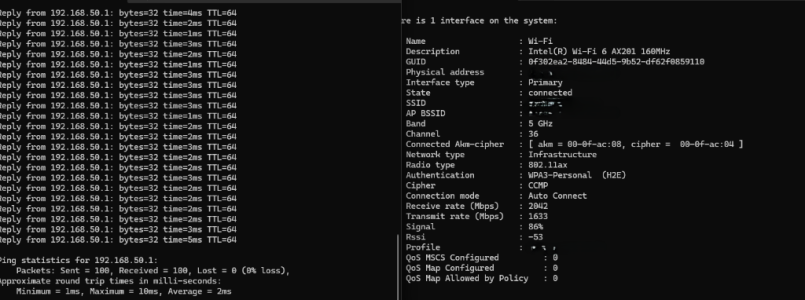
Soo I decided to run pings directly to the router while on 5ghz wifi (ax201 client)
Average ~2ms max 10ms after 100 pings.
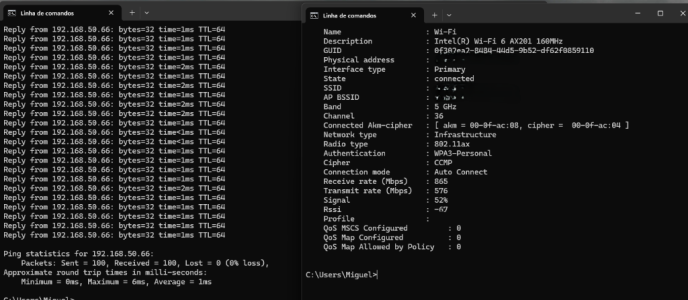
I then forced the client to the node (ax86s 192.168.50.66) and did the same test
Average 1ms, max 6ms.

I have a pretty simple network setup with no vlans and a single ssid.
I've tried disabling wifi7 and messing with professional settings but no change, BE86U noticeably higher latency. Same goes for phones and a wifi7 laptop I have. Speeds are about the same between the two considering distance, etc

Edit:
Disabling MU-MIMO is the only thing that seems to help.
TX power is also very low when set to CH36. wifiman reports 14dbm, while ax86s is at 18dbm.
2.4ghz ~14db, 5ghz ch100 ~23dbm both models. EU models (E0/DE)

How bad would it be to change Region to US to get about the same TX power on both models on ch36? I'd lower 2.4ghz tx power to meet EU regulation, last thing i'd want is to have 2.4ghz blasting at 30dbm...
Ideal solution would be for asus to fix their firmware. Doesn't make sense be86u having lower TX power when set to ch36-64, especially when both ax86s and be86u are EU models.
It would also be nice to be able to manually adjust TX/channel for each node for roaming purposes. Like lower 2.4ghz to avoid overlap/interference and 5ghz bit higher soo it's always preferred.
 

Attachments
  • ax86s.png
    ax86s.png
    183.7 KB · Views: 63
  • be86u.png
    be86u.png
    154.4 KB · Views: 63
Last edited:
Hey,
I previously had an ax86s as a solo router but was looking to improve coverage soo I ended up getting a BE86U. I set up the be86u as main router and the old ax86s as an aimesh node.

The setup has been working stable without any issues, however I noticed wifi latency on the BE86U was a good 1-2ms higher just by running speed tests on multiples devices.

Soo I decided to run pings directly to the router while on 5ghz wifi (ax201 client)
Average ~2ms max 10ms after 100 pings.
I then forced the client to the node (ax86s 192.168.50.66) and did the same test
Average 1ms, max 6ms.

I have a pretty simple network setup with no vlans and a single ssid.
I've tried disabling wifi7 and messing with professional settings but no change, BE86U noticably higher latency. Same goes for phones and a wifi7 laptop I have. Speeds are about the same between the two considering distance, etc

Any ideas on whWhat firmware and version are you running? 3.0.0.6.102_39260 is the latest Asus version which has some fixes.
What firmware and version are you running?
 
What firmware and version are you running?

I was on latest asus. Now i'm on latest merlin.
Disabling mu mimo helped a lot, seems more normal now, still higher/less stable compared to ax86s


1775158827086.png


Also, tx power is different when set to ch36 despite both having same region. (wifiman reports 14dbm for be86u and 18dbm for ax86s)
1775158900693.png

1775158911051.png
 
Last edited:
@askan7 I've noticed the same, see my post.


I contacted ASUS Support and they sent me a beta firmware that solved the mesh problem and it's also solved in latest oficial firmware.

About wifi latency they say there's no problem.
 
How bad would it be to change Region to US to get about the same TX power on both models on ch36?

This is illegal and the region is hardcoded on your devices in few places.
 
@askan7 I've noticed the same, see my post.


I contacted ASUS Support and they sent me a beta firmware that solved the mesh problem and it's also solved in latest oficial firmware.

About wifi latency they say there's no problem.

I mean, WiFi is known to be higher latency for obvious reasons.
But normal? I don't think soo as the model this router replaces is lower latency.

They could also say it's normal for certain pages on the web GUI taking longer to load. But again, older model on older firmware doesn't ha e that issue, despite the weaker CPU.
It's just poor firmware
 
This is illegal and the region is hardcoded on your devices in few places.

That's fair. However neither of my models are hardcoded.
EU has 20dbm limit for 2.4ghz and 23dbm for 5ghz 36-64.
It doesn't make sense for ax86s having 17-18dbm pre gain while BE86U is only at 14dbm.
When i set them to ch100 they're both at 22-23dbm. And 2.4ghz again 1dbm from each other, which means ch 36-64 tx power is wrong on BE86U
I can only use 160mhz width on 36-64. Ch100 160mhz doesn't work because of DFS on my area.
I'd like to use the full 23dbm legally allowed. I'm not asking for 30dbm as that is too much even for 5ghz.
 
AiMesh is known for lack of network tuning options. Whatever is Fair, Good, Performance in UI doesn't correspond to specific dBm values. If you want this level of control - wrong hardware. If you know a way to change above factory preset values - not allowed to discuss here according to forum rules. Good luck.
 
AiMesh is known for lack of network tuning options. Whatever is Fair, Good, Performance in UI doesn't correspond to specific dBm values. If you want this level of control - wrong hardware. If you know a way to change above factory preset values - not allowed to discuss here according to forum rules. Good luck.

All I want is for Asus to fix their firmware. TX power when set to ch36-64 EU be86u is below what it should be.
AiMesh could have more controls sure. Like u can't even check RSSI for clients connected to nodes!
Interface shouldn't be slower than previous models. It also shouldn't require soo much time reseting each time u change a setting. Wifi takes longer to come online compared to older models aswell.

Latency shouldn't be higher than previous models, and I bet there's more.
Lack of optimization / care from Asus is not acceptable.

That's like the devs saying Borderlands 4 is optimized when it only runs at 60fps on top end hardware...

Edit: What would u recommend that has good management options? Ubiquiti? That's a big investment, and I can't justify that for my use case. I was happy with ax86s and was only looking for a bit more coverage. Two ax86u/s would have been enough for me to be happy, ax86u pro would have been ideal for more updates.
But since they weren't available anymore I had to get be86u. I wouldn't mind if it was at the same level of ax86u, but it's WORSE! Which is unacceptable
 
Last edited:
I mean, WiFi is known to be higher latency for obvious reasons.
But normal? I don't think soo as the model this router replaces is lower latency.

They could also say it's normal for certain pages on the web GUI taking longer to load. But again, older model on older firmware doesn't ha e that issue, despite the weaker CPU.
It's just poor firmware

I replaced a TUF AX6000 for the BE86U and I noticed the latency increase. I argued ASUS with that and that I guet less wifi latency connected to a powerline AP than with BE86U, with both connected to the same ISP router.
 
I replaced a TUF AX6000 for the BE86U and I noticed the latency increase. I argued ASUS with that and that I guet less wifi latency connected to a powerline AP than with BE86U, with both connected to the same ISP router.

ye... I think the issue is the bloated firmware. Everything just feels slugish and slow and I bet that affects how fast the router responds to network requests.
Hell, my ax86s with 3.0.0.4 felt slow, and the same restart everything to change 1 setting, but this takes it to another level of sluggish

I remember an onld asus n56u that I had. Padavan firmware was amazing, clean, snappy and fast. While having a lot more features than asus at the time.
Asus firmware just feels dated, bloated and unoptimized by today's standards
 
All I want is for Asus to fix their firmware. TX power when set to ch36-64 EU be86u is below what it should be.

Up to 20dBm on 2.4GHz band means no device has to exceed this power. It doesn't mean all devices have to be at 20dBm and when they are not there is a firmware issue. Some manufacturers (like TP-Link) list the power in specifications as CE ≤20dBm/ FCC ≤30dBm, others (like ASUS) don't list anything.
 
Up to 20dBm on 2.4GHz band means no device has to exceed this power. It doesn't mean all devices have to be at 20dBm and when they are not there is a firmware issue. Some manufacturers (like TP-Link) list the power in specifications as CE ≤20dBm/ FCC ≤30dBm, others (like ASUS) don't list anything.

Ofc. But the user should have the option to max it out. At the very least we should have access to TX power levels in GUI instead of this performance , fair, etc
2.4ghz doesn't need much power. These asus routers set 25dbm(before gain) or smth crazy for US. Which is WAY too high. I'm fine with current 13-14dbm for 2.4ghz with EU models. Iit's ideal, any more it reaches the neighbors and increases noise, for a band where download speeds are not the priority.
However 14dbm for 5Ghz is on the low side...

For anyone with US models I recommend to set 2.4ghz TX power to powersave, which sets it to 13-14dbm (pre gain)

BE86U EU/DE
1775242415630.png


Very close to ax86s, whoever it doesn't use close to 16.25dbm. It uses 14dbm instead. For ch100 it uses 23dbm like it should, same thing for 2.4ghz. Because asus firmware is buggy as hell. AX86S at least works properly here.
 
Last edited:
For anyone with US models I recommend to set 2.4ghz TX power to powersave

No, Power Saving option on many ASUS routers not only reduces Tx power, but also limits the streams to single. Even though it may not matter for mostly single stream IoT devices it will eliminate spatial diversity resulting in lower reliability and further reduced effective range.

Because asus firmware is buggy as hell.

Look at SMB hardware on your next upgrade. UniFi and Omada are popular lower cost options for home application. In EU you have MikroTik readily available as well as Lancom and quality AVM home products.
 
No, Power Saving option on many ASUS routers not only reduces Tx power, but also limits the streams to single. Even though it may not matter for mostly single stream IoT devices it will eliminate spatial diversity resulting in lower reliability and further reduced effective range.


Look at SMB hardware on your next upgrade. UniFi and Omada are popular lower cost options for home application. In EU you have MikroTik readily available as well as Lancom and quality AVM home products.

I'll consider it.

With be86u/ax86s powersave only reduced tx power, it did the same as nvram set wl0_txpower=0. (50=balanced, 100=performance). Changing via gui or ssh resulted in the same changes in both ssh or gui. Node txpower % follows main router, can't lower nodes independently even if u ssh into them.
I don't have any 3x3 device but everything was using 2 streams and getting 2x2 speeds
 
Last edited:

Latest threads

Support SNBForums w/ Amazon

If you'd like to support SNBForums, just use this link and buy anything on Amazon. Thanks!

Sign Up For SNBForums Daily Digest

Get an update of what's new every day delivered to your mailbox. Sign up here!

Members online

Back
Top