What's new
  • SNBForums Code of Conduct

    SNBForums is a community for everyone, no matter what their level of experience.

    Please be tolerant and patient of others, especially newcomers. We are all here to share and learn!

    The rules are simple: Be patient, be nice, be helpful or be gone!

Change in ISP TV and want to use MoCA

Venjense

New Around Here
Hi all, I had gotten a notification from my ISP and Cable provider that they will no longer be supporting cable cards. A forced upgrade if you will.
I have all of the TV stuff working at the moment with the exception of the internet speed upgrade.
I have a plan to run Cat6 in my home next year but in the meantime, I wanted to get some advice on running MoCA as a stop gap.
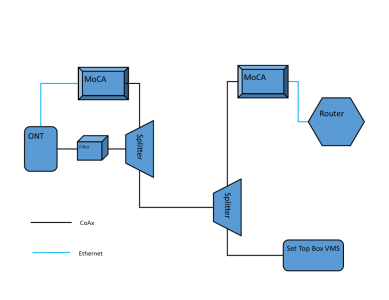
The pic I have attached is my plan after reading many posts and viewing videos. Just wanted to get an opinion on it if it will work.
As a side note, the setup is with Verizon and I do not need Gb speeds. The router is a G3100 (which I Own) set as a bridge which I have a Netgear Orbi Mesh (Wi-Fi 5) in AP mode providing 800+ Mb. So far the TV+ is working with no issuse on my own Wi-Fi network.
 

Attachments

  • mocs setup.png
    mocs setup.png
    42.1 KB · Views: 19
Unless the set top box is using moca signals, you will need a moca filter in front of it. Note that each additional coax connection will introduce about 3 dB of signal loss per splitter and filter connection if you are adding those components to the coax network. Probably not an issue if your coax plant is only as indicated, but it will depend on the output of the ONT and the set top box. Make sure the splitters are MOCA 2 certified ( not just compatible) if you want the best performance.

See also my response to your other post. You might just consider temporarily running a CAT6 flat cable between the ONT and router to save the cost of two splitters, filters, and moca modems. Flat cable is fairly easy to hide and is unobtrusive.
 
The router is a G3100 (which I Own) set as a bridge which I have a Netgear Orbi Mesh (Wi-Fi 5) in AP mode

Can't help with your MoCA questions, but if G3100 is in Bridge mode and Orbi is in AP mode... what is acting as Gateway/Router on your network?
 
Hi all, I had gotten a notification from my ISP and Cable provider that they will no longer be supporting cable cards. A forced upgrade if you will.
I have all of the TV stuff working at the moment with the exception of the internet speed upgrade.
I have a plan to run Cat6 in my home next year but in the meantime, I wanted to get some advice on running MoCA as a stop gap.
The pic I have attached is my plan after reading many posts and viewing videos. Just wanted to get an opinion on it if it will work.
As a side note, the setup is with Verizon and I do not need Gb speeds. The router is a G3100 (which I Own) set as a bridge which I have a Netgear Orbi Mesh (Wi-Fi 5) in AP mode providing 800+ Mb. So far the TV+ is working with no issuse on my own Wi-Fi network.
As degrub stated the splitters need to be able to pass MOCA frequencies and if there are any old CATV splitters hidden in the walls, attic or basement you could have problems. You need to check all coaxial runs to check and if necessary, replace splitters. If your coaxial network has any amplifiers it needs to be MOCA capable also.
 
I know for a fact that this is one home run. The end result as depicted will be 2 splitters with the filter on the "in" side of the first one from the OTA. The coax between the splitters is the home run. The spliiters are rated 10 - 2603 Mhz.

I wonder if I can just use the MoCa on the other end just attach the VSM to the pass through?

Thank you for the quick response. This forum seems to be the best place for good information that I have found!
 
Those are satellite signal splitters. They might work, might not, or may have severe signal power loss in the moca frequencies.

What is the stated frequency range out for the ONT on the coax for cable TV ?
 
So after reading this thread, I came up with this instead. I wanted to move the router anyway. It reduces a splitter and better separates physically the network WAN traffic. It will also make it easier to run the Cat 6 in the future as it was going to come from the router out anyway. This is why I like to spit ball with people!

mocs setup 2.png
 
So after reading this thread, I came up with this instead. …

View attachment 69513

The setup at the FiOS TV box is likely problematic if planning to feed the MoCA-dependent TV box via the RF pass-through of a MoCA adapter. (Such MoCA adapters use a built-in diplexer [dual filters], rather than a simple splitter, to strategically direct signals by frequency, resulting in the RF pass-through port having a limited pass-band of 5-1002 MHz …with MoCA signals severely attenuated.)

You should have better luck using a MoCA-optimized 2-way splitter to get each device directly connected to the coax.

p.s. The “PoE” MoCA filter would be optimally located on the input port of the top-level 2-way splitter, through which the ONT coax line connects.
 
that ONT generates a MOCA signal as well as OTA TV RF ?
It can, but only as a more limited (lesser throughout*) alternative to an Ethernet WAN link. (The ONT has no “LAN” connectivity to offer.)

* Frontier has ONT’s that support a full throughput MoCA 2.5 WAN link built-in, as a fallback when an Ethernet WAN link with the router isn’t possible … with the caveat that the coax must be free of TV signals, since this MoCA WAN network operates at the non-standard range of 400-900 MHz.
 
Last edited:
. It will also make it easier to run the Cat 6 in the future as it was going to come from the router out anyway.
The router wouldn’t necessarily need to be co-located with the ONT at this future date, presuming you run a couple Cat6 lines between the ONT location and router … one for the WAN link and another for LAN connectivity.

p.s. By the way, the updated diagram (with corrections) would work for older FiOS TV setups, minus caller ID and remote DVR barring supplemental port forwarding setup on the third-party router; however, as mentioned in a parallel thread, I’m not sure how well it works for the latest FiOS TV+ setups. You may also want to look into the ASK-MAE311 MoCA adapter if using TV+ wireless TV clients.

Reddit’s /r/FiOS sub may offer useful insights.
 
So it is operating as a MOCA 1.1 node to communicate directly to the set top box ?
The STB is only getting QAM TV signals direct from the ONT.

As mentioned, the ONT offers no LAN connectivity; the Verizon FiOS MoCA WAN operates at MoCA 1.1 channel C4 (975-1025 MHz), but is disabled when using a superior Ethernet WAN connection to the router.

The FiOS STBs operate at MoCA Band D and require a MoCA link to the router LAN — either via a built-in MoCA LAN bridge (typical when using a FiOS-supplied router) or via a standalone MoCA adapter linked to the router LAN. (edit: So, to be clear, a FiOS DVR is dependent on QAM TV signals coming from the ONT, and MoCA connectivity to the router LAN; FiOS client TV boxes only require the network connection, since the DVR handles QAM TV tuning duties.)
 
Last edited:
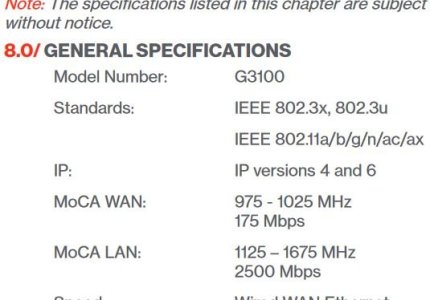
This is for the G3100 router box.
So you will want to double check the moca filter cuts off above 1025 MHz with a steep roll off ?
There is a 100 MHz to play with, so shouldn't be an issue.
 

Attachments

  • Capture.JPG
    Capture.JPG
    31.6 KB · Views: 12
This is for the G3100 router box.
So you will want to double check the moca filter cuts off above 1025 MHz with a steep roll off ?
There is a 100 MHz to play with, so shouldn't be an issue.
MoCA WAN spec of the G3100 is moot for OP, per their latest diagram, since they’re looking to relocate the router to enable an Ethernet WAN link between the ONT and primary router.
 
The router is a G3100 (which I Own) set as a bridge which I have a Netgear Orbi Mesh (Wi-Fi 5) in AP mode providing 800+ Mb. So far the TV+ is working with no issuse on my own Wi-Fi network.
I suspect that the TV+ setup is currently working because the G3100 is still functioning as the primary router, with the Orbi setup only handling the WLAN duties.

The same could be done in the “relocated” setup if TV+ proves troublesome with the FiOS router eliminated.
 
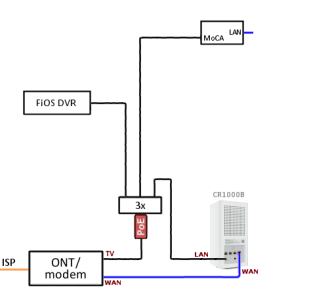
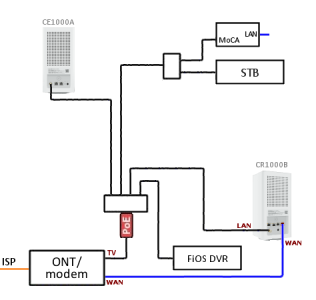
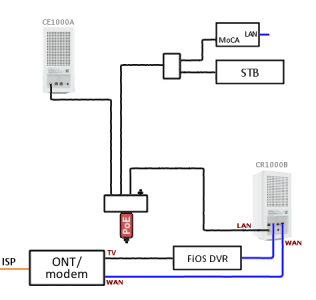
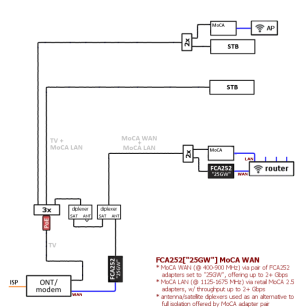
FYI/FWIW ... Just stumbled over a few similar example schemes when looking for images for a different thread.
 

Attachments

  • Eth WAN + MoCA LAN + QAM.png
    Eth WAN + MoCA LAN + QAM.png
    21.6 KB · Views: 8
  • Eth WAN + MoCA LAN + relocatd DVR.png
    Eth WAN + MoCA LAN + relocatd DVR.png
    31.2 KB · Views: 8
  • direct ONT to DVR.png
    direct ONT to DVR.png
    30.6 KB · Views: 8
  • FCA252 workaround w TV.png
    FCA252 workaround w TV.png
    125.9 KB · Views: 7

Similar threads

Support SNBForums w/ Amazon

If you'd like to support SNBForums, just use this link and buy anything on Amazon. Thanks!

Sign Up For SNBForums Daily Digest

Get an update of what's new every day delivered to your mailbox. Sign up here!
Back
Top