What's new

Compress display

octopus

Part of the Furniture
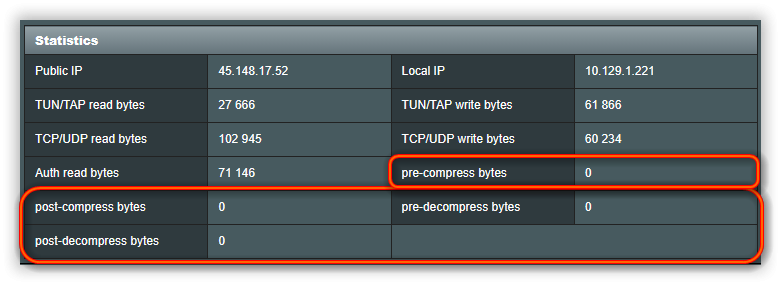
What settings remove compress statistics displayed in gui?
I have one not displaying, can't figure out what?


static.png
 
The webui will display everything returned by OpenVPN's status command.
 
Can you explain?
Under your VPN settings, if you set Compression to "none" (and perhaps even "disabled"), it will show 0 for compressed bytes under the main "VPN Status" tab. If you choose something else, or you force it on through your custom config, you will then see compressed bytes. Compression is not always better, and may slow things down depending on your situation.

1768079893937.png
 
What settings remove compress statistics displayed in gui?
I have one not displaying, can't figure out what?


View attachment 69877
If your VPN server is run by a commercial service, then you really don't control the VPN's settings. The VPN provider determines if they will compress the data which in theory might be more economical for them. The downside of compression is then your router has to compress and uncompress the data along with decrypting it so the throughput you see probably isn't improved. While my VPN provider's configuration file for OPEN VPN shows LZO adaptive I don't remember every seeing any data for pre-post compression. Currently I run WG clients so I can't verify that is still the case, but compression is probably an archaic setting no longer normally used.

I suppose if you ran your own VPN and controlled both the server and client end you could choose to compress the data and then these data fields might be populated.
 
Similar threads

Similar threads

Latest threads

Support SNBForums w/ Amazon

If you'd like to support SNBForums, just use this link and buy anything on Amazon. Thanks!

Sign Up For SNBForums Daily Digest

Get an update of what's new every day delivered to your mailbox. Sign up here!
Back
Top