What's new

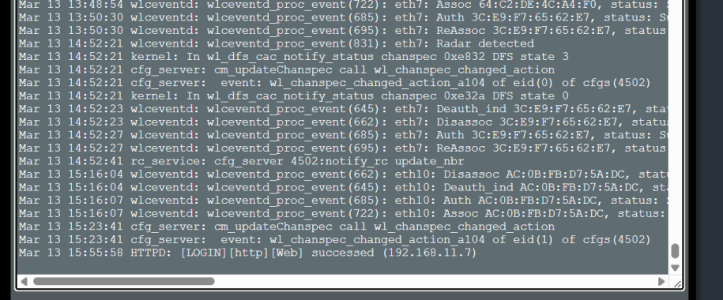
dfs channel change on latest 102.7 causes loss of connection with internet access pt

lgkahn

Senior Member
anything i do about this.. i have a bostrend ac1200 ap only being use to connect a apc nas network card to my network.. not being used as a true ap.
everytime it looses connection when the main wifi router it connects to changes the channel because of radar dfs i believe.
 

Attachments

  • Screenshot 2026-03-13 155709.png
    Screenshot 2026-03-13 155709.png
    314.2 KB · Views: 5
5 GHz also detects RADAR in the DFS channels. If this happens frequently just disable DFS channels. But, do not force 160 MHz! Use 20, 40, 80, 160 MHz.
FWIW - I've learned that is best (for me) to use the Asus default WIFI settings...mostly. I do have DFS enabled but set to 20, 40, 80 MHz on 5 GHz with the SmartConnect enabled. I have no WIFI issues with connections!
 
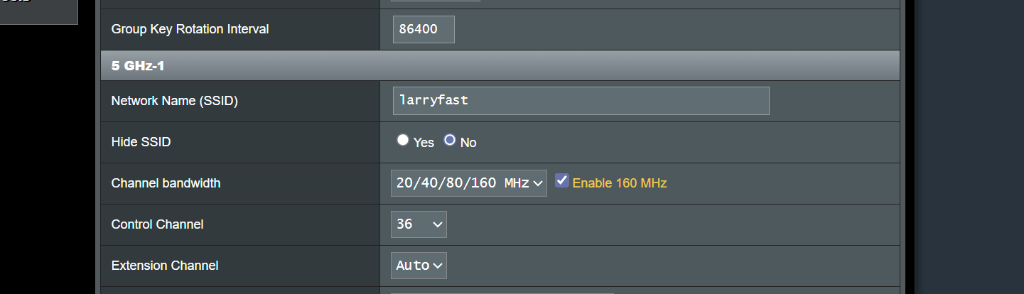
i am using hard coded channel 36 on the single 5ghz band enabled on this router.. i would have thought from ai that dfs would not be an issue here?
 
5 GHz also detects RADAR in the DFS channels. If this happens frequently just disable DFS channels. But, do not force 160 MHz! Use 20, 40, 80, 160 MHz.
FWIW - I've learned that is best (for me) to use the Asus default WIFI settings...mostly. I do have DFS enabled but set to 20, 40, 80 MHz on 5 GHz with the SmartConnect enabled. I have no WIFI issues with connections!
i th9ough i am already doing all that see attachment
 

Attachments

  • Screenshot 2026-03-13 161306.png
    Screenshot 2026-03-13 161306.png
    44.8 KB · Views: 3
is the only way to avoaid this to turn off 160mhz from reading i though channel 36 which i hard coded is dfs free. but maybe the extension channel is causing the issue
 

Support SNBForums w/ Amazon

If you'd like to support SNBForums, just use this link and buy anything on Amazon. Thanks!

Sign Up For SNBForums Daily Digest

Get an update of what's new every day delivered to your mailbox. Sign up here!
Back
Top