
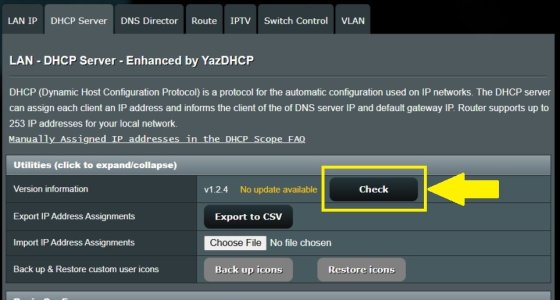
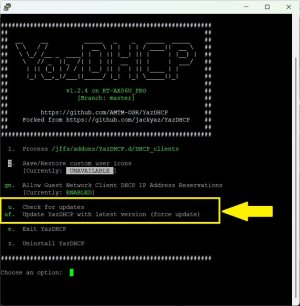
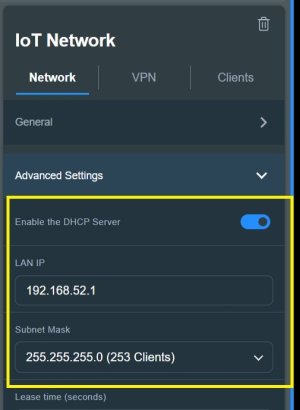
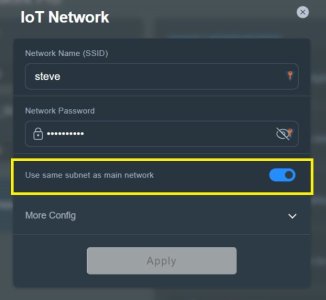
Strange issue where devices that have DHCP reservations suddenly started getting IP addresses in a different subnet. Main subnet is 192.168.1.x. DHCP pool to assign addresses 192.168.1.121 to 192.168.1.170. Most addresses above and below are assigned to devices. House is large with many Asus routers, but once central GT-AX6000 that does the DHCP for the whole network. I recently updated the firmware on the GT-AX6000 to 3006.102.6 and I believe that is when the issue developed. Devices that connect to the other routers in the house still function properly, but devices that connect directly to the GT-AX6000 are getting addresses 192.168.52.x despite the fact that their MAC addresses are reserved in the 192.168.1.x rhelm. Not all devices are getting the 192.168.52.x assignment, but it seems to be 5 +/- devices affected. I am not sure why this is happening nor what to do about it. Any ideas?
DHCP issues with Merlin and Yaz
- Thread starter pgershon
- Start date


Similar threads


Similar threads

Similar threads
-
-

-
AImesh node requests dhcp, but never receives one...
- Started by Pergola Fabio
- Replies: 53
-
Guest network pro vlan with ethernet ports configured to anything than "All(default) - SDN Profile: default" main dhcp problem
- Started by mistermoonlight1
- Replies: 6
-
 Need suggestions - 3006 firmware Guest Network preventing DHCP on Main network for one device when active
- Started by aex.perez
- Replies: 0
-
Editing DNS in the manual DHCP assignments vs. DNS Director
- Started by mrric
- Replies: 4
-
Solved Device not respecting DNS Director or (Yaz)DHCP Server settings
- Started by dangkhoa
- Replies: 11
-
-
Manually DHCP List and Domain Name Showing Unremovable Items
- Started by kidd232
- Replies: 25
-
Guest Network Pro + VLAN 52 breaks DHCP when LACP is enabled
- Started by i5Js
- Replies: 6
Latest threads
-
Release ASUS EBG15 Firmware version 3.0.0.6.102_46298 (04/17/2026)
- Started by jzchen
- Replies: 0
-
Is it possible to have AP and client at same time on Zyxel EX3301
- Started by gameboy
- Replies: 0
-
BE-88U warm boot WLAN connection failure
- Started by RiskyBusiness
- Replies: 2
-
Can RT-BE88U be as bad as it seems compared to GS-AX3000?
- Started by dwp
- Replies: 4
-
Release TUF-AX5400 firmware version 3.0.0.4.388_24356 (2026/04/16)
- Started by o-l-a-v
- Replies: 2

Support SNBForums w/ Amazon
If you'd like to support SNBForums, just use this link and buy anything on Amazon. Thanks!
Sign Up For SNBForums Daily Digest
Get an update of what's new every day delivered to your mailbox. Sign up here!