What's new

DNS Director not properly redirecting DNS traffic to router

ArbitraryLake

Occasional Visitor
I've recently put Merlin (3006.102.6) on my RT-BE92U router with AdGuardHome running locally via amtm. Thanks to all for the great product. I have the main network at 192.168.2.0/24 and 2 other isolated networks on 192.168.52/24 and 192.168.53.0/24 for IoT and guests. Everything is working great except forcing port 53 DNS requests to go through AdGuardHome. If a client is setup to talk to 192.168.2.1, 192.168.52.1, or 192.168.53.1, respectively, which DHCP does, it works as expected. The problem is if you have a hardcoded DNS server on the client and then it isn't working. The query is redirected to the router's DNS server (so redirected from 8.8.8.8 to 192.168.2.1, for instance), but the reply comes from 192.168.2.1 and it isn't rewritten to look like it is coming from 8.8.8.8. Thus, the packet is listed as unsolicited and ignored. Below is the lots of detail if that is helpful, but if this is an easy fix feel free to ignore.

I ran nslookup on a Windows computer, changed the server to 8.8.8.8 and queried for redhat.com
Code:
Default Server:  RT-BE92U-EF20.local
Address:  192.168.2.1

> server 8.8.8.8
Default Server:  dns.google
Address:  8.8.8.8

> redhat.com
Server:  dns.google
Address:  8.8.8.8

DNS request timed out.
    timeout was 2 seconds.
DNS request timed out.
    timeout was 2 seconds.
DNS request timed out.
    timeout was 2 seconds.
DNS request timed out.
    timeout was 2 seconds.
*** Request to dns.google timed-out

WireShark shows the 4 queries 192.168.2.7 to 8.8.8.8, but the replies come back from 192.168.2.1 instead of 8.8.8.8. I was expecting the reply src address to be rewritten to 8.8.8.8.

Screenshot 2025-12-09 181129.png


Running tcpdump -i br0 -n -vv 'port 53 and host 192.168.2.7' on the router yields
Code:
tcpdump: listening on br0, link-type EN10MB (Ethernet), snapshot length 262144 bytes
17:57:31.832013 IP (tos 0x0, ttl 128, id 601, offset 0, flags [none], proto UDP (17), length 62)
    192.168.2.7.49235 > 8.8.8.8.53: [udp sum ok] 55+ A? redhat.com.local. (34)
17:57:31.834188 IP (tos 0x0, ttl 64, id 4524, offset 0, flags [DF], proto UDP (17), length 62)
    192.168.2.1.53 > 192.168.2.7.49235: [bad udp cksum 0x8594 -> 0xe379!] 55 NXDomain q: A? redhat.com.local. 0/0/0 (34)
17:57:33.833144 IP (tos 0x0, ttl 128, id 602, offset 0, flags [none], proto UDP (17), length 62)
    192.168.2.7.49236 > 8.8.8.8.53: [udp sum ok] 56+ AAAA? redhat.com.local. (34)
17:57:33.835222 IP (tos 0x0, ttl 64, id 5813, offset 0, flags [DF], proto UDP (17), length 62)
    192.168.2.1.53 > 192.168.2.7.49236: [bad udp cksum 0x8594 -> 0xe35c!] 56 NXDomain q: AAAA? redhat.com.local. 0/0/0 (34)
17:57:35.847030 IP (tos 0x0, ttl 128, id 603, offset 0, flags [none], proto UDP (17), length 56)
    192.168.2.7.49237 > 8.8.8.8.53: [udp sum ok] 57+ A? redhat.com. (28)
17:57:35.848786 IP (tos 0x0, ttl 64, id 6854, offset 0, flags [DF], proto UDP (17), length 88)
    192.168.2.1.53 > 192.168.2.7.49237: [bad udp cksum 0x85ae -> 0xd5fc!] 57 q: A? redhat.com. 2/0/0 redhat.com. A 52.200.142.250, redhat.com. A 34.235.198.240 (60)
17:57:37.861334 IP (tos 0x0, ttl 128, id 604, offset 0, flags [none], proto UDP (17), length 56)
    192.168.2.7.49238 > 8.8.8.8.53: [udp sum ok] 58+ AAAA? redhat.com. (28)
17:57:37.862695 IP (tos 0x0, ttl 64, id 8436, offset 0, flags [DF], proto UDP (17), length 121)
    192.168.2.1.53 > 192.168.2.7.49238: [bad udp cksum 0x85cf -> 0x84f9!] 58 q: AAAA? redhat.com. 0/1/0 ns: redhat.com. SOA dns1.p01.nsone.net. hostmaster.nsone.net. 1684376201 200 7200 1209600 3600 (93)

Here, the responses have bad udp checksums and the unmodified 192.168.2.1 reply src addresses as well. Not sure why the checksum is bad. Below is the conntrack -E output grep'ed for port=53 and 192.168.2.7 at the same time on the router:
Code:
    [NEW] udp      17 30 src=192.168.2.1 dst=192.168.2.7 sport=53 dport=49235 [UNREPLIED] src=192.168.2.7 dst=192.168.2.1 sport=49235 dport=53
    [NEW] udp      17 30 src=192.168.2.1 dst=192.168.2.7 sport=53 dport=49236 [UNREPLIED] src=192.168.2.7 dst=192.168.2.1 sport=49236 dport=53
    [NEW] udp      17 30 src=192.168.2.1 dst=192.168.2.7 sport=53 dport=49237 [UNREPLIED] src=192.168.2.7 dst=192.168.2.1 sport=49237 dport=53
    [NEW] udp      17 30 src=192.168.2.1 dst=192.168.2.7 sport=53 dport=49238 [UNREPLIED] src=192.168.2.7 dst=192.168.2.1 sport=49238 dport=53

The conntrack results are also wierd because the AdGuardHome DNS server clearly gets the queries because it replies, but I don't see the tracking for the queries in the conntrack output. I only see the DNS replies as NEW items and no rewriting of the src to 8.8.8.8. I thought at one point I had the queries getting logged in conntrack, but in that case the replies weren't there or at least connected to the queries.

More details:
Screenshot 2025-12-09 142645.png

I've tried User Defined DNS 1 with that set to 192.168.2.1 and that didn't change the results.

I'm getting packets back, so I'm not worried about iptables firewalling, but can provide iptables dump if desired. I have some port forwarding setup, but no other specified firewall rules and nothing added via the post-conf scripts or such.
The iptables nat looks like this where I tried it with and without the line I added in DNSFilter noted below (from iptables -t nat -S)
Code:
-P PREROUTING ACCEPT
-P INPUT ACCEPT
-P OUTPUT ACCEPT
-P POSTROUTING ACCEPT
...
-A PREROUTING -d(external IP addr)/32 -j VSERVER
-A PREROUTING -i br+ -p udp -m udp --dport 53 -j DNSFILTER
-A PREROUTING -i br+ -p tcp -m tcp --dport 53 -j DNSFILTER
-A PREROUTING -i wgs1 -p udp -m udp --dport 53 -j DNSFILTER
-A PREROUTING -i wgs1 -p tcp -m tcp --dport 53 -j DNSFILTER
-A POSTROUTING -o eth0 -j PUPNP
-A POSTROUTING ! -s (external IP addr)/32 -o eth0 -j MASQUERADE
-A POSTROUTING -s 192.168.2.0/24 -d 192.168.2.0/24 -o br0 -j MASQUERADE
-A POSTROUTING -s 192.168.52.0/24 -d 192.168.52.0/24 -o br55 -j MASQUERADE
-A POSTROUTING -s 192.168.53.0/24 -d 192.168.53.0/24 -o br56 -j MASQUERADE
-A DNSFILTER -m mac --mac-source (No Redirection MAC) -j RETURN
-A DNSFILTER -i br0 -j DNAT --to-destination 192.168.2.1 (added, but tried without first)
-A DNSFILTER -i br55 -j DNAT --to-destination 192.168.52.1
-A DNSFILTER -i br56 -j DNAT --to-destination 192.168.53.1
-A DNSFILTER -j REDIRECT
-A LOCALSRV -p udp -m udp --dport 51820 -j ACCEPT
-A VSERVER -p tcp -m tcp --dport xxx -j DNAT --to-destination 192.168.2.x:xxx
-A VSERVER -j VUPNP

I added the 2nd DNSFILTER line to make sure other anything headed to port 53 tcp/udp is DNAT'ed to 192.168.2.1, Then there is masquerading setup for 182.168.2.0 addresses. I tried more generic masquerading, too without luck.

Everything looks right to me though I'm not an expert, and it isn't doing what I had hoped. I want it to take any port 53 traffic and reroute it to the AdGuardHome server running on the router. Any suggestions would be appreciated. I'm happy to include any missing information or run any tests requested.

EDIT: I guess the bad checksums are common from tcpdump and typically false positives, so that's probably not problem.
 
DNS Director doesn't change the source IP in the reply. The query is redirected to 192.168.2.1 so that's where the reply comes from. So it appears to be working as designed.

EDIT: Sorry, I misspoke. What I should have said is that DNS Director doesn't change the source IP in the reply so even though it's coming from 192.168.2.1 it looks like it originated from 8.8.8.8.
 
Last edited:
I'm not using AGH, but with DNS Director setup, the main network seems to reply correctly from a Debian machine.
Code:
$ nslookup
> server 8.8.8.8
Default server: 8.8.8.8
Address: 8.8.8.8#53
> snbforums.com.
Server:         8.8.8.8
Address:        8.8.8.8#53

Non-authoritative answer:
Name:   snbforums.com
Address: 45.77.76.174
tcpdump on router br0:
Code:
20:59:23.811696 IP 192.168.1.178.39323 > 8.8.8.8.53: 7308+ A? snbforums.com. (31)
20:59:23.828138 IP 8.8.8.8.53 > 192.168.1.178.39323: 7308 1/0/0 A 45.77.76.174 (47)
20:59:23.830647 IP 192.168.1.178.56250 > 8.8.8.8.53: 12815+ AAAA? snbforums.com. (31)
20:59:23.845100 IP 8.8.8.8.53 > 192.168.1.178.56250: 12815 0/1/0 (91)
DNS Director rules:
Code:
# iptables -t nat -nvL DNSFILTER
Chain DNSFILTER (2 references)
 pkts bytes target     prot opt in     out     source               destination        
  113  8777 DNAT       all  --  br52   *       0.0.0.0/0            0.0.0.0/0            to:192.168.52.1
  490 35457 REDIRECT   all  --  *      *       0.0.0.0/0            0.0.0.0/0
No traffic leaves the WAN to 8.8.8.8.
 
Thanks Dave and Colin for the replies. Colin, if the DNS reply comes from a different address than the query was sent to, I think it needs to be rejected because otherwise it would be super easy to poison DNS. Dave, your tcpdump looks like I'd expect, so I think I'm not insane. I've added LOG targets to the iptables, and I can see the queries hitting the LOG rules that are identical to the DNAT or REDIRECT rules. So, I don't know what's going on still. I should stop AGH, put dnsmasq back to listening to port 53, make some simple iptables rules and see if I can get it working on something different and hopefully more straightforward. I have a pihole server sitting around doing nothing, and I wonder if it will work any differently. I'll post back in a day or two after some testing. Thanks!
 
@ArbitraryLake, perhaps explain a bit more how you have your DNS Director configured. I may have missed it, but what client do you have in the DNS Director Client List that is configured for No Redirection?

How is the LAN DHCP DNS server section configured? Do you have the option Advertise router's IP in addition to user-specified DNS enabled (set to Yes) or disabled (set to No)?

And to confirm, you are not using the LAN > Route section to "block" Google DNS Servers (8.8.8.8 & 8.8.4.4)?

A reminder, if you were unaware. The DNS Director was changed back with 3006.102.4 (10-May-2025). Here is that change from the release notes:

- CHANGED: Setting DNS Director to "Router" will now always
redirect to the router's own IP. Previously it
would redirect to the first DNS server configured
on the DHCP page (which defaults to the router
itself).
If you need DNS Director to redirect to an IP
configured in your DHCP settings, use a Custom DNS
entry in DNS Director. This makes it more consistant
with what the name implies, and was also necessary
for improved Guest Network support.
 
Colin, if the DNS reply comes from a different address than the query was sent to, I think it needs to be rejected because otherwise it would be super easy to poison DNS.
Sorry, I have corrected my previous post.

This technique has been used for decades across multiple platforms. So it's not something that is unique to asuswrt-merlin. DNS Director is simply a user friendly frontend for creating the iptables rules. It could be regarded as a MITM attack which is why it doesn't work with secure DNS like DoT or DoH.

That said I would expect your Wireshark trace to show the replies apparently coming from 8.8.8.8 (as per Dave's tcpdump).

It's also strange that it takes a full two seconds for your PC with retry the query with the different variations. I guess that's because nslookup is waiting from a reply from 8.8.8.8.

I can only think this is something to do with the AGH integration, something I don't use myself.
 
Last edited:
@ColinTaylor I agree with your comments, and yes the 2 second timeout is just because it's just waiting for a "valid" reply and doesn't get it. I'm not sure I agree that the AGH is reponsible, but it could be the related like iptables rules that need to be correct. At least that's my current thinking, but I'm definitely not ruling out AGH or related issues.

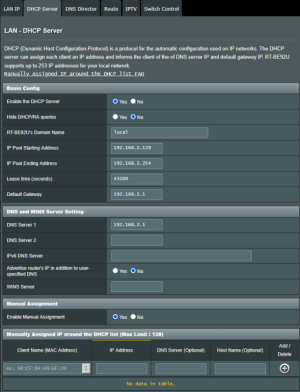
@bennor I have a pihole server sitting at 192.168.2.6, and that is the No Redirection exception in DNS Director. It was previously used, but it sitting there until things are hopefully worked out perfectly. I've had "Advertise router's IP in addition to user-specified DNS" set to
Yes and No, but currently it is No. Especially for anyone reading later, my DHCP works well on all the subnets, and DNS works as expected if directed at the router (192.168.2.1) but not at a random server like 8.8.8.8, 1.1.1.1, ... My purpose is to catch a few devices that are using Google DNS and force them through my DNS. I may not have made that clear enough at first.

1765381980662-png.69485

1765381900690.png


If I do 'nslookup redhat.com' without specifying the server, it uses 192.168.2.1 and works perfectly.

If I change the DNS Director to redirect my testing client (.7) to my pihole server (.7):
1765382942436.png

and run nslookup, server 8.8.8.8, and query redhat.com, it works. Normal DNS queries to 192.168.2.1 and 192.168.2.6 all work as well. For the DNS query to 8.8.8.8, it is redirected to 192.168.2.6 (pihole), doesn't go out the WAN, and the reply from pihole is accepted -- all the NAT'ing works correctly. And the conntrack output for 192.168.2.7 looks like:
Code:
    [NEW] udp      17 30 src=192.168.2.7 dst=8.8.8.8 sport=59328 dport=53 [UNREPLIED] src=192.168.2.6 dst=192.168.2.1 sport=53 dport=59328 mark=43393
 [UPDATE] udp      17 30 src=192.168.2.7 dst=8.8.8.8 sport=59328 dport=53 src=192.168.2.6 dst=192.168.2.1 sport=53 dport=59328 mark=43394
I'm pretty sure conntrack is saying the query is from 192.168.2.7 to 8.8.8.8 with sport=59328 and is expecting a reply from 192.168.2.6 to 192.168.2.1 with dport=59328. When it sees the reply, it knows to NAT it back to the original dest=192.168.2.7/src=8.8.8.8, which is does because it comes back correctly on Wireshark.

I'm pretty convinced I have an iptables problem but the rules are pretty simple, so I'm not sure where the problem will be. AGH just listens on port 53 and responds to whatever comes to it. Thus, I think it isn't and AGH problem, is a NAT problem, but could definitely be AGH related like in how the iptables rules are changed or not changed.

I'll play some games with iptables and see what I can find out. I have a few experiments to try. If someone sees me missing anything obvious, let me know. Thanks for everyone's help!
 

Attachments

  • 1765381980662.png
    1765381980662.png
    113.8 KB · Views: 237
I would suggest removing any custom iptables rules you've added trying to troubleshoot this. It should work out of the box.

It's unusual to specify the Default Gateway and DNS 1 on the DHCP page when the router IP is already the default. I'd remove those. Using .local as a domain can conflict with mDNS on the local LAN. Change it if you can.

When testing, append a dot to avoid Windows appending the local suffix to the query. Just creates noise when troubleshooting.
Code:
nslookup redhat.com. 8.8.8.8
 
@ArbitraryLake, You initially mention using AdGuardHome locally through AMTM, but later make mention of using Pi-Hole. I have never used AdGuardHome, so don't know if there may be a conflict with AdGuardHome and trying to run Pi-Hole at the same time. It is a bit confusing what you are trying to accomplish and how things are being setup.

A troubleshooting suggestion. You may want to reset the router, removing any custom IP table rules you've added. Then if you want to run AdGuardHome then run only that. Do not add any custom IP table rules. Don't add Pi-Hole into the mix. If you want to run Pi-Hole then do not install AdGuardHome and do not add custom IP table rules. Make sure you properly configure both the router and Pi-Hole. An example of how to setup Raspberry Pi hosted Pi-Hole on 3006.102.x Asus-Merlin firmware is explained in my post here: https://www.snbforums.com/threads/guest-network-pro-pi-hole.94392/#post-977343

Set up things initially and test to ensure it works before making major changes or trying to add custom IP table rules.

PS: And as dave14305 indicated, using the router IP address in the LAN DHCP Gateway and DNS #1 fields are not typically done unless there is a specific need for it by some other application/script.
 
@bennor Sorry, I haven't had custom or modified iptables rules in the previously posted materials. The first post was entirely AGH with the pihole server on but not involved in any DNS traffic. The last post I removed AGH from the situation for my client and used pihole. I was just trying to watch conntrack output and iptables counts.

@dave14305 I changed the .local to .lan, removed the Default Gateway and DNS 1 values, and restarted. It didn't fix the problem.

I've recreated the situation on another pair of computers. I confirmed it should be working with one iptables REDIRECT rule, and everyone is right that it should be working. I think I'll eliminate all the iptables rules and start with as few rules as possible to see if that works. I'll report back.

@Texasguy, port 853 probably cannot be redirected to a local DNS server because of the security checks and such. It's definitely possible to block it or let it through unadulterated though.
 
Well, I've spent a lot of time on this and not where I wanted to get it, but I'm going to put this on the back burner for a while. My temporary solution is to add a iptables rule:
Code:
iptables -t nat -A DNSFILTER -s 192.168.2.0/24 ! -d 192.168.2.0/24 -i br0 -j DNAT --to-destination 192.168.2.6
This forwards DNS queries (port 53) that are headed outside of the network to the pihole server (.6) because NAT works properly for me this way.
With this rule (Case 1),
nslookup redhat.com. (works and goes to 192.168.2.1 as this is the advertised DNS server)
nslookup redhat.com. 192.168.2.1 (works)
nslookup redhat.com. 192.168.2.6 (works and goes directly to pihole server)
nslookup redhat.com. 8.8.8.8 (works but is redirected to the pihole server and doesn't go to 8.8.8.8)

Just for completeness, the iptables rule was inserted at position 2 of DNSFILTER right after the exception for the pihole server that let's it out to the internet.

A nearly identical iptables rule in the same position instead directed to the router's DNS server doesn't work: (Case 2)
Code:
iptables -t nat -A DNSFILTER -s 192.168.2.0/24 ! -d 192.168.2.0/24 -i br0 -j DNAT --to-destination 192.168.2.1
OR
iptables -t nat -A DNSFILTER -s 192.168.2.0/24 ! -d 192.168.2.0/24 -i br0 -j REDIRECT
With this rule,
nslookup redhat.com. (works and goes to 192.168.2.1 as this is the advertised DNS server)
nslookup redhat.com. 192.168.2.1 (works)
nslookup redhat.com. 192.168.2.6 (works and goes directly to pihole server)
nslookup redhat.com. 8.8.8.8 (doesn't work. It is redirected to 1921.68.2.1, 192.168.2.1 replies and it makes it back to the client, but it comes from 192.168.2.1 (i.e. the source address isn't rewritten to 8.8.8.8). Thus the client sent a request to 8.8.8.8, got a response from 192.168.2.1, and rejects the "unsolicited" DNS reply and timesout never hearing back from 8.8.8.8)

I tried other rules:
Code:
iptables -t nat -A DNSFILTER -s 192.168.2.0/24 -i br0 -j REDIRECT --to-port 553
with a DNS server running on port 553 worked as well. conntrack looks right.

I replicated the
Code:
iptables -t nat -A DNSFILTER -s 192.168.2.0/24 ! -d 192.168.2.0/24 -i br0 -j REDIRECT
rule on another set of computers (6.8.0 kernel vs the 4.19.294 of the ASUS merlin router). It routed correctly and showed up correctly in conntrack.

I wrote iptables LOG rules and verified my packets hit the rules I expected. They did, but in Case 2 - nslookup redhat.com. 8.8.8.8, it hits the right DNAT/REDIRECT rules but the query just is tracked in conntrack.

TL;DR I'm using the 1st iptables rule and keeping my pihole running just to handle these hardcoded DNS server addresses on a few clients. I'll come back to this when I have time, but if anyone has experience with packets hitting iptables PREROUTING DNAT/REDIRECT rules and not getting put in the conntrack tracking list, I'd love to know what caused it.
 
Even though it makes no sense, did you try disabling AGH on the router and using dnsmasq instead?
 
I’d be curious if anyone else with a BE92U can replicate this.
 
@ColinTaylor you motivated me to "factory" reset and start from scratch. I setup a basic setup, added AGH, and slowly tried to remember all my previous settings and put them in. I kept running nslookup google.com. 8.8.8.8 after every setting change to see what broke it. Most things didn't cause any problem as expected. I found that enabling any AiProtection (Malicious Sites Blocking, Two-way IPS, or Infected Device Prevention and Blocking) broke this. I don't know how to diagnose the AiProtection behavior or if the AiProtection is even helpful. Additionally, enabling IPv6 Native (everything default values) broke it as well. I didn't try other IPv6 connection types. I can probably explore the IPv6 problem more, but I'm curious if others have either of these enabled and nslookup google.com. 8.8.8.8 works with DNS Director Global Redirection set to Router?
 
be sure to withdraw from the licensing agreement also. Not doing this can lead to flaky behavior.
 

Latest threads

Support SNBForums w/ Amazon

If you'd like to support SNBForums, just use this link and buy anything on Amazon. Thanks!

Sign Up For SNBForums Daily Digest

Get an update of what's new every day delivered to your mailbox. Sign up here!

Members online

Back
Top