Equipment: RT-AX6U PRO
Firmware: Asus Merlin 3006.102.7_2
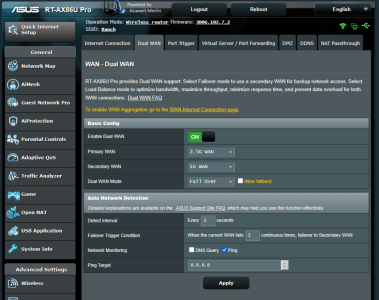
I have two internet connections, the primary is AT&T air and the secondary is Centurylink DSL. I have set up the router with dual wan, AT&T primary and Centurylink as hot standby. The AT&T connection loses connectivity occasionally in the middle of the night, which appears to be a common issue with AT&T, and the reason I maintain a backup isp. When this happens, the router quickly and properly switches to the hot standby connection, however, when the primary (AT&T) regains connectivity, it does not switch back. I have to manually disconnect the DSL connection to force the router to switch back to the primary. After that all is well until the next connection drop by AT&T, and the senario repeats.
Can someone advise me what I might be have set incorrectly that is preventing the auto return to the primary wan when connection is reestablished?
Thank you
Firmware: Asus Merlin 3006.102.7_2
I have two internet connections, the primary is AT&T air and the secondary is Centurylink DSL. I have set up the router with dual wan, AT&T primary and Centurylink as hot standby. The AT&T connection loses connectivity occasionally in the middle of the night, which appears to be a common issue with AT&T, and the reason I maintain a backup isp. When this happens, the router quickly and properly switches to the hot standby connection, however, when the primary (AT&T) regains connectivity, it does not switch back. I have to manually disconnect the DSL connection to force the router to switch back to the primary. After that all is well until the next connection drop by AT&T, and the senario repeats.
Can someone advise me what I might be have set incorrectly that is preventing the auto return to the primary wan when connection is reestablished?
Thank you