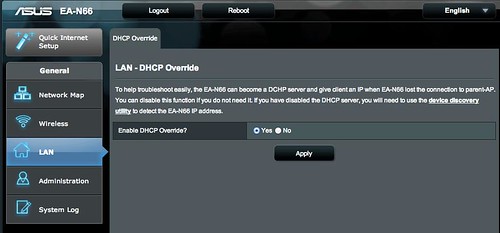
I have firmware update "g" and this minimal admin page for the "LAN" section is still the same. They definitely changed something from the version in the published manual. It's as if in their rush to push out the DHCP Override button they hid all the other features accidentally - or maybe, they don't want us messing with these settings anymore. >_>
I scoured the web for some info and ended up here.
When I upgraded from the stock firmware, I suffered from a ton of weird disconnects and such oddball behavior as duplicate MAC addresses back on the parent router this device was connected downstream from. I had the EA-N66 being listed as many as 3 times in the "attached devices" list, as well as incorrect SSID values for its MAC address. Not to mention lots of IP address conflicts.
I immediately disabled the DHCP Override, but that didn't fix the problems aside from less IP conflicts. I still see dupes in the "ARP" list (I tried this from DOS as well). It's as if most everything connected to the extender is being interpreted as this device, rather than itself. If only once device is connected, it can stabilize after enough time, seemingly - ie, I will eventually get a correct MAC address & IP in the table. But as traffic increases, so does the weird behavior and the stability tanks.
I can't imagine this new DHCP Override being a useful "default" setting... why would you ever want more than one DHCP server? As it is, there's a discovery utility from Asus that can find the dynamic IP address of the EA-N66, and it shows up anyway in the "attached devices" list of its parent router. So it seems like a totally pointless setting.
At this point I am strongly considering going back to the 1017 firmware, which at least let me set a static IP - an while the extender was less stable in general, I didn't have this madness with the MAC addresses.