What's new

How can i customize my UI

Joshuajackson

Senior Member
Im wondering if its possible to customize UI in merlin. As i would like to update a lil and make it more modern with updates pics and background pics
 
RMerlin doesn't offer those options.

But if you have programming know-how (or know someone who does and is familiar with how your RMerlin-powered Asus router does things internally), yes it is possible.
 
You can attempt it with ssh, PuTTy, and WinSCP.
 
You can attempt it with ssh, PuTTy, and WinSCP.
i got access to the file system and able to view them. However its view only and cant write. How do i give myself permission to write?
 
You can't. It's a read-only flash filesystem.
Was able to give myself read and write permission, not sure if i was able to do that but heres how i did it. SSH into the router and put this command in mount -o remount,rw '/'
 
Was able to give myself read and write permission, not sure if i was able to do that but heres how i did it. SSH into the router and put this command in mount -o remount,rw '/'
That won't work properly. If you want to change specific files used by the webUI use the rebind technique described in the thread you referenced in post #3.
 
What meant was that it is not a particularly good method because the changes would be wiped out every time there was a firmware update.
Yeah true you do have a point. I tried doing the method listed in that old post however im lost asf
 
Yeah true you do have a point. I tried doing the method listed in that old post however im lost asf
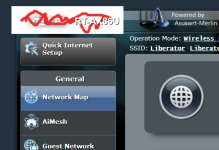
Say you wanted to customise the Asus logo in the top left of the UI (/www/images/New_ui/asustitle.png). Place your new logo somewhere in /jffs (e.g. /jffs/webUI/asustitle.png) and then mount bind it over the original.

Code:
mount -o bind /jffs/webUI/asustitle.png /www/images/New_ui/asustitle.png

Now to apply that change every time the router boots up you'd put that command into a services-start user script.

Here's one I created earlier ;):
Untitled.png

I guess it depends on what it is exactly you're wanting to change.

 
Last edited:
Say you wanted to customise the Asus logo in the top left of the UI (/www/images/New_ui/asustitle.png). Place your new logo somewhere in /jffs (e.g. /jffs/webUI/asustitle.png) and then mount bind it over the original.

Code:
mount -o bind /jffs/webUI/asustitle.png /www/images/New_ui/asustitle.png

Now to apply that change every time the router boots up you'd put that command into a services-start user script.

Here's one I created earlier ;):
View attachment 45922

I guess it depends on what it is exactly you're wanting to change.
It doesnt seem like it gets rid of the original logo though as you can see in your test
 

Latest threads

Support SNBForums w/ Amazon

If you'd like to support SNBForums, just use this link and buy anything on Amazon. Thanks!

Sign Up For SNBForums Daily Digest

Get an update of what's new every day delivered to your mailbox. Sign up here!
Back
Top