
What's new

How to unbind an old router from Asus account? Device offline

danlat1415

Regular Contributor
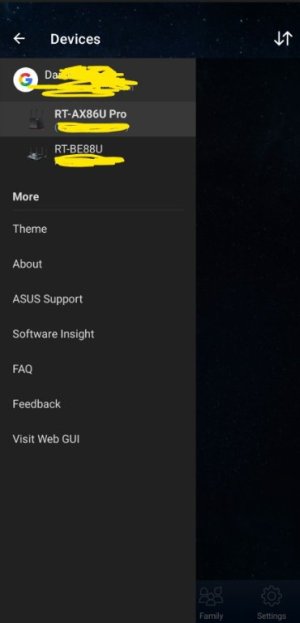
I've bought a new router and given my old one to a family member - but the router is still listed in my Asus Router App under my account as a bound router (linked to my account).

My family member is unable to bind the router to their account - saying it's already assigned to an Asus account.


How do I sort this??

When I go to their house and connect to it, I've tried to click on the 3 dots and 'unbind from account' but it's still there and won't remove.


Is there any way to remove this another way or get Asus support to help?
 
Is there any way to remove this another way or get Asus support to help?
Have you tried doing a router reset (either basic or hard factory) followed by manual configuration (do not import a saved router.cfg file) to see if that cleared the account binding?

[Wireless Router] How to bind trust account to my ASUS router?(ASUS router app)

Per Asus, they list the unbinding method as the following, which it appears you may have already performed:
Follow below steps to unbind my ASUS router from login account
Step 1. Go to home page of the router profile you want to unbind and click device icon.
Step 2. Click up-right Conner setting button
Step 3. Click Unbind with Account
Then you can see your device going to local device. Now it is not linked with your account. You can unlink it with phone or keep it on local device to management.
 
I've tried those - which is why I'm stuck.
I've emailed Asus support so hopefully they can help
 
Another option is to stop the app from running, then clear the app's cache and storage, then restart the app and see if that fixes the issue. Or fully uninstall the app, then reinstall it and see if it lists the old router as still bound to the app.
 
I've also tried that too.
Even fully uninstalled the app, factory reset the router.

The router is bound to my user account - not just the app.
As soon as I load up the app and log into my Asus account, the 2 routers are listed in my account - but 1 won't remove.
 

Attachments

  • Screenshot 2026-02-19 143826.jpg
    Screenshot 2026-02-19 143826.jpg
    20.7 KB · Views: 7
  1. Click on router in menu
  2. Click on the small picture of the router (at the top beside "status")
  3. Click the 3 dots at the top right of screen
  4. Click 'Unlink with phone"
  5. Click OK
 
That doesn't work either

When it's liked to your ACCOUNT rather than your phone, you get 'unbind from account'

If it's not linked to your account, and only your phone - then you get 'unbind from phone's, and that's where a factory reset and wiping the app works

If it's bound to your ACCOUNT - then it's locked to your user account, regardless of what phone you use.
 

Latest threads

Support SNBForums w/ Amazon

If you'd like to support SNBForums, just use this link and buy anything on Amazon. Thanks!

Sign Up For SNBForums Daily Digest

Get an update of what's new every day delivered to your mailbox. Sign up here!
Back
Top