What's new

I need a router, done with diy ones

Notconnected

Regular Contributor
Is there such a device that can be wired to my switch, and connect to my mobile phone
wirelessly in order to provide internet to all devices on the switch, that I can buy and just
plug it in and connect to my phones hotspot.

I had an OpenWrt based Pi4 that was doing very well, until it disconnected from
my phone last night, no amount of investigations, re installing was a failure too.
Am thinking hardware, as one second the interfaces would be up, the next they would
be marked as disabled, I spent a day on this, not going to buy another Pi4 with a case
a power supply and a new card, because am not sure the one am using is good, as it
did not accept changes saved to it from the command line, such as uci commit wireless.

Any way, I appreciate any advise, thank you all.
 
Is there such a device that can be wired to my switch, and connect to my mobile phone
wirelessly

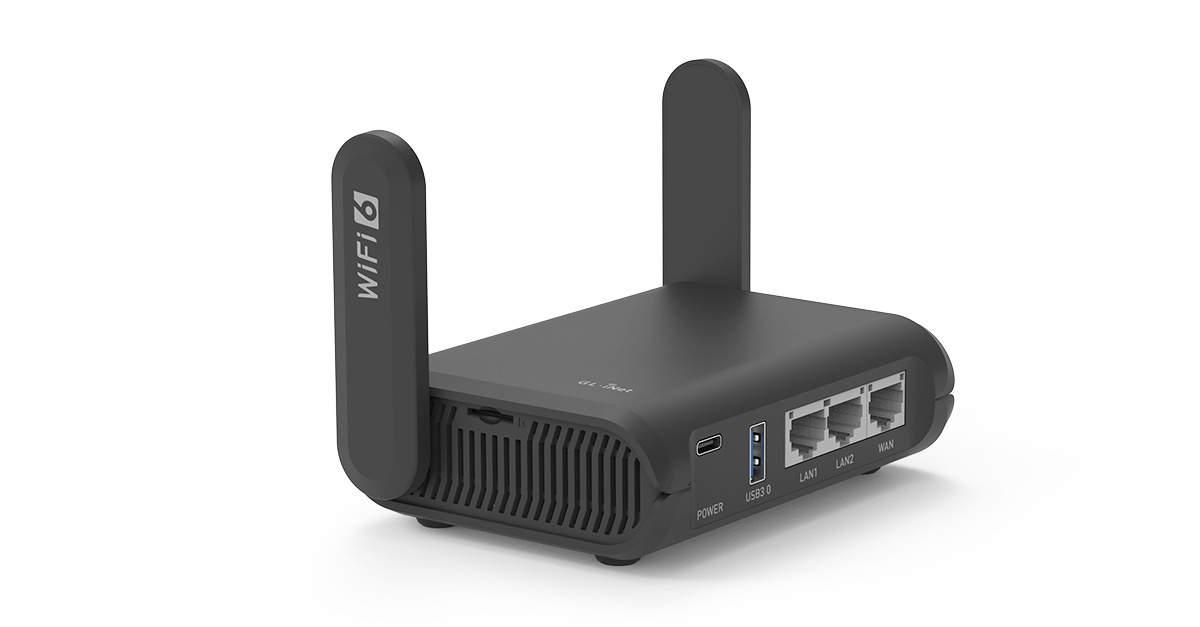
You need a router with WISP (Wireless ISP). GL.iNet travel routers have this feature working well. You have mentioned location in Europe in previous threads. I see models under €100 on Amazon Germany. You don't need anything latest and greatest for your use case. Something like this will be good enough:

 
You need a router with WISP (Wireless ISP). GL.iNet travel routers have this feature working well. You have mentioned location in Europe in previous threads. I see models under €100 on Amazon Germany. You don't need anything latest and greatest for your use case. Something like this will be good enough:

Thank you @Tech9.
WIll this plug into my switch hand out IP addresses to the connected devices and provide internet access to all the devices on the switch, or do I need to put a sim card in it to make that work.
I will have a look for one later, when my eyes stop watering, picked up a bug somewhere yesterday, its like reading in the rain with glasses.
 
Last edited:
The device has LAN ports, will provide Internet connectivity to whatever is connected to it like any other gateway. Just the WAN connection will be wireless (the WISP option) to your phone's hotspot.

I still believe with coverage in your location the best approach is gateway with SIM card from the same operator. I had to use mobile Internet service for some time in Europe, the plan was 100/40 for about €15/month with no contract. The operator provided some ZTE 5G Wi-Fi 6 residential gateway.
 
The device has LAN ports, will provide Internet connectivity to whatever is connected to it like any other gateway. Just the WAN connection will be wireless (the WISP option) to your phone's hotspot.

I still believe with coverage in your location the best approach is gateway with SIM card from the same operator. I had to use mobile Internet service for some time in Europe, the plan was 100/40 for about €15/month with no contract. The operator provided some ZTE 5G Wi-Fi 6 residential gateway.
I ordered the item you linked, hopefully it will work as advertised.
 
It was just an example of such device. I believe it will work for you. I have an older Slate travel router model, not using anymore because of better options, but it was doing well whatever it was designed for. The firmware was also stable with plenty for the intended purposes configuration options. GL.iNet offer good price/performance ratio devices. I also have one Brume 2 mini gateway and it works very well for my use case.
 
It was just an example of such device. I believe it will work for you. I have an older Slate travel router model, not using anymore because of better opner the intended purposes configuration options. GL.iNet offer good price/performance ratio devices. I also have one Brume 2 mini gateway and it works very well for my use case.
The GL.inet Slate AX (GL-AXT1800) seems on paper to do what I need, which is not really much at all, just need to be to back up my devices, so very light usage. GI.inet have some good videos, showing how to set up each and ever mode on the device. At this present time with the price of a Raspberry Pi4 and the associated case for keeping it cool and safe, and a quality SD card and power adapter it does not make sense to buy one for this project, as well as the rather temperamental issue mine seems to have the GL.inet seems the better option.
 
For anyone who wants to use a mobile phone to provide Internet access to
devices connected to their network switch, this little Router does it.
I received it today, unpacked and connected it to power, and to my computer
using an etnernet cable.
The default IP for the management window is 192.168.8.1, you will be prompted
to set a passowrd before you can continue.

All I had to do was set the router to Repeater mode, enter my mobile phones hotspot
Password and it all worked.
There are settings I changed such as default wireless passwords and the hostname,
but they don't need changed to make this work.
This is the model of Router I am talking about, Slate AX (GL-AXT1800)
This is the user guide https://docs.gl-inet.com/router/en/4/user_guide/gl-axt1800/
Below the video there are four links in a row, small print, I used the repeater guide for my purpose.
Thanks to @Tech9 for explaining the type of device I needed was one that supported WISP , Wireless Internet Service Provider functionality.
 
All I had to do was set the router to Repeater mode

This device supports Ethernet, Repeater, Tethering, and Cellular connection options. If your phone is connected via USB cable you have to use Tethering mode. If your phone makes Wi-Fi Hotspot - you have to use Cellular mode. In Repeater mode you don't have Router features anymore. It's a Repeater to the phone's Hotspot. Read the User Manual, please.
 
This device supports Ethernet, Repeater, Tethering, and Cellular connection options. If your phone is connected via USB cable you have to use Tethering mode. If your phone makes Wi-Fi Hotspot - you have to use Cellular mode. In Repeater mode you don't have Router features anymore. It's a Repeater to the phone's Hotspot. Read the User Manual, please.
I will test that out in a day or so, I have two functioning routers now that can both connect to the internet, excluding this Slate and a TP link that I did not even know had the WISP feature, I set it up yesterday and it works fine too.
Now that I have redundancy I will test the Slate and the TP Link to get them handing out IP's and provide Internet connectivity.
Thank's for pointing out the functions of the Slate, it oddly enough handed my Laptop an address yesterday when I was setting it up, I did not need to set an IP on my Laptop to connect to the device. This lead me to believe I was good to go.
 
I did not need to set an IP on my Laptop to connect to the device

I don't know why you had to set IPs manually before. Most gateway devices run DHCP server by default and the clients get an IP automatically. Getting Internet connection doesn't mean good to go. Your initial goal was to have a Router with specific WAN connection options. It's a very different role device than Repeater.
 
I don't know why you had to set IPs manually before. Most gateway devices run DHCP server by default and the clients get an IP automatically. Getting Internet connection doesn't mean good to go. Your initial goal was to have a Router with specific WAN connection options. It's a very different role device than Repeater.
My initial goal was to get a router that would allow access to any device connected to my switch.
This actually works with the configuration I have using he GLinet Slate.
It works because my switch seems to retain the IP 's associated with the various devices Mac addresses, when the leases run out then things will still work as my phone will give all the devices on the switch an IP when it is connected to the Slate via ethernet and the Slate is connected to my phone using repeater mode.
I even connected an ethernet cable from the Slate to a TV and my phone did indeed assign the TV an IP and connected it to the ethernet.

I will be setting up the Slate in the next few days to hand out IP 's in the range I currently use for my devices, and tether it to my phone over USB, as you pointed out no IP 's are handed out from the Slate using repeater mode, my phone actually does hand out IP 's.

I know very little about networking, but am slowly learning from people on here, and on other sites too.
My post regarding setting up the Slate and how it worked for me was simply that.
 
Last edited:

Similar threads

Latest threads

Support SNBForums w/ Amazon

If you'd like to support SNBForums, just use this link and buy anything on Amazon. Thanks!

Sign Up For SNBForums Daily Digest

Get an update of what's new every day delivered to your mailbox. Sign up here!

Members online

Back
Top