Hi,
This is not for now a major problem, but is a bit confusing:
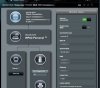
Although the internet seems to be working fine, since I installed the latest Merlin update for RT-AC66U, the router page constantly shows "Check Connection ..." status. Also, the 3 icons on the upper right corner of the page are now always dimmed (even when Wi-Fi is running). Any suggestions on what may be causing this?
Router RT-AC66U
Firmware Merlin 380.58
S
This is not for now a major problem, but is a bit confusing:
Although the internet seems to be working fine, since I installed the latest Merlin update for RT-AC66U, the router page constantly shows "Check Connection ..." status. Also, the 3 icons on the upper right corner of the page are now always dimmed (even when Wi-Fi is running). Any suggestions on what may be causing this?
Router RT-AC66U
Firmware Merlin 380.58
S