What's new

Is Roaming Assistant really running when it's disabled?

Ripshod

Part of the Furniture
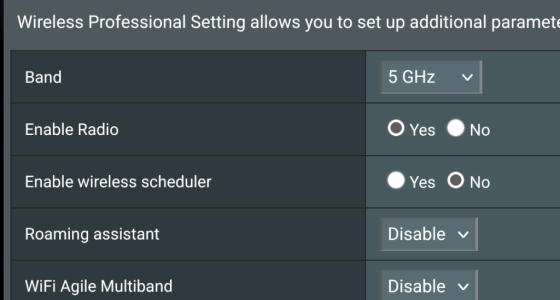
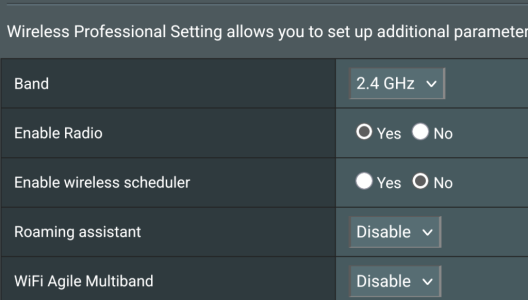
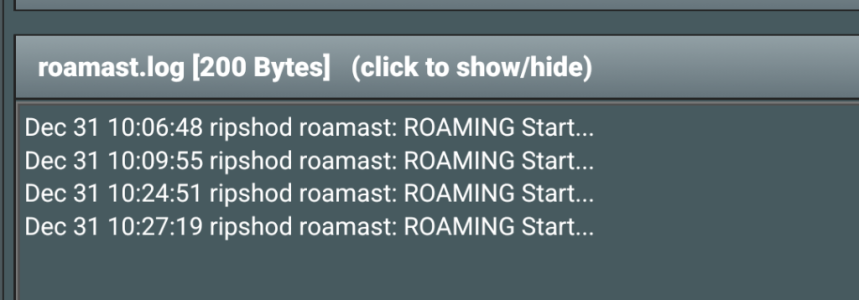
I've been seeing roamast messages in the log whenever I make changes to wifi channels despite it being disabled on both bands. Is this normal expected behaviour?
Screenshot_20251231-104459.pngScreenshot_20251231-104439.pngScreenshot_20251231-104410.png
 
I've been seeing roamast messages in the log whenever I make changes to wifi channels despite it being disabled on both bands. Is this normal expected behaviour?
View attachment 69750View attachment 69751View attachment 69752

What “Roaming Assistant = Disable” really means
On Asus routers (including the BE-88U):

Roaming Assistant = the client kick feature
When Enabled, the router:
Monitors RSSI.
Deauths clients below a threshold (e.g., -70 dBm).
Forces them to reconnect to a stronger AP/band.

So your UI setting is being respected.

Why roamast.log still shows “ROAMING Start…” This is the confusing part — but it’s expected behavior.

roamast (Roaming Assistant daemon) always runs in the background:

It initializes.
It scans.
It logs state changes.
It does NOT take action unless Roaming Assistant is enabled.

What you do NOT see….
When roaming is actually active, you would see log entries like:
deauth
disassociated due to RSSI
STA kicked
Explicit MAC addresses being forced off
You have none of those.
 
Last edited:
What “Roaming Assistant = Disable” really means
On Asus routers (including the BE-88U):

Roaming Assistant = the client kick feature
When Enabled, the router:
Monitors RSSI.
Deauths clients below a threshold (e.g., -70 dBm).
Forces them to reconnect to a stronger AP/band.

So your UI setting is being respected.

Why roamast.log still shows “ROAMING Start…” This is the confusing part — but it’s expected behavior.

roamast (Roaming Assistant daemon) always runs in the background:

It initializes.
It scans.
It logs state changes.
It does NOT take action unless Roaming Assistant is enabled.


What you do NOT see….
When roaming is actually active, you would see log entries like:
deauth
disassociated due to RSSI
STA kicked
Explicit MAC addresses being forced off
You have none of those.
I do have the deauth and disassociated in my logs, I just filtered them.
Things are going daft right now with dns errors and a laggy gui due to scMerlin's tailtaintdns - all I did was enable the 5GHz on my IoT network.
I'll spend some time right now doing a complete rebuild back as it was before the change.
 
I do have the deauth and disassociated in my logs, I just filtered them.
Things are going daft right now with dns errors and a laggy gui due to scMerlin's tailtaintdns - all I did was enable the 5GHz on my IoT network.
I'll spend some time right now doing a complete rebuild back as it was before the change.
My GT-BE98 Pro has been driving me crazy the last several weeks. It’s started with constant reboots. When I really dug into it, it was a flaky Amazon Firestick not playing nice. When I finally isolated those on their own VLAN and made very simplistic network setting for them, everything stabilized. The wife-unit is happier now that I’m not messing with it as much. My mindset forces me to tinker with stuff so I’ll be forced to go against my grain to leave it alone. Cheers sir.
 
Similar threads

Similar threads

Support SNBForums w/ Amazon

If you'd like to support SNBForums, just use this link and buy anything on Amazon. Thanks!

Sign Up For SNBForums Daily Digest

Get an update of what's new every day delivered to your mailbox. Sign up here!
Back
Top