
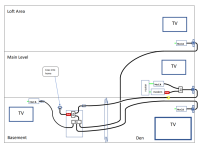
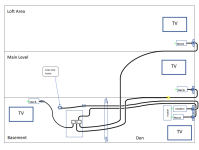
Converting older home to Moca using existing coax. Coax into home is now connected directly to cable to living room. Existing old splitter not connected. See photo. Want to use new splitter and move in cable to new one and then connect existing coax cables to basement and downstairs den and upstairs living room too using goCoax Moca 2.5 at each location with modem I’m purchasing (versus renting from Windstream/Kinetic who is discontinuing TV service April 1 but will provide internet). Any issues or concerns to address in setup changes? Or not a DIY project? Image won’t attach but you get the idea. Thanks!
Moca Conversion Old home
- Thread starter MaconDawg
- Start date
-
- Tags
- moca install

Similar threads


Similar threads
Similar threads
-
-
-
-
CAX30 dropping with Moca Setup all of a sudden
- Started by grumpaoriginal
- Replies: 11
-
-
-
MoCA setup to share both TV and DATA in the UK, some advice needed please.
- Started by DeadMode
- Replies: 9
Latest threads
-

-
Is there a paid version of Adguard that has more up to date protection
- Started by Notconnected
- Replies: 3
-
Interesting MAC address allocation on RT-AC3200
- Started by vibroverbus
- Replies: 0
-
-

Support SNBForums w/ Amazon
If you'd like to support SNBForums, just use this link and buy anything on Amazon. Thanks!
Sign Up For SNBForums Daily Digest
Get an update of what's new every day delivered to your mailbox. Sign up here!