What's new
  • SNBForums Code of Conduct

    SNBForums is a community for everyone, no matter what their level of experience.

    Please be tolerant and patient of others, especially newcomers. We are all here to share and learn!

    The rules are simple: Be patient, be nice, be helpful or be gone!

Need advice on additional router

Dazman63

New Around Here
Hey Guys,

I currently use the ASUS RT-AX86U as my main router. I did have another AX86U as part of my AiMesh using Ethernet backhaul, but I added the AC1900P and it’s not compatible with Ethernet backhaul. So they’re connected using WiFi.

I have 28 devices connected and the AC1900P has improved connectivity with my doorbell camera and garage door video camera.

So I was looking for a AX86U Pro, but they are all sold out. I want my AiMesh to be connected via Ethernet and can’t decide what to go with as a main router.

Any suggestions?

Thanks

Darryl
 
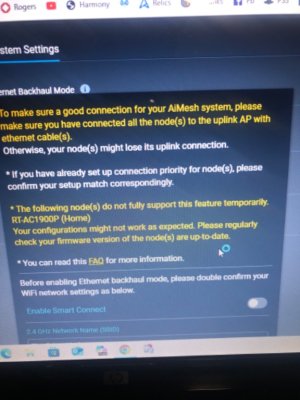
I tried it and it wouldn’t work and it gave we warnings saying it wasn’t compatible.

Maybe I was doing something wrong.
 
I have both RT-AX86U and RT-AC1900P and did multiple experiments with wired and wireless AiMesh some time ago. For AiMesh the way Asus made it work - stock Asuswrt on both routers and follow Asus FAQ.
 
This is the error I get, see attached photo.
 

Attachments

  • IMG_3997.jpeg
    IMG_3997.jpeg
    127.7 KB · Views: 53
factory reset the 1900P and the AX86U, reconfigure by hand, re-associate the node to the main. Keep both the node and main on ASUS stock firmware. Merlin is not needed there on the node anyway. Doesn't add anything for a node. . If that works, you can try flashing Merlin on the AX86U, factory reset, and hand configure. Keep the node powered off while doing. Then add the node back. See if that works.
 
RT-AX86U got a new ASUSwrt firmware 10/20/25. RT-AC1900P has new firmware 8/19/25. I could not find AC1900P on the Merlin website, but these are very new and likely newer than the GPL Merlin used, so I agree with @degrub to use stock firmware.


The "warning" you screenshot is the warning displayed when you have turned on Ethernet backhaul mode. It is not saying the AC1900P will not work. It is just saying make sure they are connected via Ethernet, otherwise the node will drop. If it did drop then I suspect a defective Ethernet cable to the RT-AC1900P.
 
Bring the AC1900P to the same room as the RT-AX86U. Connect Ethernet directly from one to the other. Turn off Ethernet Backhaul mode. Try to add the AC1900P by the find/add function. Move the AC1900P back to the place it was and reconnect the Ethernet. Verify it is connected via Ethernet Backhaul in the AiMesh Topology, then turn on Ethernet backhaul mode.

I have two central 8 port switches connected together. This acts as the hub to the 11 Ethernet ports around the house. Sometimes I find a router can not be found to add through too many switches I suspect, so I use the method above...
 
RT-AX86U got a new ASUSwrt firmware 10/20/25. RT-AC1900P has new firmware 8/19/25. I could not find AC1900P on the Merlin website, but these are very new and likely newer than the GPL Merlin used, so I agree with @degrub to use stock firmware.


The "warning" you screenshot is the warning displayed when you have turned on Ethernet backhaul mode. It is not saying the AC1900P will not work. It is just saying make sure they are connected via Ethernet, otherwise the node will drop. If it did drop then I suspect a defective Ethernet cable to the RT-AC1900P.
It does seem to be working fine and I will try the new firmware upgrade.

Thanks!
 
I’m using the non pro version of the AX86U as my main router. Would it be worth picking up the pro? I can get one for about $192 US.
 
I also have an RT-AX86U (non-Pro). I do not feel it is worth the money for the slight improvement the pro version has. (For example it still only has a single 2.5 Gb Ethernet port)...
 
That’s what I thought and I appreciate the confirmation.

I need to buy a good router and it’s proving to be a challenge. I like the GT-AX6000, but I think it’s being discontinued.
 
Just use what you have. AX-class devices were replaced by work in progress BE-class devices with ongoing issues.
 
I just wanted to provide an update.

After some digging, I found an updated version of Merlin’s firmware and it removed the warning, but no devices would connect to the AC1900P. So I disabled the Ethernet backhaul mode and then enabled it again and it all works fine.

I appreciate all the advice!
 

Similar threads

Latest threads

Support SNBForums w/ Amazon

If you'd like to support SNBForums, just use this link and buy anything on Amazon. Thanks!

Sign Up For SNBForums Daily Digest

Get an update of what's new every day delivered to your mailbox. Sign up here!
Back
Top