What's new

Preventing router access to a WireGuard client

postoronnim-v

Regular Contributor
I have an RT-BE88U router. The Wireguard VPN server (10.6.0.1/32) is enabled. The "Access Intranet" and "Allow DNS" options are disabled. However, a client connected to this server can access the router's login (192.168.50.1). For security, I tried enabling https login on the router. I successfully obtained a Let's Encrypt certificate, but I couldn't access the router via https://name.asuscomm.com:8443.
Questions: 1. Why is access to 192.168.50.1 open through the Wireguard VPN server?
2. Why isn't login using the Let's Encrypt certificate working?
 
1. Why is access to 192.168.50.1 open through the Wireguard VPN server?
Not sure why, but have you considered using the "Enable Access Restrictions" option in the Administration > System > Remote Access Config section? You can limit access to both web UI and SSH to only certain IP addresses. That might stop VPN clients from accessing the web UI.

PS: the Enable Access Restrictions tool tip:
"This feature allows you to restrict access to the wireless router via "Web UI" / "SSH" / "Telnet" to only specified IP addresses and networks from WAN (if enabled) or LAN sides. "Telnet" access from WAN side is forbidden."
 
but have you considered using the "Enable Access Restrictions" option in the Administration >
Thanks for the solution. I didn't use this because I thought it would only work with WAN access enabled. Now this will solve the router login issue. But what about the local network? Does this mean any Wireguard VPN server client can access devices on the router's local network?
 
Does this mean any Wireguard VPN server client can access devices on the router's local network?
Yes, that's intended if you use the default settings. Disable "Access Intranet" if you don't want this.
 
Just tested, router is accessible from the Internet, but the rest of the network is not. I believe this is intended. No-one can login without the login details so not an issue. Who's gonna be using this VPN?
 
Last edited:
Thanks for the solution. I didn't use this because I thought it would only work with WAN access enabled. Now this will solve the router login issue. But what about the local network? Does this mean any Wireguard VPN server client can access devices on the router's local network?
A suggestion. In the Wireguard client program on the client device enable the option (if available) "Exclude Private IP's" and save the change they try connecting again and see if you can access the router or other local network devices. That seems to work for me on Android to prevent access to the router's IP address and other local network clients.

For what ever reason I experienced the same with the Wireguard server with the Access Intranet option disabled. The Wireguard client could access the router's admin page. With the client side option Exclude Private IP's enabled I couldn't access the router's GUI.

Edit to add: One can also likely modify the client entry on the WireGuard server to exclude local IP addresses.
 
Last edited:
n the Wireguard client program on the client device enable the option (if available) "Exclude Private IP's"
For what ever reason I experienced the same with the Wireguard server with the Access Intranet option disabled
I have a problem here. I don't have full control over the device the client is installed on. It's an intermediate node (bridge) installed on the VPS. If it's compromised, it would automatically give access to my router's local network. It's obvious. It's an annoying bug.
 
Surely, if that setting is client side, anyone with wireguard access can change it on their device?
 
Surely, if that setting is client side, anyone with wireguard access can change it on their device?
we are talking about this setting

In the Wireguard client program on the client device enable the option (if available) "Exclude Private IP's" and save the change they try connecting again and see if you can access the router or other local network devices. That seems to work for me on Android to prevent access to the router's IP address and other local network clients.
It turns out that anyone who gains access to the Wireguard server client automatically gains access to the local network. For example, I gained access to a drive connected to the router.
 
As always it can only be trusted as much as those you give the config to.
 
@postoronnim-v try the following. It will likely involve having to generate a new set of Wireguard client keys and you'll likely have to import the new keys on the client device.

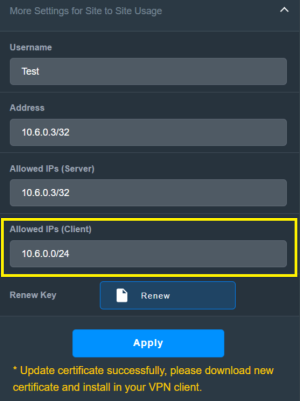
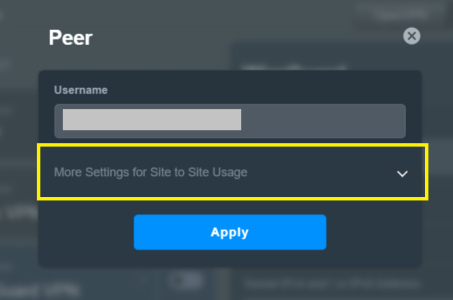
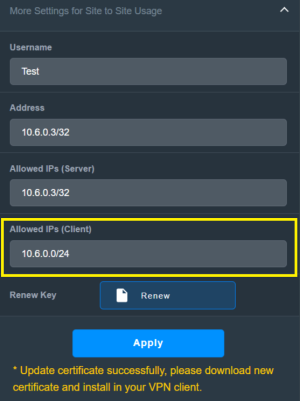
In the Wireguard server section create a new client or edit an existing client. When creating the client select the More Settings for Site to Site Usage option. For an existing client select the More Settings for Site to Site Usage. Then change the Allowed IP's (Client) value from 0.0.0.0/0 to a value like the following 10.6.0.0/24 (adjust for your settings). Apply the settings. Then either use the QR code option on the Client app to import the Wireguard client keys or export the client keys and import them into the Client app. Then connect the Client app to the Wireguard server and test if you can access the router or any local network clients.

Example More Settings option on Wireguard Server Client page.
WireguardServer3.png

Post edited to correct value for Allowed IPs (Client).
 
Last edited:
This setting is on the client. The router acts as the server. The server (router) can't restrict this. But such an option is available in its settings.
According to:
https://github.com/RMerl/asuswrt-merlin.ng/blob/main/release/src/router/rc/wireguard.c the access intranet switch only prevents traffic from being forwarded to lan.
The Gui is a service running locally on the router, and from what I see that is always allowed in the firewall and
Code:
admin@RT-AX86U_Pro-BBC8:/tmp/home/root# netstat -ntlp | grep httpd
tcp        0      0 127.0.0.1:80            0.0.0.0:*        LISTEN      15114/httpd
tcp        0      0 192.168.128.1:80        0.0.0.0:*        LISTEN      15114/httpd
tcp        0      0 :::80                   :::*        LISTEN      15114/httpd
Looks like the gui is listening to all source address allowed by the firewall.

I could understand why some would want to prevent this while others may not. Regardless I think such prevention is currently not found under the Wireguard settings. Possibly under Gui settings as already mentioned?

What about ssh access? Those are granted as well from what I can see.

If you are in control of the VPS you could always prevent access to router ip there via a firewall rule?
 
Then change the Allowed IP's value from 0.0.0.0/0 to the same value as Address and Allowed IP (Server).
This didn't solve the access issue. Furthermore, this setting isn't transferred to the client (it doesn't work), and changing it on the server doesn't restrict access.
 
@bennor those settings don't exist on the RT-BE88U.
What does your WireGuard Server screen look like on the RT-BE88U?

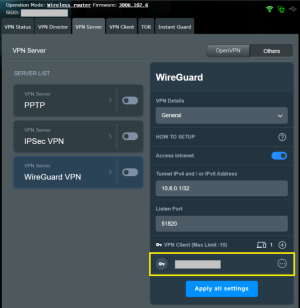
Here is how it looks on an RT-AX86U Pro.
WireguardServer1.png
WireguardServer2.png
WireguardServer3.png

This didn't solve the access issue. Furthermore, this setting isn't transferred to the client (it doesn't work), and changing it on the server doesn't restrict access.
Did you create a new Wireguard entry on the client device with the new changes that were applied on the Wireguard server client entry? Did a quick test and it appeared to work on my end to block access to the router when using the Address value that ends with 10.x.x..0/24 as the Allowed IP's (Client) value. See example above.

An AI response on what "wireguard allowed IP's client" is:
"In WireGuard, the "AllowedIPs" setting for a client specifies which IP addresses or subnets the client is allowed to route through the VPN tunnel."

Post edited to fix incorrect value in Allowed IP's (Client) entry.
 
Last edited:
If you are in control of the VPS you could always prevent access to router ip there via a firewall rule?
I assume that to control a VPS, you need to physically control it. I live in a country where "anything is possible." I view this VPS as a section of the network that isn't 100% under my control (it's located in my country). I'm looking for a way to restrict access to my router. I have 100% control over it.
 

Support SNBForums w/ Amazon

If you'd like to support SNBForums, just use this link and buy anything on Amazon. Thanks!

Sign Up For SNBForums Daily Digest

Get an update of what's new every day delivered to your mailbox. Sign up here!
Back
Top