What's new

Release RT-AX88U Pro Firmware Version 3.0.0.6.102_37421 (2026/03/24)

wol-shiver

Regular Contributor
ASUS RT-AX88U Pro Firmware version 3.0.0.6.102_37421
Version 3.0.0.6.102_37421 59.15 MB 2026/03/24

https://www.asus.com/supportonly/rt-ax88u pro/helpdesk_bios/

Bug Fixes and Enhancements
- Improved WiFi roaming behavior to reduce temporary disconnections in some scenarios.
- Improved roaming compatibility for certain client devices.
- Improved App Remote Connection stability in certain scenarios to prevent unexpected connection drops.
- Improved AiMesh onboarding reliability, addressing cases where the onboarding process could stall and fail to complete.
- Fixed an issue where the guest network client list might not display correctly in certain scenarios.
- Fixed an issue with Web history display.
- Fixed an issue where the app could not remove offline devices.
- Fixed an issue where specific IPv6 configuration flows could cause IPv6 connectivity problems on the main network.
- Fixed an issue where enabling System Diagnostics and staying on a specific page could cause repeated reboots.

Security Fixes
- Enhanced input validation and protection to reduce the risk of command injection and SQL injection.
- Hardened environment variable handling.
- Hardened protections around specific logging/command composition flows to reduce potential injection risks.
- Patched a command injection risk in a specific network diagnostic function.
We recommend upgrading to this version to maintain best protection.
 
Anyone know why this version is listed on the Asus support website, but a search for new firmware in the app and web GUI says no new firmware available?

Is it just a latency issue?
 
Anyone know why this version is listed on the Asus support website, but a search for new firmware in the app and web GUI says no new firmware available?

Is it just a latency issue?
Situation normal, it often takes a few days for all of the company piece parts to get on the same page.
 
Situation normal, it often takes a few days for all of the company piece parts to get on the same page.
OK thanks. Seems like the query would check a config DB that would get updated in real time when a new version is uploaded.

But I guess I can do a manual update if I can’t wait. 😀
 
I recently installed beta Version:9.0.0.6.102_37342 which fixed guest network pro’s GUI missing dhcp reservation options. I’m foggy on it, but I think an update took it away over a year ago on mine. Back then I just jumped to Merlin, but I started using mesh nodes this month and wanted to see if stock firmware handled my devices better. I also really need reservations to tie down some flaky IOT devices with dns/firewall, and saw the feature not there to set. I reset to factory, rescue loaded, and nothing restored the GUI to manage them till the beta did. Again foggy on the details, maybe I confused if it should have ever been there.

Does anyone have the beta I’m on downloaded in case I want to try 3.0.0.6.102_37421 ? I got it automatically from the GUI and don’t want to screw up if it’s not offered to me later. Then again, maybe not touching things because everything seems to be working well now.
 
I recently installed beta Version:9.0.0.6.102_37342 which fixed guest network pro’s GUI missing dhcp reservation options. I’m foggy on it, but I think an update took it away over a year ago on mine. Back then I just jumped to Merlin, but I started using mesh nodes this month and wanted to see if stock firmware handled my devices better. I also really need reservations to tie down some flaky IOT devices with dns/firewall, and saw the feature not there to set. I reset to factory, rescue loaded, and nothing restored the GUI to manage them till the beta did. Again foggy on the details, maybe I confused if it should have ever been there.

Does anyone have the beta I’m on downloaded in case I want to try 3.0.0.6.102_37421 ? I got it automatically from the GUI and don’t want to screw up if it’s not offered to me later. Then again, maybe not touching things because everything seems to be working well now.
FWIW - The manual reservations are still in the AX86U Pro firmware _37421 so the should be in the same version for your AX88U Pro. Just do an upgrade from the beta and you shouldn't loose anything.
 
FWIW - The manual reservations are still in the AX86U Pro firmware _37421 so the should be in the same version for your AX88U Pro. Just do an upgrade from the beta and you shouldn't loose anything.

I’ll totally give it a go if I can get back to beta if needed. Anyway to backup your own firmware file?
 
OK thanks. Seems like the query would check a config DB that would get updated in real time when a new version is uploaded.

But I guess I can do a manual update if I can’t wait. 😀
Did a manual update last night. So far, so good for the main router and AI Mesh node. No observed issues.
 
Noticed one thing that’s just started since update. Not sure really why it’s happening or if it can be suppressed.

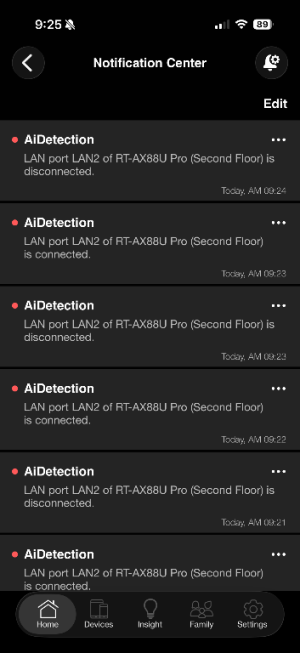
I see hundreds of messages from “AIDetection” that tell me wired LAN ports are “connected” and “disconnected” all within fractions of a second, over and over.

Anyone know what’s up?
 
Noticed one thing that’s just started since update. Not sure really why it’s happening or if it can be suppressed.

I see hundreds of messages from “AIDetection” that tell me wired LAN ports are “connected” and “disconnected” all within fractions of a second, over and over.

Anyone know what’s up?
Been happening since a fw or two for me, from the Asus app. It seems like when something goes into standby and changes link speed like some do in the phy to save power, it picks it up as a reconnection, where as it ignored it before
 
Been happening since a fw or two for me, from the Asus app. It seems like when something goes into standby and changes link speed like some do in the phy to save power, it picks it up as a reconnection, where as it ignored it before
Thanks. Could be, but if that was the case on my end, I’d expect it would only happen after a period of non-use or when a link goes to standby, rather than over and over.
 
Noticed one thing that’s just started since update. Not sure really why it’s happening or if it can be suppressed.

I see hundreds of messages from “AIDetection” that tell me wired LAN ports are “connected” and “disconnected” all within fractions of a second, over and over.

Anyone know what’s up?
Here’s what’s happening, constantly, since the update. And while the screenshot shows one specific router and port, it’s been happening for both routers and multiple ports.
 

Attachments

  • IMG_2763.png
    IMG_2763.png
    56.7 KB · Views: 39
Here’s what’s happening, constantly, since the update. And while the screenshot shows one specific router and port, it’s been happening for both routers and multiple ports.
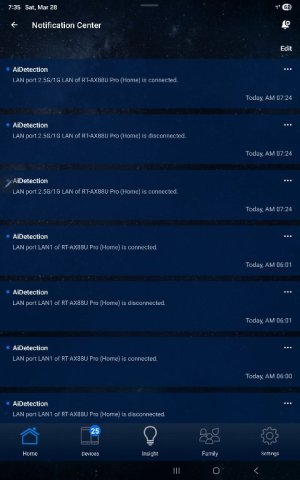
Similar situation here. I have one router connected to Xfinity using a Netgear CM2050V. My LAN2 port feeds a POE switch with lots of activity. No other ports showing AI notifications. I have had the firmware update in place for 24 hours or so.
 

Attachments

  • Screenshot_20260328_073502_ASUS Router.jpg
    Screenshot_20260328_073502_ASUS Router.jpg
    50.4 KB · Views: 30
FWIW, here are some of the new screens/functions I have seen with 3.0.0.6.102_37421.

1. Network Map > Clients > Client Status --> individual VLAN clients now show an option to "Block Internet Access" for any individual VLAN device. The "Time Schedule" option is also now available on the same screen.
1774727330626.png


2. Guest Network Pro > VLAN > Access InTRAnet now provides a list of all router VLANs allowing users to specify which VLANs are can be connected to other VLANs.

Asus describes this function as "Enable customized traffic access controls between different networks."
1774727149534.png


I have not fully tested these new features, but my simple tests show they do work.

Finally, a few steps closer to a router with "- PRO" functionality.
 
Last edited:
FWIW, here are some of the new screens/functions I have seen with 3.0.0.6.102_37421.
<snip>
Made some comments about these new features (Access Intranet and Guest Network Pro client Block Interent) after some very quick and dirty testing in this post over in the RT-AX86U Pro Firmware Version 3.0.0.6.102_37421 (2026/03/24) discussion. May be of interest to some.
 
I've upgraded and reconfigured and I like it.

FYI I captured this privacy notice during initial setup before configuration:

"Dear users, thank you for your ongoing support of this product. In order to comply with privacy regulations in various countries and further protect your data, we have updated the ASUS Privacy Notice. Please update it before using ASUS networking products.

Please be advised that disagreeing with ASUS PRIVACY NOTICE may result in the inability to update to the latest firmware version and unable to receive the most up-to-date protection on your ASUS networking products; However, to protect the security of your router and ensure the compliance with laws, for upgrades addressing important security issues or meeting legal/regulatory requirements , those upgrades will still be downloaded and installed automatically.

Declining certain information may limit the functionality of the following features that rely on that information.
Account Binding
Config transfer
DDNS
Alexa
IFTTT
Google Assistant
Remote Connection
Notification
AFC
ASUS Expert Site Manager"

OE
 
FYI I captured this privacy notice during initial setup before configuration:

There are scare tactics used in this message. You can always upgrade the firmware of your router manually. And no matter if you agree or disagree ASUS will be still tracking your router. Otherwise they have no way to know what firmware you are running and if it has critical vulnerability so they can push an upgrade to you.
 

Latest threads

Support SNBForums w/ Amazon

If you'd like to support SNBForums, just use this link and buy anything on Amazon. Thanks!

Sign Up For SNBForums Daily Digest

Get an update of what's new every day delivered to your mailbox. Sign up here!
Back
Top