What's new
  • SNBForums Code of Conduct

    SNBForums is a community for everyone, no matter what their level of experience.

    Please be tolerant and patient of others, especially newcomers. We are all here to share and learn!

    The rules are simple: Be patient, be nice, be helpful or be gone!

Trying to use my ZTE Home Gateway Router as a modem only with my AX-86U Pro, please help.

Zakalwe

Regular Contributor
1764695226442.png


1764695338851.png
1764695355625.png


1764695402422.png
 

Attachments

  • 1764695446730.png
    1764695446730.png
    100.3 KB · Views: 15
1764695467515.png
1764695513009.png


1764695541902.png
1764695559256.png


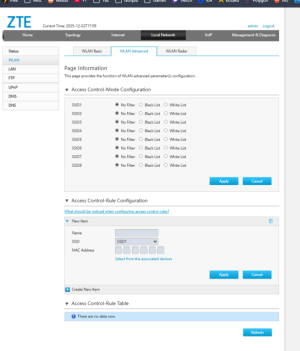
These are all the pages on the ZTE router. What should I set each thing as, if I want to use my AX86U-Pro as my main router @ 192.168.2.95? (address is already configured to be that for my unraid server stuff)

How should I set up the AX up? Right now it is setup to use DUAL-WAN so I could tether my phone to it. I tried changing / removing that and still couldn't get an internet connection from my PC even though the router said it was online.
 
£2 in XMR if anyone can quickly help me get this up and running, can use discord/voip or something. Thank you guys,
 
Search how to bridge zxhn h3600

Your router/modem combo needs to be in bridge mode. However, your ISP may have put a custom firmware on that prevents bridging. In this case you can disable the WIFI on the modem/router and just connect the LAN port to the WAN of the AX86U
 
>Your router/modem combo needs to be in bridge mode.

seriously no cable connection is possible you need to hook it up to the routers wifi? Is there another bare-bones modem I could get that might work and let me use cable?
 
read more closely please -
If the modem/router cannot be put into bridge mode -

"disable the WIFI on the modem/router and just connect the LAN port to the WAN of the AX86U" using an ethernet cable.

If it can be put in bridge mode, then just connect an ethernet cable between the modem and your router WAN port. Done.
 
I did put the 1st lan port to the WAN of my AX86U, but I either get 'cable unplugged' or 'your isps dhcp does not function correctly'.

My router is already setup to use 192.168.2.1, and the ZTE uses 192.168.1.1 by default, I disabled DHCP on the ZTE, hooked it up, but I can't get internet access via the AC86U.


Any more advice please?

>However, your ISP may have put a custom firmware on that prevents bridging. In this case you can disable the WIFI on the modem/router and just connect the LAN port to the WAN of the AX86U

Yep I disabled the wifi on the ZTE anyway since I don't use it. There's no way to change the 'work mode' of the router, and I did the ports as said.
 
"cable unplugged" can mean several things -
port turned off or malfunction
physical connection issue between the cable termination and the port "fingers" ( little wires that are supposed to make contact with the termination wires)
Try a different LAN port at least and/or different cable. You can also try wiggling the cable in the port if it is loose and doesn't "snap" in securely.

"your isps dhcp does not function correctly" means that the WAN port of the ASUS is not getting a TCP/IP address . i believe there are several options for DHCP type in the ASUS config. i don't have them handy. But if you turned off the DHCP server in the ZTE, that could also be consistent with the error message. Perhaps "bridge mode" is not actually functioning ? Perhaps the ASUS DHCP mode needs to change to get an address while it is in "bridge mode" ?

Restoring the DHCP server in the ZTE and double NATing should not cause any issues for you. Only if you are running services to the outside world would that matter.
 
Well I have a 130TB unraid server, I really can't double nat. Am I going to have to reset the ASUS? I'd like to save my amtm setup and DHCP information.
 
There are other threads that outline how to save those setups. i don't have direct experience. Should be in the Merlin threads.
Search for your modem/router as well. i recall a few others with one asking questions. i have exhausted my knowledge for this setup.
 
This ISP is perhaps not the best choice for the intended purpose. Seems like the modem doesn't have bridge mode option and most mobile operator ISPs don't allow incoming connections by default. I have no information who this ISP is and what they offer. Can't comment what is possible and what isn't. The best source of information is the ISP support.
 

Support SNBForums w/ Amazon

If you'd like to support SNBForums, just use this link and buy anything on Amazon. Thanks!

Sign Up For SNBForums Daily Digest

Get an update of what's new every day delivered to your mailbox. Sign up here!
Back
Top