What's new

VPNMON VPNMON-R3 v1.8.2 -Nov 23, 2025- Monitor OpenVPN/Wireguard WAN/Dual-WAN Health & Random Reset Multiple Connections (Available in AMTM!) - v1.8.3Beta4

One final beta of VPNMON-R3 1.8.3b3 before the end of the year... mostly addressing timer tracking, which has been bugging me for a while now. This should hopefully provide some more Tx/Rx accuracy if you venture off the main UI into the config menus, and then come back.

What's new?
- PATCH: Improved the tracking of the timer
, plus any time spent in other menus outside of the regular timer, to provide a more accurate view of the Tx/Rx stats.

Download link:
Code:
curl --retry 3 "https://raw.githubusercontent.com/ViktorJp/VPNMON-R3/develop/vpnmon-r3.sh" -o "/jffs/scripts/vpnmon-r3.sh" && chmod 755 "/jffs/scripts/vpnmon-r3.sh"

Significant Screenshots:
None today!
 
Last edited:
One final beta of VPNMON-R3 1.8.3b3 before the end of the year... mostly addressing timer tracking, which has been bugging me for a while now. This should hopefully provide some more Tx/Rx accuracy if you venture off the main UI into the config menus, and then come back.

What's new?
- PATCH: Improved the tracking of the timer
, plus any time spent in other menus outside of the regular timer, to provide a more accurate view of the Tx/Rx stats.

Download link:
Code:
curl --retry 3 "https://raw.githubusercontent.com/ViktorJp/VPNMON-R3/develop/vpnmon-r3.sh" -o "/jffs/scripts/vpnmon-r3.sh" && chmod 755 "/jffs/scripts/vpnmon-r3.sh

Significant Screenshots:
None today!
You missed a " at the end
 
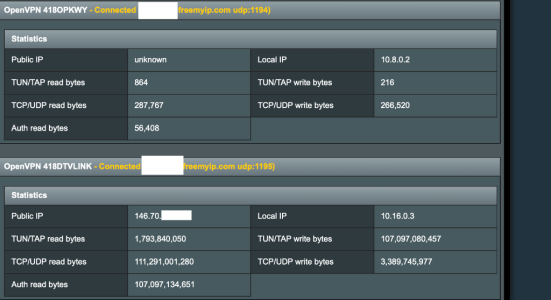
@Viktor Jaep I love this add-on & thanks for all the work on it !!.. However I'm having a problem with something - I am doing a two type vpn thing meaning I have 2 servers running on my home router and then on my remote router I'm connecting to these two servers. The issue I'm having is one of my servers isn't showing a public IP or it says unknown but it connects and is working.. Your add-on seems to get stuck meaning the add-on just stops doing anything in SSH I can't even press C to show configuration -- eventually I see retry or something -- is there a way you can have an option to ignore the public IP -- I'm just using your add-on to reconnect the server with port UDP 1194 if the vpn ever stops.
 

Attachments

  • Screenshot 2025-12-28 at 11.03.51 AM.png
    Screenshot 2025-12-28 at 11.03.51 AM.png
    119.3 KB · Views: 8
@Viktor Jaep I love this add-on & thanks for all the work on it !!.. However I'm having a problem with something - I am doing a two type vpn thing meaning I have 2 servers running on my home router and then on my remote router I'm connecting to these two servers. The issue I'm having is one of my servers isn't showing a public IP or it says unknown but it connects and is working.. Your add-on seems to get stuck meaning the add-on just stops doing anything in SSH I can't even press C to show configuration -- eventually I see retry or something -- is there a way you can have an option to ignore the public IP -- I'm just using your add-on to reconnect the server with port UDP 1194 if the vpn ever stops.
Could you show me where things get stuck in VPNMON? Could you send a screenshot of that please? I'll see what can be done...

Another troubleshooting step... try "unmonitoring" that particular troublesome VPN slot in VPNMON. Make sure the green X is not active.
 
Last edited:
Could you show me where things get stuck in VPNMON? Could you send a screenshot of that please? I'll see what can be done...

Another troubleshooting step... try "unmonitoring" that particular troublesome VPN slot in VPNMON. Make sure the green X is not active.
I have sent you a direct message !
 
So it looks like @ComputerSteve was able to come up with a workaround for anyone else using this particular DDNS setup that he's using through freemyip.com. Apparently each VPN connection points to the same host, but uses different ports, and believe that one or more tunnels somehow get bonded, preventing one or more of them from being able to pass traffic, or report on a public WAN IP. Looks like this keeps VPNMON fully functional, and is somehow able to get the problem tunnel to report a legit WAN IP.

Here's his fix:

Add this to your firewall-startfile (using the correct 10.x network for your problem tunnel):
Code:
# NAT OpenVPN Server 1 subnet (dual-WAN safe)
iptables -t nat -C POSTROUTING -s 10.20.0.0/24 -j MASQUERADE 2>/dev/null \
|| iptables -t nat -A POSTROUTING -s 10.20.0.0/24 -j MASQUERADE
 
Beta 4 is out based on a small improvement brought up by @ComputerSteve's issue he was experiencing today. Let's see if this helps improve performance on those occasions the tunnel experiences connectivity issues!

What's new?
- PATCH:
Based on some feedback that @ComputerSteve was experiencing, I've optimized both the VPN and WG connectivity tests to fail the curl test if the ping test fails. It seems the ping test will fail pretty quickly, while the curl test could hang in there for quite some time before indicating a fail. This should help resolve some of the sluggishness you would see if any of your tunnels are misbehaving.

Download link:
Code:
curl --retry 3 "https://raw.githubusercontent.com/ViktorJp/VPNMON-R3/develop/vpnmon-r3.sh" -o "/jffs/scripts/vpnmon-r3.sh" && chmod 755 "/jffs/scripts/vpnmon-r3.sh"

Significant Screenshots:
None today!
 

Similar threads

Support SNBForums w/ Amazon

If you'd like to support SNBForums, just use this link and buy anything on Amazon. Thanks!

Sign Up For SNBForums Daily Digest

Get an update of what's new every day delivered to your mailbox. Sign up here!
Back
Top