What's new
  • SNBForums Code of Conduct

    SNBForums is a community for everyone, no matter what their level of experience.

    Please be tolerant and patient of others, especially newcomers. We are all here to share and learn!

    The rules are simple: Be patient, be nice, be helpful or be gone!

WAN IP (eth0) wrong?

archiel

Very Senior Member
The WAN IP reported on Network Status > Internet Status is not the actual WAN IP.

I first noticed this when I could not connect to the router over Wireguard. Looking further the WAN showing in Network Status > Internet Status and via ifconfig eth0 is 100.69.119.85 which tallies with System Log > Routing Table showing the IPv4 gateway as 100.69.119.1.

However look at the system log I can see
Code:
Dec  8 10:03:08 Router inadyn[10421]: alias address=<95.214.228.171>
Dec  8 10:03:08 Router inadyn[10421]: request<GET /ddns/update.jsp?hostname=xxxxxx.asuscomm.com&myip=95.214.228.171&model=RT-AX88U&fw_ver=3.0.0.4.388.10_2 HTTP/1.0

where 95.214.228.171 is also given running any tool like Browserleaks, ipleak.net etc.

I have cold rebooted both the router and ONT (adtran) and in each case while the WAN IP address detected by inadyn, ipleak, browserleaks, etc changes, the WAN address shown on the router stays stuck at 100.69.119.85.

I was running 3004.388.11_alpha1 but reverted to 3004.388.10_2 in case this was the issue, but it made no difference.

Before I do a full reset and rebuild from scratch - can anyone suggest what else I can try or what may be causing this?

Thank you
 
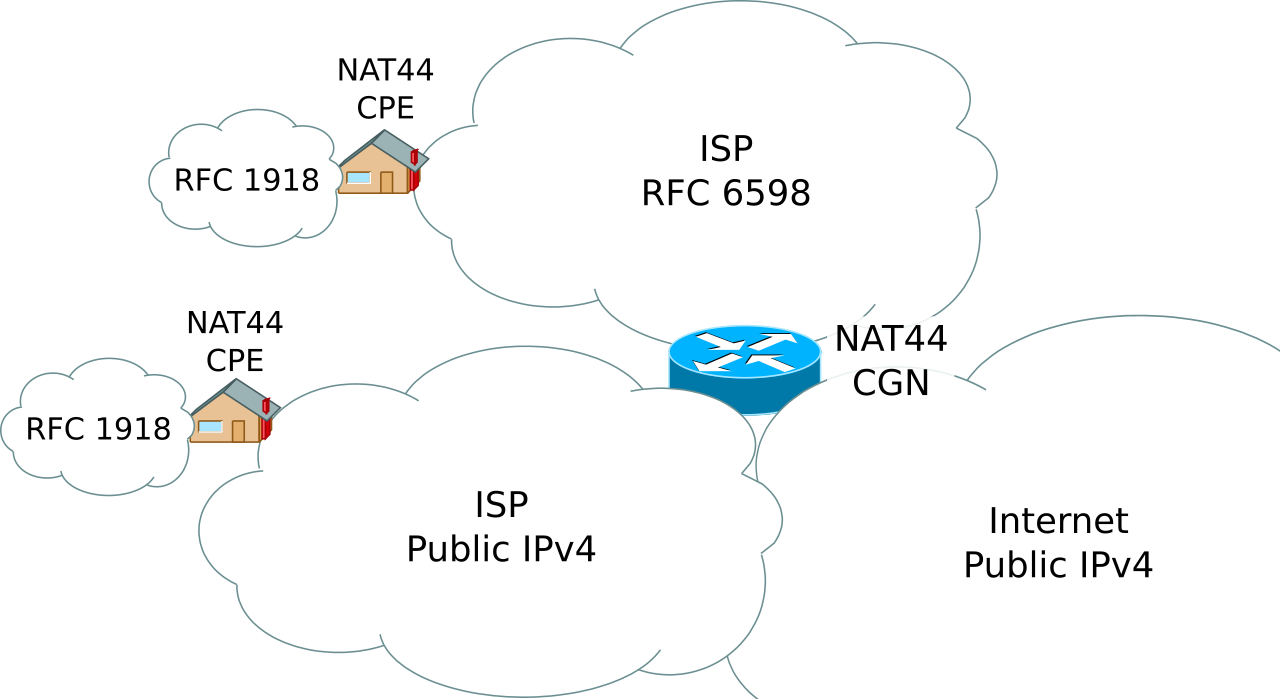
You are behind CG-NAT. The WAN IP you get is private address, there is an ISP Router doing NAT upstream with the actual public shared WAN IP you see with your DDNS, but you can't use this IP for your own services.
 
Last edited:
Your ISP is using CGNAT.
Bah humbug.... i just renewed my contract last Friday, which must be when they moved me to CGNAT - also explains why IPv6 is reporting correctly. As I still want to connect to the LAN when away from home, can you suggest where I start - ideally via the WireGuard already configured.
 
Bah humbug.... i just renewed my contract last Friday, which must be when they moved me to CGNAT - also explains why IPv6 is reporting correctly. As I still want to connect to the LAN when away from home, can you suggest where I start - ideally via the WireGuard already configured.
You can call your ISP and see if they are willing to give you a public IP. Otherwise, connect to your network through IPv6 as you have already indicated that you are getting an ipv6 address
 
You can call your ISP and see if they are willing to give you a public IP. Otherwise, connect to your network through IPv6 as you have already indicated that you are getting an ipv6 address
Many thanks to everyone who helped, after a very protracted call I have manged to end up with a 2.5Gbps link in lieu of my old 1Gbps for a net increase of £1.50 pm, which means I now have a public IPv4 WAN address again. So all is good until December 2027 😅

Next issue, what should I replace my RT-AX88U with, to make use of the faster speed, I will create a new thread for this?
 
Next issue, what should I replace my RT-AX88U with, to make use of the faster speed

Don't chase the ISP speed. Investment in Speed Test with minimal user experience improvements.
 
Many thanks to everyone who helped, after a very protracted call I have manged to end up with a 2.5Gbps link in lieu of my old 1Gbps for a net increase of £1.50 pm, which means I now have a public IPv4 WAN address again. So all is good until December 2027 😅

Next issue, what should I replace my RT-AX88U with, to make use of the faster speed, I will create a new thread for this?
Bonus!! Funny story with my ISP (Bell Canada Business) - and I put this out there for @Tech9 - I was offered a 1.5 Gbits/1 Gbits service on a special offer. A big step up from the 75/75 mbits service I was using. Not needing a 1.5 GBits service, I tried to get a lower speed service for a cheaper price. To go with a lower speed service would have actually cost me more. Good old Bell! That led me to buy my AX86U Pro - two months later Merlin dropped the 388 support for it .... grrrr.
 
I don't care much how faster above Gigabit the ISP line is. Not changing my equipment for no reason. In North America I have 1000/50 and 300/30, in Europe 300/40 and 100/40 with 20/1 backup. No much of a difference in daily online activities. I don't participate in speed tests competitions and rarely do large downloads.
 

Support SNBForums w/ Amazon

If you'd like to support SNBForums, just use this link and buy anything on Amazon. Thanks!

Sign Up For SNBForums Daily Digest

Get an update of what's new every day delivered to your mailbox. Sign up here!
Back
Top