What's new

Weak wifi signal on AX86U

j911

Occasional Visitor
I have an RT-AX86U which I bought faulty from eBay as a dead unit. I found a repair guide and removed a faulty capacitor which was causing a short and the pad is now empty. The router is now working and I have flashed merlin firmware on it but the wifi signal for both 2.4 and 5GHz bands is really weak even with the antennas attached.
I'm not an electronics expert but can do basic soldering. Is the weak signal due to the missing capacitor, not sure what the value of it should be or is it something else?

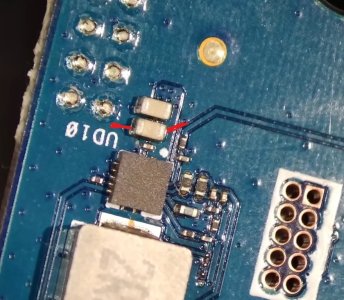
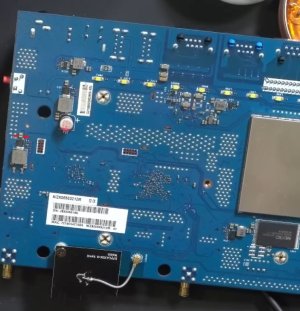
For reference this is the faulty capacitor in the attached images.
 

Attachments

  • AX86U 1.jpg
    AX86U 1.jpg
    102.4 KB · Views: 11
  • AX86U 2.jpg
    AX86U 2.jpg
    140.6 KB · Views: 11
Found some detailed PCB pictures online and the marking on this VRM is AEAM 677. Can't be 100% sure, but most likely similar to this one. There is a reference application in the PDF, trace the PCB and try to match the components. This may help you find the C value. Check Vout, most likely 3.3V. Trace what is this VRM supplying. My or may not be related to the Wi-Fi issue. Good luck!
 
Last edited:
This C looks like just a filter 22µF on Vin, ASUS used 2x in parallel, the small R next is perhaps 500k to EN like on reference application. The missing C itself is unlikely to cause the Wi-Fi issue. This router was probably hit by high voltage through power plug. Bad power supply, lightning, etc. SMD capacitors fail short on overvoltage. There are 5-6 more VRMs inside, you may want to check them all.
 

Latest threads

Support SNBForums w/ Amazon

If you'd like to support SNBForums, just use this link and buy anything on Amazon. Thanks!

Sign Up For SNBForums Daily Digest

Get an update of what's new every day delivered to your mailbox. Sign up here!
Back
Top