
Notconnected
Regular Contributor
Opened up an 2017 Dell Optiplex 7010.
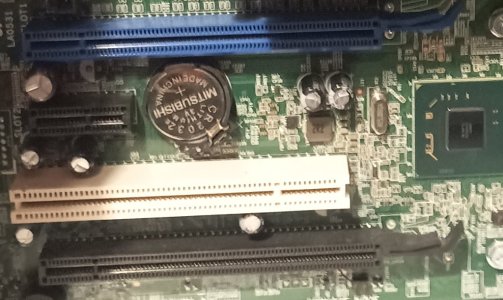
Wondering if anyone can determine what the blue and the white and the black ports are.
I want to buy a network card for this computer so need to know the connection type.
I think they are Pci, but not sure if the colors relate to the generation or speed of them.
I don't want to go buying a 2.5G network card if the ports shown are going to be too slow
for the card to run at full speed or there abouts.
It is not the best of an image but had no light to make it clearer.
Am hoping someone familiar with these ports will recognise them.
Wondering if anyone can determine what the blue and the white and the black ports are.
I want to buy a network card for this computer so need to know the connection type.
I think they are Pci, but not sure if the colors relate to the generation or speed of them.
I don't want to go buying a 2.5G network card if the ports shown are going to be too slow
for the card to run at full speed or there abouts.
It is not the best of an image but had no light to make it clearer.
Am hoping someone familiar with these ports will recognise them.
Attachments
Last edited:


