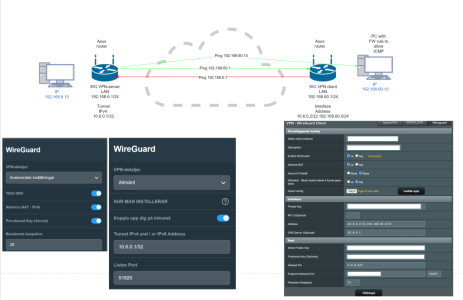
I tried to follow your advise but then I could not access LAN either way, it worked one way at least with the settings I posted.
Perhaps it is best to make a new connection or try IPsec instead.

After doing some thinking (I'm alittle slow sometimes). 2 way could work with nat, maybe. As only new packets are treated but im not sure. It would not add any value, just slow everything down.
Looking at your picture your server can ping lan (10.6.0.1 -> 192.168.60.x) so server is aware of other lan. And client is aware of server 10.6.0.1
What is not working is client pinging server lan (10.6.0.2 -> 192.168.50.x), if you instead tried to ping server wg ip it would probably work?
If not, then server is not aware of 10.6.0.2, which needs to be added on AllowedIPs (server). But it does not make sense since you are using nat and it works the other way.
so the obvious conclusion is that the client is not aware of server lan and the scheme of adding this to the address field is not providing the routes needed. Your issue is likely on the client vpndirector as rules are needed to point server lan destinations to wg vpn interface.
For vpndirector (merlin) it's easy, just add remote ip: 192.168.50.0/24 to this wgc Interface. While you are at it you should probably make a second rule for Remote ip: 10.6.0.0/24 to use this wgc interface as well. Leave local IP blank.
When this is done and things start to work you can test to remove nat and reset the interface Address to what it should be.