What's new

Wireless Report for AIMesh v1.2.0 - [Mar-26-2026]

OK, I can't explain why, but tried again after walking away for some hours, with no other changes, and it just worked. If I discover a reason why, I'll share. Thanks!
 
OK, I can't explain why, but tried again after walking away for some hours, with no other changes, and it just worked. If I discover a reason why, I'll share. Thanks!
Could it be that SoFluffy pulled the rabbit out of the hat …
 
v1.1.6-fix issue where wired devices could creep through. thanks @jksmurf
 
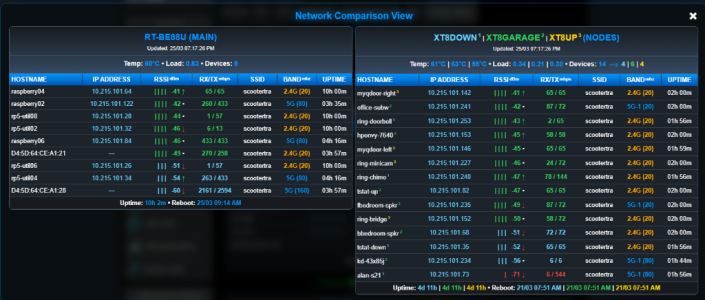
v1.1.7-visual enhancements

Screenshot 2026-03-24 182125.png
 
Last edited:
I have another small request. Any chance you could locate the wr_install.sh script or have something with similar
functionally in a location that is not wiped out by a reboot. It would be nice to not have to find the curl command
to re-download you script just to upgrade. :eek: ;);)
 
I have another small request. Any chance you could locate the wr_install.sh script or have something with similar
functionally in a location that is not wiped out by a reboot. It would be nice to not have to find the curl command
to re-download you script just to upgrade. :eek: ;);)
I 2nd that emoticon … i do use the history function in amtm but sometimes I also have to go find, copy and paste the long curl …
 
I 2nd that emoticon … i do use the history function in amtm but sometimes I also have to go find, copy and paste the long curl …
run below in ssh, now it will always be in /jffs/addons/wireless_report/wr_install.sh, even after reboot.

Code:
cp /tmp/wr_install.sh /jffs/addons/wireless_report
 
run below in ssh, now it will always be in /jffs/addons/wireless_report/wr_install.sh, even after reboot.

Code:
cp /tmp/wr_install.sh /jffs/addons/wireless_report

Great, thank you 🙏. So I just need to append this line to the profile.add file in the /jffs/configs/ dir and I can run it from anywhere. I personally use WinSCP to edit the profile.add file.

Code:
alias wr_install="sh /jffs/addons/wireless_report/wr_install.sh" # Allows Wireless Report install script to be run from anywhere, including root.

Then to restart profile.add

Code:
source /jffs/configs/profile.add

With that I can re-run wr_install (without the .sh) from root i.e. as soon as I get in via ssh. Cool 😎.
 
Last edited:
Great, thank you 🙏. So I just need to append this line to the profile.add file in the /jffs/configs/ dir and I can run it from anywhere. I personally use WinSCP to edit the profile.add file.

Code:
alias wr_install="sh /jffs/addons/wireless_report/wr_install.sh # Allows Wireless Report install script to be run from anywhere, including root.

With that I can re-run wr_install (without the .sh) from root i.e. as soon as I get in via ssh. Cool 😎.
I use up/down-arrow, shell-history, easier.
 
Thanks for the script and the continuous improvements, hoping that it becomes compatible with AMTM, I find it very useful.
 
Looking for feedback

Having used this excellent addon for a while now I have to say it's really great, and just gets better and better. Thank you to @JB_1366 and I agree it would be a great amtm addition. With a view to that end result, I wanted to put out a few feelers to see (for those using it) how many would find these (at install time) options useful?
  • Allow a user-defined blue pulsing connect period figure e.g. 15mins as opposed to the default 30mins (esp useful for the 5GHz/6GHz itinerant clients like iPhones that roam}
  • Allow a user-defined SSID Column Width e.g. 15chars as opposed to the default 10chars
  • Allow more options for refresh periods or just allow a user-defined refresh period in mins.
  • Allow user-defined 12 or 24hr time for the updated and reboot times.
  • Left-justify the IP Addresses to distinguish (currently centre-aligned) 192.168.X.ABC vs 192.168.X.A vs 192.168.XY.A vs 192.168.XYZ.ABC vs 192.168.X.A etc.
  • Format the alignment of TX/RC about the "/"
  • Maybe see if the Hostnames can be further identified (Unkown were fixed in favour of MAC Addresses, but Asus Network Map goes a step further to show (e.g. iPhone, iPAD, Macbook)?
  • Allow Node Router Name Suffixes e.g. MB, ANX, Kitchen to differentiate between similar Node Models i.e.
THIS: RT-AX86U_Pro | RT-AX86U_Pro | RT-AX58U (NODES) (note that the raised 1, 2, 3 node numbering is not shown here for convenience only)

becomes

THIS: RT-AX86U_Pro (MB) | RT-AX86U_Pro (ANX) | RT-AX58U (Kitchen) (NODES)
 
Last edited:
  • Allow Node Router Name Suffixes e.g. MB, ANX, Kitchen to differentiate between similar Node Models i.e.
THIS: RT-AX86U_Pro | RT-AX86U_Pro | RT-AX58U (NODES) (note that the raised 1, 2, 3 node numbering is not shown here for convenience only)

becomes

THIS: RT-AX86U_Pro (MB) | RT-AX86U_Pro (ANX) | RT-AX58U (Kitchen) (NODES)
@jksmurf

This is only temporary but it seems to work for this. Edit the webui.conf and adjust the names you prefer.
It would be nice to have this as a configuration option. I have not noticed any issues running with this change.

Code:
agagne@rt-be88u:/jffs/addons/wireless_report# diff webui.conf webui.conf.bak
--- webui.conf
+++ webui.conf.bak
@@ -1,4 +1,4 @@
 INSTALLED_PAGE=user9.asp
 REPORT_UNIT=C
 SSH_PORT=1220
-SSH_NODES=" XT8DOWN|10.215.101.54 XT8GARAGE|10.215.101.69 XT8UP|10.215.101.95"
+SSH_NODES=" ZenWiFi_XT8|10.215.101.54 ZenWiFi_XT8|10.215.101.69 ZenWiFi_XT8|10.215.101.95"
 

Attachments

  • Screenshot 2026-03-26 074617.png
    Screenshot 2026-03-26 074617.png
    279.6 KB · Views: 10
This is only temporary but it seems to work for this. Edit the webui.conf and adjust the names you prefer.
It would be nice to have this as a configuration option. I have not noticed any issues running with this change.
Thanks for that, appreciated.

Yes, in the same way, adjusting the number 1800 in /jffs/addons/wireless_report/gen_report.sh to 900 changes the pulsing blue recently connected devices time periods from 30 mins to 15mins. Great for roaming 5GHz devices, which often start on a new node with a new connection at shorter intervals.

Code:
fmt_time() {
    T=$1; [ -z "$T" ] || ! echo "$T" | grep -qE '^[0-9]+$' && echo "<span data-sort='0'>---</span>" && return
    local pulse=""; [ "$T" -lt 1800 ] && pulse="pulse-blue"

However your sentiment, with which I agree, that "it would be nice to have this as a configuration option" is exactly the point. We could all customise it in various ways, but for areas where variables would work equally well in lieu of hard coded numbers or characters, it makes sense for those options to (hopefully) find their way into the script setup section as user-defined parameters. If enough folks say "that's a great idea, yes please" I am sure it can be achieved.

That way we can all benefit from updates, without the custom edits getting wiped out every time a new version comes along.
I know it's asking a lot, but I really like this addon and I think it will really benefit from a few tweaks in that direction.
 
v1.1.9-updated version display, hover header for version, pulsating-header on new version available
 
EDIT: v1.1.9-updated version display, hover header for version, pulsating-header on new version available, 'added hover on device selection'
 

Similar threads

Support SNBForums w/ Amazon

If you'd like to support SNBForums, just use this link and buy anything on Amazon. Thanks!

Sign Up For SNBForums Daily Digest

Get an update of what's new every day delivered to your mailbox. Sign up here!
Back
Top