What's new

Adding RT-BE88U guest network messes up Spotify Connect for IOT network devices

jimmybond009_

New Around Here
I need help understanding why adding a Guest network on an RT-BE88U would mess up Spotify Connet for devices on the separate IOT network, thanks.

=============
I have an Asus RT-BE88U on up-to-date stock firmware.
It was set up with a main 2.4/5ghz network, along with a separate IOT network at 2.4 (set up as a 'Default IOT Network', shows up under Guest Network PRO)
I had my older Yamaha musiccast devices on IOT since they need 2.4 only (get confused if dual band), and things worked fine and I could use Spotify Connect to send music to them even if my Spotify app was on phone on the main network.

So things were working fine. Then I wanted to to add an actual guest network for visitors, and created one with totally unique SSID. (so now 3: main, IOT, Guest)

After adding this guest network, Spotify Connect would not work to send anything to the Musiccast devices on the IOT network. Even though I did not change any settings/networks on the devices, and Asus router settings showed there were zero devices connected to the Guest network.

Removing the newly added Guest network resolved things >> Spotify Connect worked again to cast to devices on the IOT network.

I am unclear why the new guest network caused issues as it had a totally separate SSID, and the BE88U seems to support having all sorts of networks simultaneously.

Is there some kind of setting I need to toggle so that I can have a separate guest network AND IOT network, and not end up with Spotify Connect issues for devices on the IOT network?

(Note: I already have Enable IGMP Snooping ENABLED which google suggested.)
 
It may help if you post your Guest Network Pro configurations (redacting any sensitive information) to provide context to your setup.

If you search the subforums here you'll see that there are numerous discussions where people experience issues with the Guest Network Pro configuration (across various 3006.102.x supported Asus routers). Common problems are being unable to communicate across different Guest Network Pro profiles. Using Home Assistant (HA) on main LAN with Guest Network Pro clients being unable to access the HA. Guest Network Pro clients being unable to access a media server/device on a different network (either main LAN or Guest Network Pro). And so on.

One may have to change from using the Guest Network Pro IoT profile to using the Custom Network profile. In some cases it means setting the Guest Network Pro profile option Use same subnet as main network to enable when creating the Guest Network Pro profile. Or it may mean enabling the Access Intranet option (if Asus fixed it) on the Guest Network Pro profile. Or it may mean using Asus-Merlin firmware, if one 's router is supported by Asus-Merlin, and setting up custom firewall scripting to pass traffic between Guest Network Pro profiles. There are numerous discussions with respect to Asus-Merlin firmware and trying to pass traffic from the Guest Network Pro profile to other IP subnets on the router.
 
Last edited:
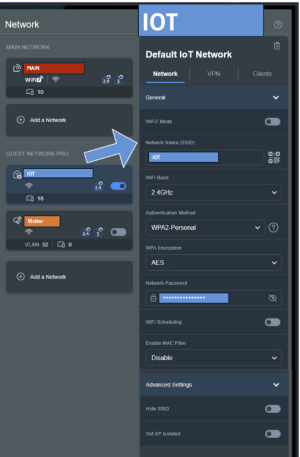
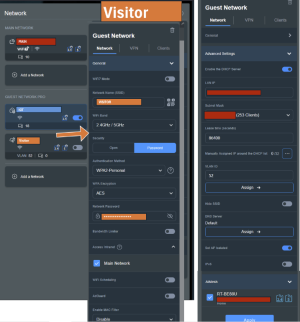
Thanks for the reply @bennor . My settings are attached. Hopefully I didn't redact so far as to be unhelpful.

I guess broadly I was confused at why enabling the new 'Visitor' guest network knocked out that media connectivity between Main >> IOT. I thought I was setting up the Visitor one to be unique, though perhaps not given the AIMesh setting etc.? I am not sure how spotify got confused trying to find those devices and vice versa when not a single device was even connected anything to 'Visitor' and it had a unique SSID.

In general I am fine with the Visitor Guest network being totally vanilla - it is just a way for visitors to access the internet, it does not need any intranet (or media) connectivity. Priority #1 is for Spotify to work perfectly all the time; Priority #2 is for visitors to access the Internet, so it just needs to be able to get internet access without disrupting the IOT devices. :)

So maybe I need to disable the "Access Intranet" on Visitor"? Or AIMesh"? (I just use one router, no mesh network)

I did use Merlin firmware on a past RT series router, and it worked well, but was trying to go with stock firmware this time around if possible so as not to overcomplicate things and end up with a ton of router config to-do (and manual updates all the time)

Thanks for any insight you can provide.
 

Attachments

  • IOT-setting.PNG
    IOT-setting.PNG
    97.6 KB · Views: 6
  • Visitor-setting-2.PNG
    Visitor-setting-2.PNG
    143.8 KB · Views: 6
@jimmybond009_, Guest Network Pro frustrates many as it some times does not operate as expected or as one would think. Feels like a beta feature at times. Certain options when enabled or disabled under Guest Network Pro may not work as expected.

It appears on the Visitor Guest Network profile you have enabled the option Set AP Isolated (in second screen shot). Try disabling that and see if anything changes.

For a brief explanation from Asus on what each of the various Profiles under Guest Network Pro do, see the following Asus support doc if you haven't already:
 
appreciate this. I think I had AP Isolated disabled at first, and enabled it while troubleshooting, but I will give it another go and see if that changes the connectivity.

Is there a Guest Network non-Pro option on these models? (like I said I just need internet for visitors, that's it)
 
I am not sure why Spotify would be messed up with the additional Network and @bennor is certainly pointing to all the right things to check in the first instance.

If bennor's suggestions do not work consider looking at avahi reflector (mDNS), you can find some help in this post here. I believe (?) Spotify uses mDNS but it would still not explain why it originally worked, then adding a Guest Network caused it to fail, unless that isolation does not work across networks, which is an issue I have come across in the past and needed a reflector and firewall rules (IPTABLES) as suggested by bennor; but try the simple things from the GUI first.

If you need more detail on avahi (mDNS) see also this post.
 
Last edited:
Is there a Guest Network non-Pro option on these models? (like I said I just need internet for visitors, that's it)
You may have to experiment with other Guest Network Pro Profiles, like Custom Network rather than Guest Network, for the Visitor network you are trying to create.

No idea why you're having issues like this. Could be simply a bug somewhere in the Guest Network Pro coding that is causing issues when you create an IoT profile and a Guest Network profile. Like said before Guest Network Pro can be buggy at times, which leads to having to do some of the custom scripting @jksmurf mentioned in their post.
 

Latest threads

Support SNBForums w/ Amazon

If you'd like to support SNBForums, just use this link and buy anything on Amazon. Thanks!

Sign Up For SNBForums Daily Digest

Get an update of what's new every day delivered to your mailbox. Sign up here!

Members online

Back
Top