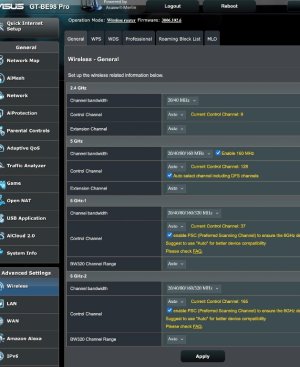
Just upgraded from RT-AC86U to GT-BE98 Pro. As was my custom with the old router on the new one I assigned SSID names that include a band designation. On Mac mini M4 Pro, macOS System Settings for Wi-Fi shows connection to one of the two 6GHz bands. The Details button shows this warning: "Limited Compatibility / This network is configured with a separate network name for 6GHz, which may impact some experiences like AirPlay. If this is your Wi-Fi network, configure the router to use a single network name for all bands." Then there's a "Learn more..." link: Recommended settings for Wi-Fi routers and access points.
The linked page says, "Make sure that all routers on your network use the same name for every band they support. If you give your 2.4 GHz, 5 GHz, or 6 GHz bands different names, devices might not connect reliably to your network, to all routers on your network, or to all available bands of your routers. If your router is providing a Wi-Fi 6E network that isn't using the same name for all bands, Apple devices that support Wi-Fi 6E will identify the network as having limited compatibility." The page links to yet another page, Use Wi-Fi 6E networks with Apple devices that says, "If the router isn’t using the same name for all bands, your device identifies the network as having limited compatibility. It then finds the name of the corresponding 5 GHz network and asks whether you want to join it for better compatibility" And in the spirit of vagueness already established: "If you select Not Now, your device continues to use the Wi-Fi 6E network, but your overall experience with some activities over the network might not be as expected."
It's not clear to me that this warning and advice applies to my single-router network. Also, I have no idea how, if all bands have the same name, a device determines which one to connect to. Currently, based on habit formed using the RT-AC68U, I choose the band from the SSIDs shown as available with each SSID name indicating its band.
Despite my having a "Pro" router and a "Pro" Apple Silicon CPU, I'm not a pro with respect to networking.
The linked page says, "Make sure that all routers on your network use the same name for every band they support. If you give your 2.4 GHz, 5 GHz, or 6 GHz bands different names, devices might not connect reliably to your network, to all routers on your network, or to all available bands of your routers. If your router is providing a Wi-Fi 6E network that isn't using the same name for all bands, Apple devices that support Wi-Fi 6E will identify the network as having limited compatibility." The page links to yet another page, Use Wi-Fi 6E networks with Apple devices that says, "If the router isn’t using the same name for all bands, your device identifies the network as having limited compatibility. It then finds the name of the corresponding 5 GHz network and asks whether you want to join it for better compatibility" And in the spirit of vagueness already established: "If you select Not Now, your device continues to use the Wi-Fi 6E network, but your overall experience with some activities over the network might not be as expected."
It's not clear to me that this warning and advice applies to my single-router network. Also, I have no idea how, if all bands have the same name, a device determines which one to connect to. Currently, based on habit formed using the RT-AC68U, I choose the band from the SSIDs shown as available with each SSID name indicating its band.
Despite my having a "Pro" router and a "Pro" Apple Silicon CPU, I'm not a pro with respect to networking.