You don't know what you're missing.. so much fun...Same here, but no nodes
Nodes are not always "fun", and sometimes they are scary.You don't know what you're missing.. so much fun...
the only weird behavior i've noticed since my 102.7 update was with the usb 3.0 health scanner panel. when doing a rescan of my nas attached usb.30 ssd, at ~50% i get logged out! after logging back in, the scan shows completion. this behavior is new with 102.7 as that 860 evo ssd has been solid on several asus devices over the years.Thank you as always!
If anyone installs this on their (ROG) GT-AX11000 Pro, would appreciate andy follow ups/comments. Both the August and November releases displayed quirks, was awating this to see how it goes. Good weekend to all, S.
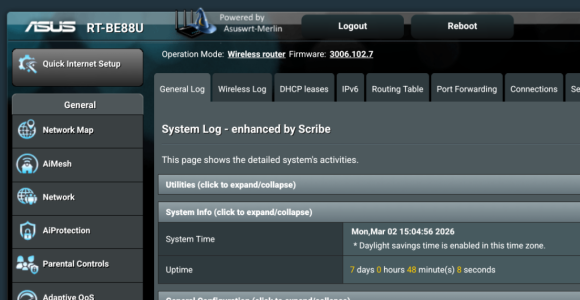
Check the system log. The most likely reason I can think of would be your router runs out of memory while doing the scan, causing service crashes. In the past running a fs check on a large disk has always been a problem due to the amount of RAM required for it.the only weird behavior i've noticed since my 102.7 update was with the usb 3.0 health scanner panel. when doing a rescan of my nas attached usb.30 ssd, at ~50% i get logged out! after logging back in, the scan shows completion. this behavior is new with 102.7 as that 860 evo ssd has been solid on several asus devices over the years.
not seeing anything specific re ram/memory in the syslog.Check the system log. The most likely reason I can think of would be your router runs out of memory while doing the scan, causing service crashes. In the past running a fs check on a large disk has always been a problem due to the amount of RAM required for it.
I suppose it’s this part of disk_monitor that stops the httpd daemon. Perhaps this isn’t meant to be there:Mar 2 11:14:39 rc_service: disk_monitor 4555:notify_rc stop_httpd
Mar 2 11:14:39 rc_service: disk_monitor 4555:notify_rc start_httpd
Mar 2 11:14:39 rc_service: waitting "stop_httpd"(last_rc:stop_httpd) via disk_monitor ...
Mar 2 11:14:40 rc_service: disk_monitor 4555:notify_rc start_samba
Mar 2 11:14:40 rc_service: waitting "start_httpd"(last_rc:start_httpd) via disk_monitor ...
The real question is why Asus is setting DEBUG_RCTEST in the Makefile, which I would expect should only be enabled for test purposes. I just checked the GPL code itself and it's there.I suppose it’s this part of disk_monitor that stops the httpd daemon. Perhaps this isn’t meant to be there:
![]()
asuswrt-merlin.ng/release/src/router/rc/usb.c at 58b0b7acd100117014970d01741952939cd79ad8 · RMerl/asuswrt-merlin.ng
Third party firmware for Asus routers (newer codebase) - RMerl/asuswrt-merlin.nggithub.com
#ifdef HND_ROTUER
I think it’s French.I also see this (unrelated) typo next to a DEBUG_RCTEST section I just reviewed:
hey guys, been working this and another connect problem but fwiw, "claude" called out the same possibility with ram as u did but after seeing the log, though it may be a bug. i realize "ai" can be sensitive on this board but i assure you, i'm just trying to learn - below the text from a claude session. the log it had may have been larger.The real question is why Asus is setting DEBUG_RCTEST in the Makefile, which I would expect should only be enabled for test purposes. I just checked the GPL code itself and it's there.
I also see this (unrelated) typo next to a DEBUG_RCTEST section I just reviewed:
Code:#ifdef HND_ROTUER
Well...
I would try to recreate this problem on 102.6. Since this code has been there a while, maybe somehow the disabling of AiCloud and other USB adjacent features causes something not to happen. It’s only a wild guess, but Claude tends to agree with me.hey guys, been working this and another connect problem but fwiw, "claude" called out the same possibility with ram as u did but after seeing the log, though it may be a bug. i realize "ai" can be sensitive on this board but i assure you, i'm just trying to learn - below the text from a claude session. the log it had may have been larger.
I think it’s suspicious that this DEBUG_RCTEST in usb.c immediately follows a RTCONFIG_CLOUDSYNC section. I wonder if it’s meant to be within it.If Asus decided to put an httpd restart there it might be for a reason, so I'm not really keen on changing that behaviour.
The whole function will mount a partition, so I can see restarting httpd after mounting the volume to ensure that httpd is aware of the system level change.I think it’s suspicious that this DEBUG_RCTEST in usb.c immediately follows a RTCONFIG_CLOUDSYNC section. I wonder if it’s meant to be within it.
I've always noticed funny things with networkmap losing it's brains a little bit. I usually have around 124 devices connected to my mesh on average. In the evenings it's more in the mornings it's less. If I notice any discrepancies in those numbers I'll just run a 'killall -HUP networkmap' and it fixes it. I'm not running ipv6 though. I saw some fixed issues around ipv6 earlier in the thread with restarting some services via cron. You may want to look at those.AXE-16000. Have reverted back to 3006.102.6. Losing devices, both wired and wireless. Reboot brings them back and then they disappear around two hours later. Might have something to do with IPV6. Don't see anything in the logs that pops out at me.
i can assure you that with every new release, i dismount then physically remove the usb 3 ssd. once the new fw is loaded and the mesh node operational, that process is reversed. been doin that for years and never experienced this behavior. going back to 102.6 would be painful as it never failed on that fw.I would try to recreate this problem on 102.6. Since this code has been there a while, maybe somehow the disabling of AiCloud and other USB adjacent features causes something not to happen. It’s only a wild guess, but Claude tends to agree with me.
Same here. When things start to look odd, I also notice the device counts on the AI Mesh page do not add up to the number on the main page. Also the AI Mesh counts seem to be frozen, and the station binding/unbinding doesn't work. (or it does but the AI Mesh interface doesn't reflect it).I've always noticed funny things with networkmap losing it's brains a little bit. I usually have around 124 devices connected to my mesh on average. In the evenings it's more in the mornings it's less. If I notice any discrepancies in those numbers I'll just run a 'killall -HUP networkmap' and it fixes it. I'm not running ipv6 though. I saw some fixed issues around ipv6 earlier in the thread with restarting some services via cron. You may want to look at those.
We use essential cookies to make this site work, and optional cookies to enhance your experience.