
What's new

BE88U replace AX88U with VLAN

AiMesh apparently uses/shares TVL data with neighbor smart/managed switches for AiMesh. I originally had one (still have it as I found the issue after 30 days) that did not support it and the system log of the ASUS router kept popping up an error missing tvl data 2 times at 12 second intervals. TVL data is capability data shared by each smart node. The acronym stands for Link Layer Discovery Protocol, Type Length Variable data is the information encapsulated I believe. (I actually opted for the managed switch to share the static IP I assigned to it/it's management page.
 
I thought I had the correct settings but only passed VLAN Tag 1, the range is 1-4094. This morning I woke up and decided to check on my Sensi smart thermostats, and one was offline, but shows on the display still connected to WiFi. Changed the Tag to 1-4094. So far this is the correct workaround for the default VLAN:
VLAN_Propper_Settings.jpg


(EDIT)- Please ignore what is default at the top/the pull downs, as those are the defaults that show, the correct settings are on the table at the bottom. Should have just cropped the top out my apologies...
 
Last edited:
Currently AX88U and AC68U are in a mesh and quite close to each other. I do notice differences in speed depending which device I am connected to (WIFI 6 vs 5).
Still reluctant to believe that there's a performance difference with AiMesh, except for the different latency because:

AX88U - client
is shorter than
AX88U - AC68U - client

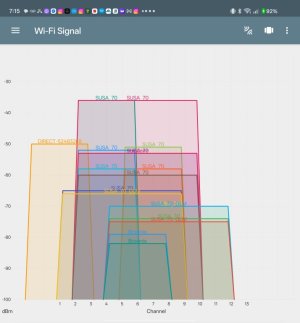
A WiFi Analyzer app image would be very helpful to demystify this.
Screenshot_AiMesh_5GHz.jpg
 

Attachments

  • Screenshot_Analyzer_AiMesh.jpg
    Screenshot_Analyzer_AiMesh.jpg
    47.4 KB · Views: 24
Last edited:
Interestingly got a hint that something's wrong with the last VLAN settings I posted, so this is the current one that I am running. (Hoping it's the last correction, my apologies).
Binardat_VLAN_for_AiMesh.jpg
 
Just some update (maybe others are in similar situations)

I have now bought a BE88U (luckily got it very cheap) and replaced the AX88U. So currently my setup is like this:
!!! BE88U !!! <=> Managed switch <=> AC68U (all connected via LAN)

The AC68U is a AiMesh node having both 2G and 5G WiFi. Unfortunately it does not provide any guest WiFi (which is a pity). (Guest Network for AC68U cannot be ticked in the BE88U "Network" panel "The WiFi interface has reached the maximum. (2.4GHz / 5GHz)")
With the AX88U there was a guest WiFi on both routers (AX88U + AC68U).
It seems that the new Guest Network Pro is not backwards compatible to the old Guest Network.

I will try to get a cheap node (BE58 Go) to support Guest Network Pro. So my new taqrget is
BE58 Go (*) <=> !!! BE88U !!! <=> Managed switch <=> BE58 Go (**)
* being far away but connected via LAN
** connected via LAN
 
It seems that the new Guest Network Pro is not backwards compatible to the old Guest Network.

Your old 386 firmware router can have one guest network per band in AiMesh configuration. Why your setup doesn't allow any is unknown, perhaps specific configuration limitation. We are discussing compatibility between Guest Network, Guest Network Pro and Smart Home Master for >2 years here on SNB Forums.
 
We are discussing compatibility between Guest Network, Guest Network Pro and Smart Home Master for >2 years here on SNB Forums.
So a never ending story?

Guest Wifi has no special settings. Just added it in BE88U and ensured that WiFi7 is off and WPA2 only is set.
AP Isolation is on / IPv6 is off
Maybe it is related to the automatic assignment of a VLAN id?
 
So a never ending story?

This is correct. The managed switch in between may also be a problem. It has to pass specific VLANs to the node otherwise even GNP capable router won't work correctly. In general with wired infrastructure in place and eventual future expansion plans my recommendation is to move up to SMB gear. Your firmware requirement locks you to single vendor and their multi-AP solution is not the greatest. It has compatibility, expandability and configuration limitations. Depending on use case - some of them may become critical.
 
Last edited:
@ZTHawk Since my L3 switch is not Cisco, I had to try to adapt what I found here, which I hope is helpful to you. I still have not got it to work, but simply connecting the routers directly without the managed switch may help for testing what is available:

 
Just for clarification as I gave up a while back, the IPs changed:

Old -------------- New
192.168.0.1 ----- 192.168.50.1
192.168.0.254 - 192.168.50.254
192.168.2.254 - 192.168.51.254

Hopefully you can continue to connect the dots if I missed any....
 
Using a direct connection between BE88U and AC68U did not help with guest WiFi.
 
Using a direct connection between BE88U and AC68U did not help with guest WiFi.
I just realized this, but can you still use the AX88U? Then remove the AC68U?
 
You really want to replace RT-AX88U with RT-BE58 Go and keep 12+ old RT-AC68U??? 🤔

Do you know you can script VLANs on RT-AX88U in Asuswrt-Merlin and have much better Router + AP configuration instead of limited same channels, no Tx power, etc... AiMesh? Get rid of the museum piece.
 
You really want to replace RT-AX88U with RT-BE58 Go and keep 12+ old RT-AC68U??? 🤔
Well, not really. I want 2x BE58 Go.
Do you know you can script VLANs on RT-AX88U in Asuswrt-Merlin and have much better Router + AP configuration instead of limited same channels, no Tx power, etc... AiMesh? Get rid of the museum piece.
I heard about it, but I also want to simplify my network editing actions (I am not that good with it). So yes, I will loose potential performance/customizability/... but I also want to keep things simple (so I have time for other stuff).
In the end it is a trade-off
  1. power
  2. simplicity
  3. money
 
Last edited:

Latest threads

Support SNBForums w/ Amazon

If you'd like to support SNBForums, just use this link and buy anything on Amazon. Thanks!

Sign Up For SNBForums Daily Digest

Get an update of what's new every day delivered to your mailbox. Sign up here!
Back
Top