
What's new
  • SNBForums Code of Conduct

    SNBForums is a community for everyone, no matter what their level of experience.

    Please be tolerant and patient of others, especially newcomers. We are all here to share and learn!

    The rules are simple: Be patient, be nice, be helpful or be gone!

BE92u/AX92u in mesh

Dilbert

Occasional Visitor
Hi, I’ve been running 6 AX92u’s in a stable mesh for years, 2 wired (~900mbit/100mbit) and 4 with wireless backhaul (~450mbit/100mbit).

For reasons that I’m now regretting, I picked up a couple of cheap BE92u’s that I intended to replace the wired units with.

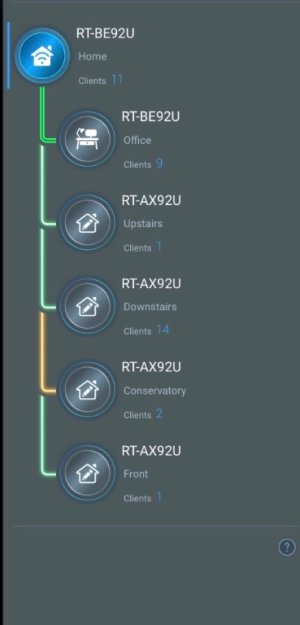
After a few oddities setting them up (and multiple hard resets!), I managed to get them up and running but the nodes all star-connect from the main router, regardless of what settings I change or which preferred uplink I specify.

The problem is that a couple of the nodes are too far away from the main, so they are generally connecting at 2.4ghz with RSSI’s of ~ -92dBm. This gives a poor throughput and regular disconnections.

When I take the BE92u’s out of the mix, they connect as expected.

Any ideas anyone?

Thanks.
 

Attachments

  • IMG_1046.jpeg
    IMG_1046.jpeg
    40.4 KB · Views: 56
Hi, I’ve been running 6 AX92u’s in a stable mesh for years, 2 wired (~900mbit/100mbit) and 4 with wireless backhaul (~450mbit/100mbit).

For reasons that I’m now regretting, I picked up a couple of cheap BE92u’s that I intended to replace the wired units with.

After a few oddities setting them up (and multiple hard resets!), I managed to get them up and running but the nodes all star-connect from the main router, regardless of what settings I change or which preferred uplink I specify.

The problem is that a couple of the nodes are too far away from the main, so they are generally connecting at 2.4ghz with RSSI’s of ~ -92dBm. This gives a poor throughput and regular disconnections.

When I take the BE92u’s out of the mix, they connect as expected.

Any ideas anyone?

Thanks.
Probably because your mixing be wifi with ax wifi, and Asus are still working out the kinks with be class routers, any possibility of moving to ethernet backhaul ?
 
Probably because your mixing be wifi with ax wifi, and Asus are still working out the kinks with be class routers, any possibility of moving to ethernet backhaul ?
I’ve disabled all of the WiFi7/6ghz gubbins and it’s still not working properly. Unfortunately wired backhaul isn’t really feasible without hefty cost and disruption. I think I’ll just revert back to the AX92s. Thanks.
 
I think this router is a complete dud.

I havea ROG STRIX GS-BE18000 and 2 x AXE7800's on an AiMesh set up, any time I add the BE92U, the entire network becomes unstable, slow and full of disconnections.
Spoken to Asus and they admitted it's a problematic router worldwide, will be returning it asap.
 
I was gonna suggest swapping the Office BE92U and the Downstairs AX92U. (Sorry I'm so late to the thread). These are interestingly "top heavy" models the AX92U 4804 Mbps 5 GHz-2 and BE92U 5764 Mbps 6 GHz. To take advantage of such specs you'd need an all BE92U lineup so they can backhaul on 6 GHz....
 
I think this router is a complete dud.

I havea ROG STRIX GS-BE18000 and 2 x AXE7800's on an AiMesh set up, any time I add the BE92U, the entire network becomes unstable, slow and full of disconnections.
Spoken to Asus and they admitted it's a problematic router worldwide, will be returning it asap.


Did you keep the router and has the BE92U continued to be problematic for you..? On paper it seems so good, I had hoped the firmware would have resolved many of the issues noted..?
 
Did you keep the router and has the BE92U continued to be problematic for you..? On paper it seems so good, I had hoped the firmware would have resolved many of the issues noted..?
Asus told me to return it but I held off for a few more days and ran an extra ethernet cable through my house to connect the BE92U.

It's been working prefectly fine ever since.

It's only when connected to the mesh wirelessly that it causes problems.
 
Last edited:
Asus told me to return it but I held off for a few more days and ran an extra ethernet cable through my house to connect the BE92U.

It's been working prefectly fine ever since.

It's only when connected to the mesh wordlessly that it causes problems.


Good to know, it seems that using a ethernet backhaul worked well for you. I do get an impression that the most recent firmware has, hopefully, resolved a lot of the issues that first plagued that router. On paper, for the cost, it does seem to offer a lot.
 
I had an issue with Ethernet backhaul mode where 5 GHz disappeared, but the latest Merlin seems to have resolved that:

*EBG15, GT-BE98 Pro, BQ16 Pro, -GT-AXE16000, -RT-BE92U, -RT-AX86U, and RT-AX5400 (WPA2/WPA3-PERSONAL).

* Primary router, - Merlin

Removed my RT-AC68U as it is EOL and WiFi 5.
 
Good to know, it seems that using a ethernet backhaul worked well for you. I do get an impression that the most recent firmware has, hopefully, resolved a lot of the issues that first plagued that router. On paper, for the cost, it does seem to offer a lot.
Yeah its specs are pretty strong at that price point, Tri-band Wifi 7.

I feel like there's no point in getting dual band when it comes to Wifi 7.
 

Latest threads

Support SNBForums w/ Amazon

If you'd like to support SNBForums, just use this link and buy anything on Amazon. Thanks!

Sign Up For SNBForums Daily Digest

Get an update of what's new every day delivered to your mailbox. Sign up here!
Back
Top