What's new
  • SNBForums Code of Conduct

    SNBForums is a community for everyone, no matter what their level of experience.

    Please be tolerant and patient of others, especially newcomers. We are all here to share and learn!

    The rules are simple: Be patient, be nice, be helpful or be gone!

Can Guest Network Pro (guest network #1) use a DNS server which is located in the main LAN?

Rici

Regular Contributor
Hi,

Since I am not sure about the internal routing mechanisms of the Guest Network Pro towards the main LAN: Can my Guest Network clients use a pi-hole located in the main LAN?

My router is RT-AX86U Pro running Merlin FW 3006.102.6 .

Thank you!
 
If they are on a separate VLAN, then no - that's the whole point of using VLANs, to isolate networks.
 
Can my Guest Network clients use a pi-hole located in the main LAN?
It will all depend on how you initially setup the Guest Network Pro profile. If you enabled the option Use same subnet as main network when creating the Guest Network Pro profile, then the Guest Network Pro profile clients one should be able to use a Pi-Hole on the main network as the client's DNS server.

If you disabled the option Use same subnet as main network when creating the Guest Network Pro profile, it creates an isolated network that generally cannot access the main LAN clients. Not sure if Asus fixed the Guest Network Pro profile Access Intranet option that was broken in early 3006.102.x firmware releases (at least on the RT-AX86U Pro).

If you have disabled the option Use same subnet as main network when creating the Guest Network Pro profile; see the following link/post which gives a general explanation of how to configure the Asus-Merlin 3006.102.x firmware with Pi-Hole so Guest Network Pro profile client(s) use the Pi-Hole. It involves using DNS Director.

 
I have GNP running an IoT VLAN (AP isolated) using Pi-hole via DNS Director with user defined redirection. I assume it's working as the IoT device is showing up in the Pi-hole logs.

Under LAN; DNS Director tab
Settings: two separate Pi-holes as User Defined 1 and 2 with Global redirection set to 1.
Client List: Both Pi-holes set to No Redirection.
GNP Profiles: IoT set to User Defined 2.
 
I have GNP running an IoT VLAN (AP isolated) using Pi-hole via DNS Director with user defined redirection. I assume it's working as the IoT device is showing up in the Pi-hole logs.

Under LAN; DNS Director tab
Settings: two separate Pi-holes as User Defined 1 and 2 with Global redirection set to 1.
Client List: Both Pi-holes set to No Redirection.
GNP Profiles: IoT set to User Defined 2.
Depending on one's configuration there may be more steps needed to properly configure the Pi-Hole to resolve the Guest Network Pro profile clients. Per the link posted above to a prior post where similar question(s) were asked. General steps:
  • Input the Pi-Hole IP address into the LAN > DHCP Server DNS field(s). (Set Advertise router's IP in addition to user specified DNS to No if that option is available.)
  • For the WAN DNS fields use any public or ISP DNS server.
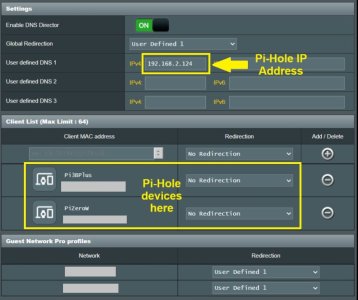
  • On the DNS Director page, enable DNS Director.
  • On the DNS Director page, set Global Redirection to User defined DNS #1.
  • On the DNS Director page, input the Pi-Hole IP into User defined DNS #1 field
  • On the DNS Director page, in the Client List select the Pi-Hole's MAC address and set Redirection to No Redirection, then click the Add (plus) icon to add it to the list.
  • Under the DNS Director's Guest Network Pro Profile section, select each Guest Network Pro Profile and set it's Redirection to User defined #1.
  • When finished making changes on DNS Director remember to select the Apply button.
  • On the Guest Network Pro profile settings page, under Advanced Settings set the DNS Server to Default.
  • On the Pi-Hole > Settings >DNS one may need to change the Interface Settings to either Respond only on interface (select Pi-Hole network interface), or if using multiple network ports on the Pi-Hole device select Permit all all origins.
  • On the Pi-Hole > Settings > DNS page under Conditional Forwarding, follow the examples to input your router's main LAN and any Guest Network Pro profiles in the format the example indicates (ex: true,192.168.0.0/24,192.168.0.1,fritz.box) in the provided Conditional Forwarding field.
  • Make sure to apply any changes to the Pi-Hole settings.
  • When finished test the settings to see if clients are using the Pi-Hole and if the Pi-Hole is properly showing the client requests in the Pi-Hole Query Log.
  • In rare cases one may need to reboot both the router and any network clients.
  • One may also want to input a domain name into the LAN >LAN-IP Domain Name field and LAN > DHCP Server Router's Domain Name field. That domain name can used when setting up the Pi-Hole Conditional Forwarding reverse server(s).
Example DNS Director page (with two Pi-Hole devices):
DNS Director.jpg

Example Pi-Hole Conditional Forwarding (with main LAN and two Guest Network Pro profiles):
Pi-hole Conditional Forwardingjpg.jpg
 
Last edited:

Support SNBForums w/ Amazon

If you'd like to support SNBForums, just use this link and buy anything on Amazon. Thanks!

Sign Up For SNBForums Daily Digest

Get an update of what's new every day delivered to your mailbox. Sign up here!

Staff online

Back
Top