
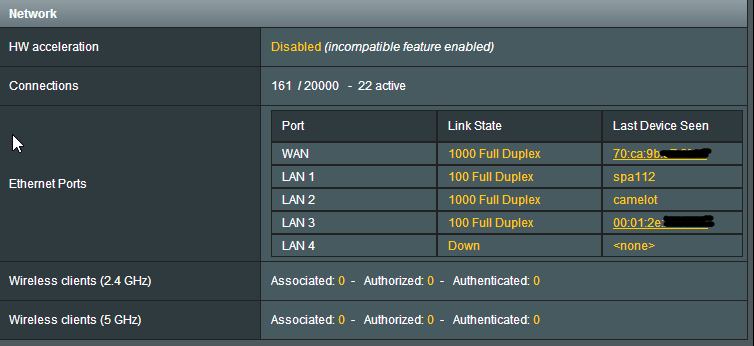
[Feature req] Port Status
- Thread starter bz2
- Start date



Similar threads


Similar threads

Similar threads
-
-
RT-BE88U – dnsmasq intermittently disappears (no process, port 53 unbound)
- Started by bacon612
- Replies: 7
-
Looking for help Trunking on WAN Port RT-AX86U 3004.388.11
- Started by geobernd
- Replies: 10
-
MerlinWRT port forward over VPN (VPN director connection)
- Started by samw5
- Replies: 1
-
-
 Suggestion: Allow selecting interface for NAT rules (Virtual Server / Port Forwarding)
- Started by maghuro
- Replies: 2
-
-
-
[Security] SSH port opened to WAN even though "Enable SSH" is set to "LAN only"
- Started by ppfoong
- Replies: 3
Latest threads
-
-

-
Release ASUS ZenWiFi BT10 Firmware version 3.0.0.6.102_39110 (2026/04/02)
- Started by fruitcornbread
- Replies: 0
-
-
GT-AXE11000 Stability help needed after NAND replacement (amtm/Scribe setup)
- Started by jr lee
- Replies: 2
Support SNBForums w/ Amazon
If you'd like to support SNBForums, just use this link and buy anything on Amazon. Thanks!
Sign Up For SNBForums Daily Digest
Get an update of what's new every day delivered to your mailbox. Sign up here!