What's new
  • SNBForums Code of Conduct

    SNBForums is a community for everyone, no matter what their level of experience.

    Please be tolerant and patient of others, especially newcomers. We are all here to share and learn!

    The rules are simple: Be patient, be nice, be helpful or be gone!

FlexQoS FlexQoS on Gaming

Priority_Application.jpg


Hi @Kingp1n this is my customization. The huge file 100G and sometime 200G is going through https:// or http:// link to go and click the download. This is classified under Web Surfing. When the big download happen, I saw it is classified under Web Surfing. Therefore I put it to the last. Yes, I found the GAME side using openNAT to be unstable. I've removed it. Thank you for this.
 
View attachment 69270


Hi @Kingp1n this is my customization. The huge file 100G and sometime 200G is going through https:// or http:// link to go and click the download. This is classified under Web Surfing. When the big download happen, I saw it is classified under Web Surfing. Therefore I put it to the last. Yes, I found the GAME side using openNAT to be unstable. I've removed it. Thank you for this.
You can also put L-f-H at the bottom. Make sure remote ports shows !80,443 under your gaming rule.

Explanation below:

Post in thread 'Which version of QoS to use for gaming' https://www.snbforums.com/threads/which-version-of-qos-to-use-for-gaming.65005/post-601712

Post in thread 'Why keep Learn-From-Home at the bottom of the priority list?' https://www.snbforums.com/threads/w...bottom-of-the-priority-list.71895/post-682215
 
Last edited:
@Kingp1n ,,I have to put UDP and BOTH for a reason. I cannot key in all the ports in that cell. So I separate it out.
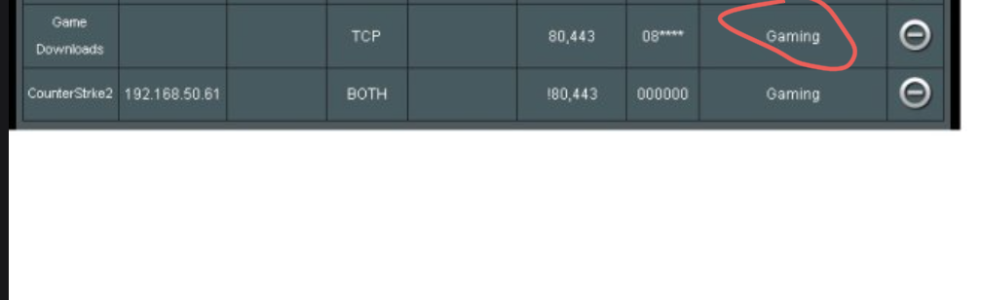
There is this 80, 443 under Game Download. I put this under web surfing instead of game. Last time I saw when my internet unstable is due to these 80,443 activities. So I push it to web surfing which I classify it as least priority. Does gaming uses these ports? I google CounterStrike and it dont use these ports.

Best Regards,
Wee-How
 
@Kingp1n ,,I have to put UDP and BOTH for a reason. I cannot key in all the ports in that cell. So I separate it out.
There is this 80, 443 under Game Download. I put this under web surfing instead of game. Last time I saw when my internet unstable is due to these 80,443 activities. So I push it to web surfing which I classify it as least priority. Does gaming uses these ports? I google CounterStrike and it dont use these ports.

Best Regards,
Wee-How
You only need 1 gaming rule set to 'BOTH' and you ONLY need !80,443 inside remote ports (remove anything else). Leave all other default rules the same. It's not what ports counterstrike or any other game uses is the way flex is design to work and prioritizing gaming traffic set by the static IP.
Any changes you have made to the default rules ...please go back and change to default again. Don't change them. For the gaming rule you only need to add your static IP for your gaming device/PC. Flex will take care of the rest.
Please read the explanation.
 
Last edited:
UpdatedFlexQoS.jpg

Thank you @Kingp1n . Ok got it. Can you help me screen through again? I've added the local IP address 192.168.50.61 , set BOTH and only include 80,443. That "Mark" thing is unknown to me. It just come out to be 0.

Best Regards,
Wee-How
 
View attachment 69271
Thank you @Kingp1n . Ok got it. Can you help me screen through again? I've added the local IP address 192.168.50.61 , set BOTH and only include 80,443. That "Mark" thing is unknown to me. It just come out to be 0.

Best Regards,
Wee-How
Please add the exclamation ❗ inside the gaming rule. To reflect
!80,443 (inside remote ports)
Leave mark at default.

The game download under class should reflect 'File Transfer' and not Gaming...and don't change ports there (leave as is) It's the reason you should change all rules back to default if you made any changes. This will minimize any traffic issues. Once you make these changes it should fix all the issues you're having.

Remember to put L-f-H to be towards the bottom or just make sure Streaming and Web Surfing are higher priority than Learn-From-Home (this will allow traffic to get prioritized as expected).
 
Last edited:

Attachments

  • Screenshot_20251201-000344.png
    Screenshot_20251201-000344.png
    73.6 KB · Views: 14
Thank you so much for the help. I’ve changed per your comment. T👍
Let us know if this helps you or if you're still having issues when downloading occurs.

You can also fine tune your setup if you know how your ISP shapes your traffic under WAN packet overhead. You can leave this at '0' if you're not sure as you currently have it setup.

However as an example, I use Comcast (ISP) so I chose 'DOCSIS' (18 bytes) as my WAN packet overhead.
 
Last edited:
@Kingp1n , so far nothing wrong happen but probably haven’t seen that user doing a high download yet. By the way, the setting I’m having will it auto disable NAT acceleration or I must manually disable it? Or because I’m using flexQOS, it don’t need to disable unlike traditional QoS/cake.

Lastly, how do you find out the WAN overhead from ISP? You called up to ask? How it benefits the QoS thing ? Can share to enlighten ? ☺️
 
@Kingp1n , so far nothing wrong happen but probably haven’t seen that user doing a high download yet. By the way, the setting I’m having will it auto disable NAT acceleration or I must manually disable it? Or because I’m using flexQOS, it don’t need to disable unlike traditional QoS/cake.

Lastly, how do you find out the WAN overhead from ISP? You called up to ask? How it benefits the QoS thing ? Can share to enlighten ? ☺️
I wouldn't make any changes for now. If everything is working well I wouldn't mess with the settings. Who's your ISP provider and I think you have fiber correct? Maybe someone here can recommend a setting. Some providers require a VLAN tag and others require you use a username/password.

NAT acceleration wouldn't get disable. But you can check it under the Tools/Systems Info tab towards the bottom. You should see NAT Accelerator and Flow Cache.
 
Last edited:

Latest threads

Support SNBForums w/ Amazon

If you'd like to support SNBForums, just use this link and buy anything on Amazon. Thanks!

Sign Up For SNBForums Daily Digest

Get an update of what's new every day delivered to your mailbox. Sign up here!
Back
Top