Hello everyone,
I have a very serious issue with my ASUS GT-BE19000AI (WiFi 7) on the 2.4 GHz band that makes all my home automation (IoT) devices practically unusable.
The 5 GHz and 6 GHz bands work perfectly (ping to router ~10–15 ms stable, 0% loss), but the 2.4 GHz band is problematic across the entire 2.4 GHz network, not just one or two devices. I only use the 2.4 GHz band (20 MHz width) for my IoT/home automation devices (WiFi 7 features disabled on this band)
Hardware:
I tested on both the main 2.4 GHz SSID and the dedicated IoT SSID – same issues persist on both.
Comparison:With my previous basic Starlink router, none of these issues on 2.4 GHz with the same IoT devices.
I am running the latest ASUSWRT firmware (checked and updated). The problem seems specific to the 2.4 GHz band.
I have tested both Auto channel and manual channels 1, 6, 11 – same issues persist on 2.4 GHz.
Thank you in advance for any feedback!
I have a very serious issue with my ASUS GT-BE19000AI (WiFi 7) on the 2.4 GHz band that makes all my home automation (IoT) devices practically unusable.
The 5 GHz and 6 GHz bands work perfectly (ping to router ~10–15 ms stable, 0% loss), but the 2.4 GHz band is problematic across the entire 2.4 GHz network, not just one or two devices. I only use the 2.4 GHz band (20 MHz width) for my IoT/home automation devices (WiFi 7 features disabled on this band)
Hardware:
- Main router: ASUS ROG Rapture GT-BE19000AI
- AiMesh node: GS-BE18000
- Internet connection: Starlink in bypass mode (no Starlink router active)
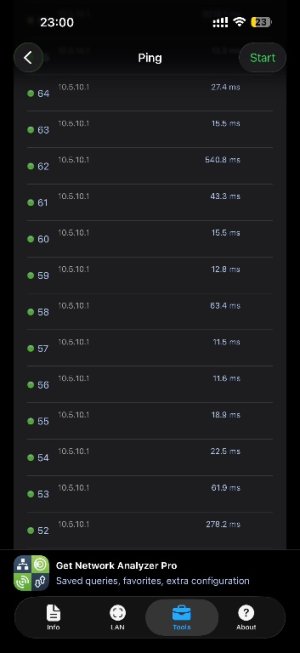
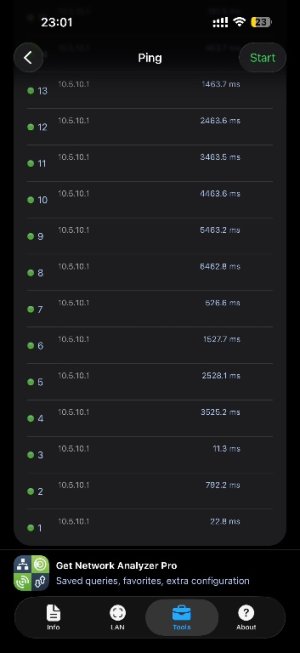
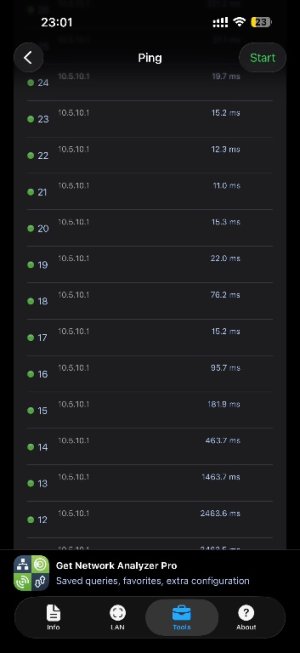
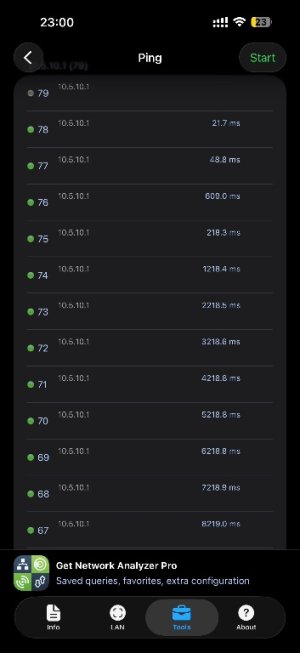
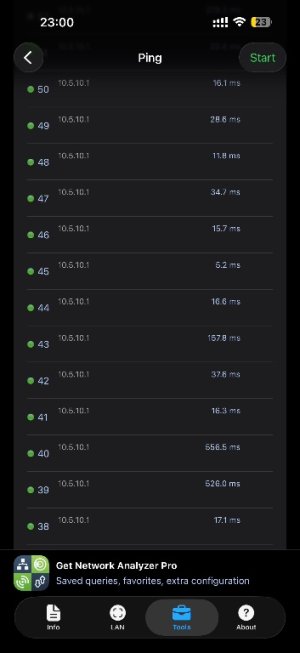
- Ping to the router itself (10.5.10.1) from any device on 2.4 GHz: average 200–400 ms, peaks up to 2–4 seconds, frequent packet loss (3–19% depending on the test, e.g. avg 88 ms but still peaks at 2614 ms and losses).
- All home automation (IoT) devices are affected: command execution delays of several seconds to over 10 s, commands stuck on "executing…" or timeout, random disconnections.
I tested on both the main 2.4 GHz SSID and the dedicated IoT SSID – same issues persist on both.
Comparison:With my previous basic Starlink router, none of these issues on 2.4 GHz with the same IoT devices.
I am running the latest ASUSWRT firmware (checked and updated). The problem seems specific to the 2.4 GHz band.
I have tested both Auto channel and manual channels 1, 6, 11 – same issues persist on 2.4 GHz.
Thank you in advance for any feedback!