What's new
  • SNBForums Code of Conduct

    SNBForums is a community for everyone, no matter what their level of experience.

    Please be tolerant and patient of others, especially newcomers. We are all here to share and learn!

    The rules are simple: Be patient, be nice, be helpful or be gone!

Guest Network Pro Pi Hole

gp-se

Regular Contributor
Hey everyone, I have an issue with DNS resolution that I'm looking for help with. I have a RT-AX88U Pro using Guest Network Pro and a raspberry pi4 running Pi-Hole. The devices on my LAN can connect to the Pi-Hole without issue, however devices on my guest network (VLAN) cannot. In the guest network pro settings I put the ip address of the Pi-Hole in the DNS settings (just like with LAN settings), but the devices cannot connect to it.

When I connect my laptop on the guest network I cannot ping the Pi-Hole, so I assume there is a firewall setting on the router I need to change to allow DNS traffic to the Pi-Hole through the VLAN?
 
Are you using stock Asus firmware or Asus-Merlin 3006 beta?
If you have the Guest Network Pro Profile option Use same subnet as main network set to disabled, you generally won't be able to have Guest Network Pro Profile clients access a Pi-Hole on the main LAN. Depending on which Guest Network Pro Profile you are using you might be able to enable the Access Intranet option and see if that fixes the issue. Or you can reconfigure (or delete and create a new) the Guest Network Pro Profile option Use same subnet as main network to enabled.

If using the Asus-Merlin 3006 Beta firmware you can set the Guest Network Pro Profile to use the Pi-Hole (for example set in the User Defined DNS 1 field) under the Asus-Merlin DNS Director setting while having Use same subnet as main network set to disabled.
 
There is a way to do what you want with the Asus firmware.
When you set up the RPI, use a wired, Ethernet, connection for your main LAN and set the WIFI to use your guest WIFI. In the RPI do an ifconfig to get the IP address assigned by the guest WIFI. Don't worry that the WIFI is not a static IP address as once assigned the IP address almost never changes. In future releases of firmware it is expected that you will be able to manually assign addresses in Guest Network Pro. You can and should assign a static IP address to the RPI Ethernet connection.
In the Pi-Hole, Settings/DNS Settings check Permit all origins in the Interface Settings. In Settings/All settings/dns.interface add eth0 wlan0
In the Asus router settings - Guest Network Pro/Network/DNS Server click assign, Manual Setting and enter the IP address of the RPI WIFI address.
 
Last edited:
I am using the latest stock firmware. I rather not use WiFi even for the guest network because of latency. If I use "Use same subnet as main network" would that mean devices on my guest network can communicate with devices on the main network, defeating the purpose of guest network?
 
I am using the latest stock firmware. I rather not use WiFi even for the guest network because of latency.
The topic of latency when using WiFi has been done to death in the Pi-Hole discussion forums elsewhere (both on Reddit's Pi-Hole subreddit, and Pi-Hole's Discourse server). Everyone has their views on it. Some have no issue due, others claim it's an issue. Where using WiFi can be an issue is if your WiFi network/environment is already saturated. Personally I have Pi-Hole running on a Pi Zero W connected to the router via WiFi, it works (YMMV and all that).

If you really don't want to use WiFi on the Raspberry Pi then consider getting a USB to Ethernet adapter (can be had for $10 USD on Amazon or similar) and run a second Ethernet adapter on the Pi. When the second adapter is connected to the router you could configure the LAN > VLAN section to combine the second adapter with the Guest Network Pro VLAN. Using the Pi-Hole's DNS Permit All Origins setting that bbunge mentioned above it should work to allow the Pi-Hole to serve the main LAN at the same time it serves the VLAN clients. Just a thought on another possible way to handle it, if you want Use same subnet as main network disabled in the Guest Network Pro Profile.
 
The object of a guest network is to isolate clients from the main network. Using the same subnet as the main defeats the isolation. Who cares about latency in an IoT or kids network. Security is or should be the main concern!

Another way to use the Ethernet connection for the main and guest would be to add a virtual interface to eth0 and VLAN tag the virtual port. This will work but can get complicated.

Simple is best! Try the Ethernet and WIFI suggestion I made. It does work but make sure to restart the RPI after making changes.
 
If I decide to use the Pi-Hole WiFi interface to connect to my guest network would devices be able to communicate with it? I have "access intranet" disabled because I don't want devices on the guest network interacting with each other, would I have to enable that setting for it to work?

Also most of the solutions I found on Google say to configure the firewall to allow the VLAN to make DNS requests on port 53 to the Pi-Hole, lots of guides for Ubiquiti, but nothing for ASUS.
 
Last edited:
If I decide to use the Pi-Hole WiFi interface to connect to my guest network would devices be able to communicate with it? I have "access intranet" disabled because I don't want devices on the guest network interacting with each other, would I have to enable that setting for it to work?

Also most of the solutions I found on Google say to configure the firewall to allow the VLAN to make DNS requests on port 53 to the Pi-Hole, lots of guides for Ubiquiti, but nothing for ASUS.
The Pi-Hole would be listening and responding on both the LAN network and the Guest network. It works! I flashed my AX86U Pro back to the Asus firmware this afternoon and set up a Pi-Hole on a RPI3b+ just to test it out. I've since gone back to the Merlin 3006.102.4 beta 1 because it has far more options than the Asus firmware. Running Diversion on the Merlin firmware allows both the LAN and Guest networks to be filtered by Diversion. Diversion uses the same block lists as Pi-Hole. Not as many statistics but who really needs them anyway.
 
If I decide to use the Pi-Hole WiFi interface to connect to my guest network would devices be able to communicate with it? I have "access intranet" disabled because I don't want devices on the guest network interacting with each other, would I have to enable that setting for it to work?

Also most of the solutions I found on Google say to configure the firewall to allow the VLAN to make DNS requests on port 53 to the Pi-Hole, lots of guides for Ubiquiti, but nothing for ASUS.
So if its just a vlan on the wired network, you just have to add a VLAN ip to that PI-hole.

Like so:
Code:
sudo ip link add link eth0 name eth0.10 type vlan id 10
sudo ip address add 192.168.10.165/24 dev eth0.10
sudo ip link set eth0.10 up

You will have to restart bind so listen 0.0.0.0.:53 will listen on the 2nd ip we added as bind reads from the arp table on startup only.
its been awhile since I messed with Pi-Hole, but I think all you would have to do is

Code:
pihole -a -i all

after you added the VLAN IP to the interface.
 
Last edited:
There is a way to do what you want with the Asus firmware.
When you set up the RPI, use a wired, Ethernet, connection for your main LAN and set the WIFI to use your guest WIFI. In the RPI do an ifconfig to get the IP address assigned by the guest WIFI. Don't worry that the WIFI is not a static IP address as once assigned the IP address almost never changes. In future releases of firmware it is expected that you will be able to manually assign addresses in Guest Network Pro. You can and should assign a static IP address to the RPI Ethernet connection.
In the Pi-Hole, Settings/DNS Settings check Permit all origins in the Interface Settings. In Settings/All settings/dns.interface add eth0 wlan0
In the Asus router settings - Guest Network Pro/Network/DNS Server click assign, Manual Setting and enter the IP address of the RPI WIFI address.
I think I got your suggested steps and ideas to work. I can confirm that Pi-Hole is blocking ads on my VLAN by connecting Raspberry Pi to VLAN WiFi SSID.

On Pi-Hole settings page, I changed DNS -- Interface Settings to "Permit all origins" which could be potentially dangerous.

Can someone explain me what's the danger in doing so? My Pi-Hole is running on a home network using Raspberry Pi...on Asus router with latest firmware.

From Pi-Hole documentation it sounds like I should be ok as long as I haven't forwarded Port 53...which I have not.

Should I take any other precautions to secure network?
 
Can someone explain me what's the danger in doing so?
Pi-Hole explains the danger. The Pi-Hole could potentially, with a misconfigured local network, become an open resolver that responds to any and all requests from the internet. So long as you are not letting unfettered Internet traffic (DNS requests) through the router to the Pi-Hole one should be fine. This assumes one has properly secured their local network and WiFi and hasn't enabled router port forwarding to the Pi-Hole or put the Pi-Hole into the router's DMZ zone.
 
Can someone explain me what's the danger in doing so? My Pi-Hole is running on a home network using Raspberry Pi...on Asus router with latest firmwar
Because you using a store bought router made by people that makes insecure products so there is no guarantee its dns address advertisement feature is only locked to networks assigned instead of all addresses. So you should learn how to use ubound correctly, which is the program pihole uses as its DNS server. So you need to learn how to edit ubound.conf so you can limit the DNS access because a port can be opened from the inside so its not necessarily going to be blocked by not forwarding it.

Here is a sample of a ubound.conf:

Code:
server:
    # Define the network interfaces Unbound listens on (optional, but good practice)
    interface: 127.0.0.1  # For local queries
    interface: 192.168.1.1 # Your internal network interface IP
     interface: 10.0.0.1  # Your guest network interface IP

    # Allow queries from specific network schemes
    access-control: 192.168.1.0/24 allow
    access-control: 10.0.0.0/24 allow
    # If you have a different subnet, add it here:
    # access-control: <your_subnet>/<netmask_bits> allow

    # Deny all other networks (if not explicitly allowed)
    access-control: 0.0.0.0/0 refuse
 
So you should learn how to use ubound correctly, which is the program pihole uses as its DNS server.
It should be noted that Unbound is optional. Typically (eta: at least on a basic Raspberry Pi install) users will have to install and configure Unbound separately from a default Pi-Hole install (https://docs.pi-hole.net/guides/dns/unbound/).

Pi-Hole has several options for DNS resolution, Upstream DNS Servers and Custom DNS Servers like Unbound. Currently Pi-Hole has the Upstream DNS servers available for selection in the DNS Settings section:
Google (ECS, DNSSEC)
OpenDNS (ECS, DNSSEC)
Level3
Comodo
Quad9 (filtered, DNSSEC)
Quad9 (unfiltered, no DNSSEC)
Quad9 (filtered, ECS, DNSSEC)
Cloudflare (DNSSEC)
 
Because you using a store bought router made by people that makes insecure products

Sure thing. I'm making my next home AP on a CNC lathe as we speak...

1753018117930.png


I like Ubiquiti, makes them round. Cisco with their square CBW's pisses me off.
 
Is there any solution with the latest Merlin FW 3006.102.6 and Pihole on a small PC with just one Ethernet port?
I tried to set the DNS for the Guest networks manually to my primary network adress (192.168.1.50 with /24 is PiHole, Guest network is 192.168.53.0/24), I tried to "override" the DNS with the DNS Director in the ASUS settings. But it seems that there is no working solution.

I tried also to use this tutorial https://discourse.pi-hole.net/t/how-to-use-pi-hole-with-guest-network/72662
In Proxmox I set the network devices for PiHole with VLAN Tag 52 and IP 192.168.52.50:
1764447654121.png


In the ASUS settings, the Proxmox PiHole LXC is shown with IP 192.168.52.50 and I set the DNS to 192.168.52.50 (including the DNS Director Override)
But my iPhone for test purpose with IP 192.168.52.33 is not shown in the PiHole logs (and I already set it to "Permit all origins")
Do I need the overlapping IP range? If so, I dont understand what is meant by "DNS Subnet settings"
1764447877569.png
 
Last edited:
I found maybe the solution:
1. Pihole must accept from all origins (Settings > DNS > Interface Settings > Permit all origins)
2. In Proxmox, PiHole need multiple IPs (like shown above)
  • 192.168.1.50/24 (for my main network - trusted devices and IT infrastructure)
  • 192.168.52.50/24 with VLAN Tag 52 (for my guests in the guest network 192.168.52.0/24)
3. In the ASUS Guest Network Pro
  • Set the VLAN for the guest networks to the same as for PiHole (here 52)
  • Set the DNS for the guest networks to the second PiHole IP (192.168.52.50) not 1!
  • Disable "isolate AP", because the devices must talk to PiHole
4. In the ASUS settings check to disable the DNS Director and the VLAN mods to "All" (not trunked, not access)

Is it working? Yes. PiHole shows me logs with the IP 192.168.52.9 (my test Iphone)

1764458115844.png

even the filters are working (fb.com is blocked by default)
 
Last edited:
@HeeroYuy, it is a bit confusing what you are trying to do and how you have configured your setup.
Is there a specific reason to have the Proxmox on a Guest Network Pro Profile?
Does the Pi-Hole or the device it is running on have a manually reserved, or static, IP address?

Post readable screen shots of your DNS Director page.

To confirm you have not input the Pi-Hole IP address into the WAN DNS fields, correct? Inputting the Pi-Hole IP address into the WAN DNS field while using Conditional Forwarding on the Pi-Hole can potentially setup a feedback loop between the Pi-Hole and router.

DNS Director, if configured properly, can intercept the Guest Network Pro profile DNS requests and route them to the Pi-Hole.
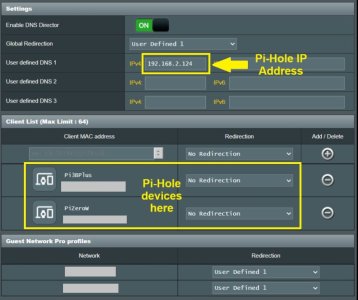
Depending on what you are trying to achieve with DNS Director you will need to add the Pi-Hole MAC address to the Client List, then set it's Redirection to No Redirection, then add and save the change.
Depending on what you are trying to achieve you input the Pi-Hole IP address into the User Defined #1 field then configured any Guest Network Pro Profiles to use User Defined #1. By doing it this way you do not need to input the Pi-Hole IP address into the Guest Network Pro profile's DNS section.

If you haven't done so already, use the forum search feature, there are several other discussions about how to setup and configure Pi-Hole for use with the 3006.102.x firmware. For example some discussion in this post/thread. And in this post.
 
And from an Oct post made elsewhere, a repost, edited and trimmed down, of some very basic directions on how to setup Pi-Hole on the 3006.102.x firmware when the Pi-Hole is running on an external device like a Raspberry Pi and the Pi-Hole device is connected to the main LAN/main WiFI. The Pi-Hole device should have a manually reserved or static IP address. The following steps assumes the router running Asus-Merlin 3006.102.x firmware is configured as the local network DHCP server. Your use case may require a different setup. There may be different ways to accomplish the same end goal.
  • Input the Pi-Hole IP address into the LAN > DHCP Server DNS field(s). (Set Advertise router's IP in addition to user specified DNS to No if that option is available.)
  • For the WAN DNS fields use any public or ISP DNS server.
  • On the DNS Director page, enable DNS Director.
  • On the DNS Director page, set Global Redirection to User defined DNS #1.
  • On the DNS Director page, input the Pi-Hole IP into User defined DNS #1 field
  • On the DNS Director page, in the Client List select the Pi-Hole's MAC address and set Redirection to No Redirection, then click the Add (plus) icon to add it to the list.
  • Under the DNS Director's Guest Network Pro Profile section, select each Guest Network Pro Profile and set it's Redirection to User defined #1.
  • When finished making changes on DNS Director remember to select the Apply button.
  • On the Guest Network Pro profile settings page, under Advanced Settings set the DNS Server to Default.
  • On the Pi-Hole > Settings >DNS one may need to change the Interface Settings to either Respond only on interface (select Pi-Hole network interface), or if using multiple network ports on the Pi-Hole device select Permit all all origins.
  • On the Pi-Hole > Settings > DNS page under Conditional Forwarding, follow the examples to input your router's main LAN and any Guest Network Pro profiles in the format the example indicates (ex: true,192.168.0.0/24,192.168.0.1,fritz.box) in the provided Conditional Forwarding field.
  • Make sure to apply any changes to the Pi-Hole settings.
  • When finished test the settings to see if clients are using the Pi-Hole and if the Pi-Hole is properly showing the client requests in the Pi-Hole Query Log.
  • In rare cases one may need to reboot both the router and any network clients.
  • One may also want to input a domain name into the LAN >LAN-IP Domain Name field and LAN > DHCP Server Router's Domain Name field. That domain name can used when setting up the Pi-Hole Conditional Forwarding reverse server(s).
Few notes on setting up a Guest Network Pro profile:
When creating the Guest Network Pro profile, if you disable the option Use same subnet as main network you will be creating a separate IP subnet, one that generally is blocked from accessing the main LAN/main WiFi. This will usually block access direct access to a Pi-Hole on the main LAN/main WiFi. If you put a Pi-Hole with a single network port on a Guest Network Pro profile that has the option Use same subnet as main network disabled, that Pi-Hole device may be inaccessible to any network client other than those network clients connected to the same Guest Network Pro profile as the Pi-Hole with it's single network port.

If the device hosting the Pi-Hole has two (or more) network adapters it may be possible to assign one adapter to the main LAN/main WiFi and a second to a Guest Network Pro profile. But in the end one should really conder why they are putting the Pi-Hole device on a Guest Network Pro profile rather than on the main LAN/main WiFi. One can use Asus-Merlin's DNS Director to force Guest Network Pro profile clients to use a Pi-Hole that is connected to the main LAN/main WiFi.

Example DNS Director page (with two Pi-Hole devices):
DNS Director.jpg

Example Pi-Hole Conditional Forwarding (with main LAN and two Guest Network Pro profiles):
Pi-hole Conditional Forwardingjpg.jpg

Post edited and updated.
 
Last edited:
And from an Oct post made elsewhere, a repost, edited and trimmed down, of some very basic directions on how to setup Pi-Hole on the 3006.102.x firmware when the Pi-Hole is running on an external device like a Raspberry Pi and the Pi-Hole device is connected to the main LAN/main WiFI. The Pi-Hole device should have a manually reserved or static IP address. The following steps assumes the router running Asus-Merlin 3006.102.x firmware is configured as the local network DHCP server. Your use case may require a different setup. There may be different ways to accomplish the same end goal.
  • Input the Pi-Hole IP address into the LAN > DHCP Server DNS field(s). (Set Advertise router's IP in addition to user specified DNS to No if that option is available.)
  • For the WAN DNS fields use any public or ISP DNS server.
  • On the DNS Director page, enable DNS Director.
  • On the DNS Director page, set Global Redirection to User defined DNS #1.
  • On the DNS Director page, input the Pi-Hole IP into User defined DNS #1 field
  • On the DNS Director page, in the Client List select the Pi-Hole's MAC address and set Redirection to No Redirection, then click the Add (plus) icon to add it to the list.
  • Under the DNS Director's Guest Network Pro Profile section, select each Guest Network Pro Profile and set it's Redirection to User defined #1.
  • When finished making changes on DNS Director remember to select the Apply button.
  • On the Guest Network Pro profile settings page, under Advanced Settings set the DNS Server to Default.
  • On the Pi-Hole > Settings >DNS one may need to change the Interface Settings to either Respond only on interface (select Pi-Hole network interface), or if using multiple network ports on the Pi-Hole device select Permit all all origins.
  • On the Pi-Hole > Settings > DNS page under Conditional Forwarding, follow the examples to input your router's main LAN and any Guest Network Pro profiles in the format the example indicates (ex: true,192.168.0.0/24,192.168.0.1,fritz.box) in the provided Conditional Forwarding field.
  • Make sure to apply any changes to the Pi-Hole settings.
  • When finished test the settings to see if clients are using the Pi-Hole and if the Pi-Hole is properly showing the client requests in the Pi-Hole Query Log.
  • In rare cases one may need to reboot both the router and any network clients.
  • One may also want to input a domain name into the LAN >LAN-IP Domain Name field and LAN > DHCP Server Router's Domain Name field. That domain name can used when setting up the Pi-Hole Conditional Forwarding reverse server(s).
Few notes on setting up a Guest Network Pro profile:
When creating the Guest Network Pro profile, if you disable the option Use same subnet as main network you will be creating a separate IP subnet, one that generally is blocked from accessing the main LAN/main WiFi. This will usually block access direct access to a Pi-Hole on the main LAN/main WiFi. If you put a Pi-Hole with a single network port on a Guest Network Pro profile that has the option Use same subnet as main network disabled, that Pi-Hole device may be inaccessible to any network client other than those network clients connected to the same Guest Network Pro profile as the Pi-Hole with it's single network port.

If the device hosting the Pi-Hole has two (or more) network adapters it may be possible to assign one adapter to the main LAN/main WiFi and a second to a Guest Network Pro profile. But in the end one should really conder why they are putting the Pi-Hole device on a Guest Network Pro profile rather than on the main LAN/main WiFi. One can use Asus-Merlin's DNS Director to force Guest Network Pro profile clients to use a Pi-Hole that is connected to the main LAN/main WiFi.

Example DNS Director page (with two Pi-Hole devices):
View attachment 69256

Example Pi-Hole Conditional Forwarding (with main LAN and two Guest Network Pro profiles):
View attachment 69257

Post edited and updated.

Quick question, and apologies for the thread hijack.

With the above quoted Pi-hole configuration, if one is using (for example) Cloudflare DNS in WAN settings, should DNSSEC support be enabled?
 

Latest threads

Support SNBForums w/ Amazon

If you'd like to support SNBForums, just use this link and buy anything on Amazon. Thanks!

Sign Up For SNBForums Daily Digest

Get an update of what's new every day delivered to your mailbox. Sign up here!
Back
Top