
What's new

Help with Diversion and Unbound

rkalinka

Occasional Visitor
Hey folks - I have been using Diversion and Skynet at home for a while on my RT-AC88U (3-node AiMesh setup Merlin 386.13) - and it's been performing well enough. Recently, I have had some ISP outages/latency that cause some problems with home automation and was hoping that Unbound might solve for some of those issues. As such, I installed unbound and am trying it out. A couple things I noticed- even "less" ad's showing up in my user experience and faster internet surfing - which is great. Some problems, I noticed that almost every email on Apple devices have this "cannot download content privately due to your network settings" error that can be solved for by simply tapping "download content". Found a couple posts on whitelisting icloud.com - but not sure I did it correctly as the issue persists. The bigger issue is that some websites (for example medical claims) have issues rendering drop down menus showing a "network error" in the drop down preventing online forms from being processed. My users are having serious heartburn over this security add-on.

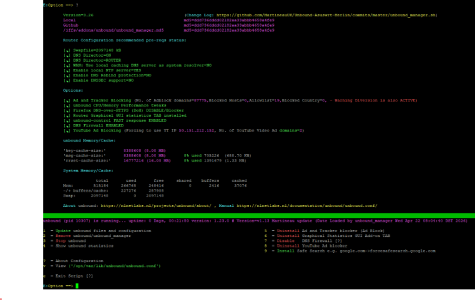
So here is my question: What should I configure or deconfigure with unbound to help solve for some of the user experience? THere are many posts saying "use diversion for ad blocking and use unbound as resolver only" - but i am not exactly sure how to configure that. Can someone confirm what should or should not be configured with unbound? NOTE - when I uninstall unbound, the user experience is better for those who are complaining. How should I best configure unbound to "play nice" in my environment? For example - should I enable/disable options 5/7/8 in the UNBOUND menu to achieve my desired result? I like the idea of YouTube ad blocker - but it's a nice to have, not a requirement.

Thanks in advance for any help - I only know enough about this stuff to be dangerous and could use some guidance. Attached is my screenshot of what is showing for unbound on my router for reference.
 

Attachments

  • UNBOUND_Screenshot 2026-04-22 084152.png
    UNBOUND_Screenshot 2026-04-22 084152.png
    198.5 KB · Views: 16
Sounds like you are not a computer geek. Therefore you are better off to dump your unbound frustration and use a reliable upstream DNS resolver such as Quad9 or Cloudflare Security. I use Cloudflare Security, 1.1.1.2 and 1.0.0.2, with DoT and Diversion. No issues at all!
 
I like the idea of YouTube ad blocker
That never worked right, if at all. I removed that same mechanism years ago from Diversion.
 
Sounds like you are not a computer geek. Therefore you are better off to dump your unbound frustration and use a reliable upstream DNS resolver such as Quad9 or Cloudflare Security. I use Cloudflare Security, 1.1.1.2 and 1.0.0.2, with DoT and Diversion. No issues at all!
@bbunge - I guess I would consider myself an advanced user - but others have called me a computer geek. I understand networking, but the tools and config's are new to me here - (I didn't really want to take the time to go build a raspberry-pie or anything like that because I am lazy). In this respect, I just want the system to work WITH better DNS performance. For whatever reason, some of my home automation devices have the occasional perf issue - and are completely useless during a network outage. (In the process if implementing DUAL WAN to address some of it). I was using Cloudfare for the last 2 years (or so) before - this is my first foray with unbound, so trying to understand some of the basics.
 
In this respect, I just want the system to work WITH better DNS performance.

Your best DNS performance is fast upstream DNS server with large cache directing your queries to local resources. In most cases this is your router's DNS proxy (the built-in Dnsmasq) forwarding queries to your ISP DNS server or Google, Cloudflare, OpenDNS, etc. known reliable and fast DNS providers. Many also offer encryption as DoT, DoH, DoQ, etc. With Unbound as resolver replacing the above - additional complication for home network, first time queries will take much longer, you have to maintain healthy cache and there is no encryption to root servers (although there are other privacy mechanisms in place).

In the process if implementing DUAL WAN to address some of it

Dual WAN on ASUS routers has issues of it's own.
 
Recently, I have had some ISP outages/latency that cause some problems with home automation and was hoping that Unbound might solve for some of those issues.

Your home automation issues are most likely coming from some of your devices with hardcoded DNS servers (often) and/or requiring access to specific cloud servers (often) in order to work correctly and you are blocking what they need with your new setup. Diversion is DNS-based blocker and Skynet is IP-based blocker. Sometimes AiProtection may be blocking what IoT devices need. Unbound won't solve any of the above and the more you complicate the setup the harder it will be to troubleshoot.
 
Uninstalled YouTube Ad Blocker. Any thoughts on DNS Firewall being on or off? What about Ad and Tracker blocker? --- recall that I also have diversion deployed.
Anyone?
 
Avoid stacked blockers. If something stops working it will be hard to find which one is causing the issue. Use Unbound as resolver only and Diversion and Skynet for blocking... in case you like it this way. I personally will remove all 3 and use DoT to AdGuard upstream, it's even included GUI option. Dnsmasq works perfectly fine as forwarder, the built-in firewall blocks all unsolicited connections by default and AdGuard will do the ad-blocking with fail-safe dynamically updated blocklists. No scripts and USB sticks required.
 
@Tech9 - thanks for the perspective!
Avoid stacked blockers. If something stops working it will be hard to find which one is causing the issue. Use Unbound as resolver only and Diversion and Skynet for blocking... in case you like it this way. I personally will remove all 3 and use DoT to AdGuard upstream, it's even included GUI option. Dnsmasq works perfectly fine as forwarder, the built-in firewall blocks all unsolicited connections by default and AdGuard will do the ad-blocking with fail-safe dynamically updated blocklists. No scripts and USB sticks required.ch
 
I understand the joy of tweaking things, but keep your RT-AC88U in light configuration because the hardware is >10 years old and may start slowing down with too many customizations. Also don't expose services to Internet because the firmware you use is from 2024 and ASUS pushed some emergency security updates for your model in 2025 even after official EoL. You can run VPN server to access you network from outside. Don't use Assess from WAN, ASUS App (officially unsupported with your firmware) or AiCloud. Good luck!
 
I understand the joy of tweaking things, but keep your RT-AC88U in light configuration because the hardware is >10 years old and may start slowing down with too many customizations. Also don't expose services to Internet because the firmware you use is from 2024 and ASUS pushed some emergency security updates for your model in 2025 even after official EoL. You can run VPN server to access you network from outside. Don't use Assess from WAN, ASUS App (officially unsupported with your firmware) or AiCloud. Good luck!
@Tech9 - 100% agree. So - this is something that I have been watching for (CPU saturation). Fully aware of the age of my ecosystem - but all in all it's does pretty well. It started really flaking out a couple years back so I finally moved to Merlin (with USB flash drives, etc). Since doing that, everything is much more stable. While playing around, I did happen to notice pretty high CPU spikes with UNBOUND in the mix - though not really sure why so I just removed it for now. The Dual WAN thing is more important to me. For packages installed - I have settled on Diversion, Skynet, FlexQoS for active daily use which give a pretty decent user experience (ad blocking is so much nicer on all my devices - reminds me of the old days of surfing the net without all the extra stuff). For utilities, I installed scMerlin, Disk Check script, Shell history. Not much of anything else as I am trying to squeeze a few more years out of this old setup without overloading it.

I don't allow remote access into my network from the outside - so not worried about that. I like the Traffic analyzer to keep an eye on things periodically - so with all this, I am limited to about 400MB throughput - which is good enough with QoS involved. The reason for the older firmware is because traffic analyzer seems to be broken in the final release of Merlin firmware for my router. Appreciate all the help along the way though!
 

Latest threads

Support SNBForums w/ Amazon

If you'd like to support SNBForums, just use this link and buy anything on Amazon. Thanks!

Sign Up For SNBForums Daily Digest

Get an update of what's new every day delivered to your mailbox. Sign up here!
Back
Top